Lighting / Smart Lighting
American Lighting Spektrum+ Series MR16 Smart Lamp User Manual
Quick guide for the American Lighting Spektrum+ Series MR16 Smart Lamp. Learn about installation, Bluetooth pairing, app control, troubleshooting signal issues, and technical specifications.
Table of contents
Manual images
Click an image to enlargeQuick Guide
The Spektrum+ MR16 Smart Lamp is an IoT-enabled lighting solution using Bluetooth mesh connectivity. It is designed to replace standard MR16 lamps and is controlled via the Spektrum+ Smart Lighting App or a Spektrum+ Smart Switch. Important: This device is not intended for use with standard wall dimmer switches. Automation features and voice assistant compatibility require the Spektrum+ Smart Hub (sold separately).
Product Overview
The MR16 lamp features a frosted lens and provides RGB + Tunable White (2700K-6000K) lighting. It offers 80+ CRI for excellent color rendering and up to 400 lumens of output. The device is cETLus listed for damp locations and is FCC compliant.
Technical Specifications
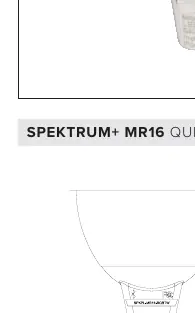
- Voltage: 12V AC/DC
- Wattage: 5W
- Lumens: 400Lm
- Color/CCT: RGB + TW (2700K-6000K)
- Base: GU5.3 Bi-Pin
- Beam Angle: 160°
- Operating Temp: <90°C (194°F)
- Ambient Temp: -10°C (14°F) to 45°C (113°F)
- Rated Life: 25,000 Hours
Installation and Setup
To install, simply replace your existing MR16 lamp with the Spektrum+ MR16. Ensure your fixture is compatible with 12V AC/DC power. Do not use with a standard wall dimmer.
Resetting the Device: If you need to reset the lamp for pairing, power the device ON and OFF 3 times in succession. The device will pulse BLUE once it has been reset and is ready to be paired with the app.
Signal and Connectivity
The device uses Bluetooth Wireless Technology. Signal distance is approximately 25 meters (80ft) based on a clear line of sight. Obstacles will significantly reduce this distance. The following materials impact signal strength:
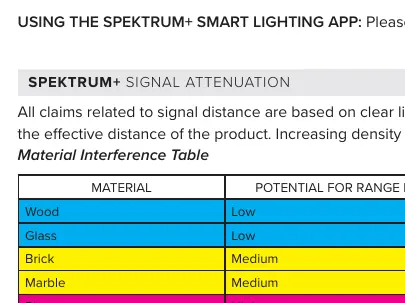
- Low Reduction: Wood, Glass
- Medium Reduction: Brick, Marble
- High Reduction: Plaster, Concrete
- Very High Reduction: Metal
If you experience connectivity issues, try moving the receiver to an alternate location or placing a barrier between interfering devices. Ensure receivers are not fully enclosed in metal or concrete.
System Limits
The Spektrum+ system has specific capacity limits per account, including:
- Devices per network/family/home: 200
- Devices per room: 50
- Devices per group: 100
- Schedules per device: 30
- Scenes/Automations in a home: 100 each
Warranty
This product includes a 3-year limited warranty for LED products, covering defects in material and workmanship. The warranty does not cover products misused, improperly installed, or used with incompatible power supplies/dimmers.
Manufacturer information
American Lighting Inc.
Practical help
Common problems
Device not pairing or responding
Power the device ON and OFF 3 times in succession to reset. The device will pulse BLUE when ready to pair.
Poor signal range
Avoid placing the lamp behind metal, concrete, or plaster. Ensure clear line of sight and move the receiver closer to the opening if enclosed.
Flickering or device failure
Ensure you are not using a standard wall dimmer switch. The device must be controlled via the Spektrum+ App or Smart Switch.
Before use
- Verify the power supply is 12V AC/DC.
- Ensure the fixture is not connected to a standard wall dimmer.
- Download the Spektrum+ Smart Lighting App.
- Check for clear line of sight to avoid signal attenuation.
- Confirm if a Spektrum+ Smart Hub is needed for your specific automation requirements.
Specs in practice
- GU5.3 Bi-Pin
- The standard base type for this MR16 lamp.
Images and diagrams
- Material Interference Table: Shows how different building materials (Wood, Glass, Brick, Marble, Plaster, Concrete, Metal) reduce the Bluetooth signal range.
Model compatibility
- Requires Spektrum+ Smart Hub for automation and voice assistant features.
- Not compatible with standard wall dimmers.

Manual page author
David Miller
Documentation analyst
Organizes user manual content into clear summaries, with attention to model details, product context, and everyday usability.