Lighting / Fixtures
Installation Guide for Immax 07077L Neo Hipodromo Smart Pendant Lamp
A comprehensive installation and safety guide for the Immax 07077L Neo Hipodromo Smart Pendant Lamp. Includes technical specifications, step-by-step mounting instructions, and maintenance tips.
Table of contents
Quick guide from the manual
This document provides essential installation and safety instructions for the Immax 07077L/07078L Smart Pendant Lamp. Important: Electrical installation must be performed by a qualified technician in accordance with local regulations. Always ensure the power is safely turned off at the fuse box before beginning any work. The device uses the Zigbee 3.0 protocol and is compatible with various smart home ecosystems.
Technical parameters
- Protocol: Zigbee 3.0
- Power: 66W
- Input Voltage: AC 100-240V 50-60Hz
- Dimensions: 120 x 30 cm
- Light Color: 3000K-6000K
- Luminous Flux: 4620lm
- Dimmable: Yes
- Illumination Time: 50,000 hours
- CRI(Ra): <80
- Warranty: 3 years
Installation
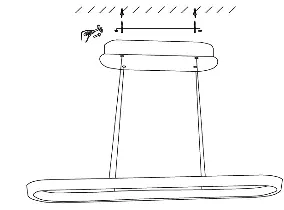
- Turn off the fuses before starting the installation.
- Adjust the position of the light and mark the mounting holes on the ceiling with a pencil.
- Drill the holes for installing the frame.
- Pull the guide cable through the cable hole and attach the base of the light fixture. Secure the frame with screws and connect it to the terminal block.
- Secure the lampshade to the mounting frame.
- Turn on the fuse.
Safety information
Warning: Keep out of reach of children. This product contains small parts that may cause choking or injury if swallowed.
- Installation must only be performed by a person with the appropriate electrical certification.
- Do not disassemble the product, as there is a risk of electric shock.
- Only use the original power adapter supplied with the product.
- Do not operate the device if the power cord shows signs of damage.
- If a fault is detected, always disconnect the power cord from the socket or switch off the relevant circuit breaker.
Maintenance
Protect the device from contamination and dirt. Wipe the device with a soft cloth; do not use rough or coarse materials. Do not use solvents or other aggressive cleaners or chemicals.
Disposal
The product and batteries must not be disposed of with municipal waste. They should be disposed of at a recycling centre or designated collection points.
Contact
For questions or advice, you can contact the manufacturer at [email protected] or visit www.immax.cz.
Official resources from the manual
Manufacturer information
Immax
Practical help
Common problems
Electric shock risk
Do not disassemble the product. Ensure power is turned off at the fuse box before installation.
Damaged power cord
Do not operate the device if the power cord shows signs of damage.
Incorrect installation
Installation must be performed by a qualified technician. Incorrect installation may result in damage to the product and injury.
Before use
- Ensure the power is safely turned off at the fuse box.
- Verify that the installation is performed by a qualified technician.
- Check that the power cord is free from damage.
- Ensure the mounting surface is suitable for the fixture.
Specs in practice
- Protocol: Zigbee 3.0
- The wireless communication standard used for smart home connectivity.
- Luminous flux: 4620lm
- The total amount of visible light emitted by the lamp.
- Dimmable: Yes
- The brightness of the light can be adjusted.
Images and diagrams
- The installation diagram illustrates the process of turning off the power, marking the ceiling, drilling holes, connecting the wiring to the terminal block, and securing the lamp frame.
Model compatibility
- Compatible with iOS and Android devices.
- Supports Amazon Alexa, Apple Siri Shortcuts, and Google Assistant.
- Works with Philips HUE, TUYA, Tahoma, Lidl, and Ikea ecosystems.

Manual page author
David Miller
Documentation analyst
Organizes user manual content into clear summaries, with attention to model details, product context, and everyday usability.