Smart Home / Smart Plugs & Strips
User Manual for Innr OFL 12x C Smart Outdoor Flex Light
Quick guide for the Innr OFL 12x C and OFL 22x C Smart Outdoor Flex Light. Includes installation steps, safety warnings, factory reset procedure, and connection instructions.
Table of contents
Manual images
Click an image to enlargeQuick guide for Innr OFL 12x C / OFL 22x C
This document provides essential instructions for the installation and operation of the Innr Smart Outdoor Flex Light. Ensure you have all components before starting: power adapter, cable, light strip, clips, and screws.
Installation
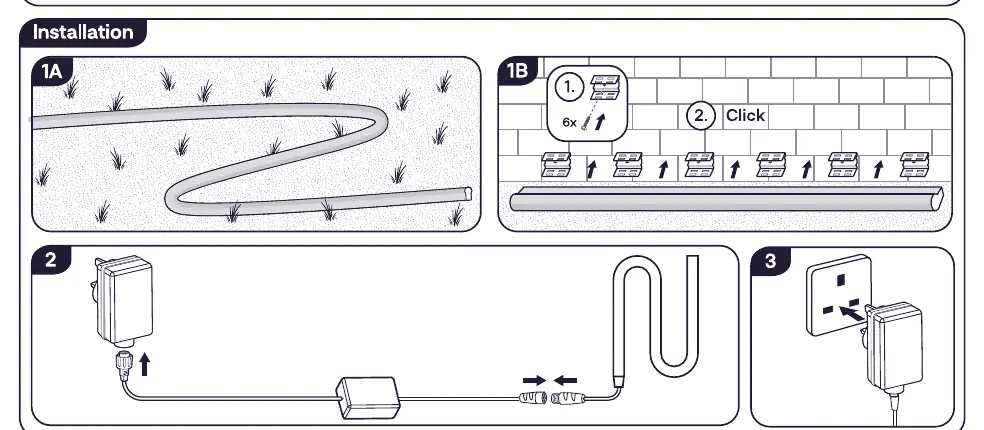
- Layout: Unroll the light strip in the desired outdoor location.
- Mounting: Use the provided clips and screws to secure the light strip to the surface. Ensure the clips are spaced appropriately to hold the strip firmly.
- Connection: Connect the power cable to the light strip connector.
- Power: Plug the power adapter into an outdoor-rated power outlet.
Connection
To connect the lamp to your smart home system, follow the instructions provided in the mobile app associated with your Zigbee bridge.
Factory reset
If you need to reset the device to factory settings:
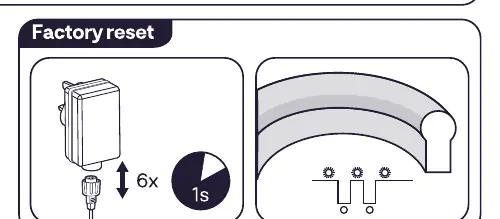
- Power cycle the device 6 times.
- Wait 1 second between each power cycle.
Safety and maintenance
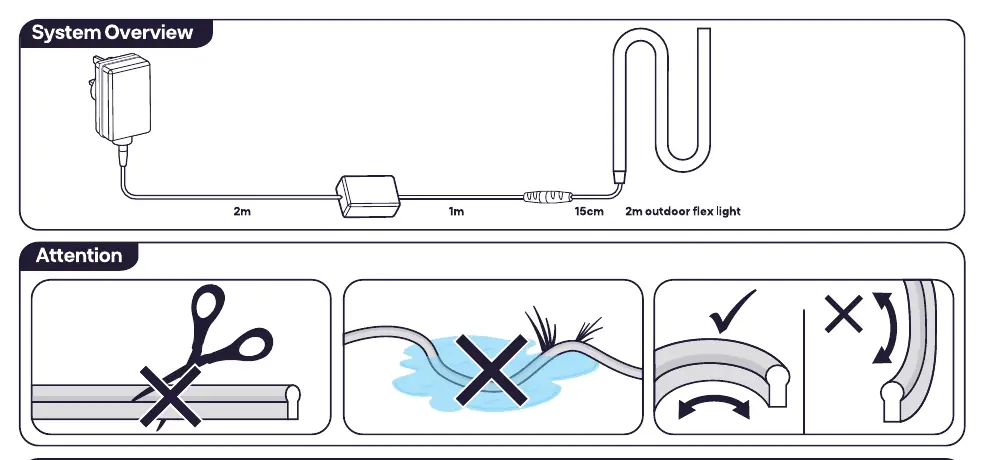
- Outdoor use: The product is suitable for outdoor use.
- Handling: Do not cut the light strip. Do not bend the strip sharply.
- Water: Do not submerge the product in water.
- Cleaning: Use a damp cloth for cleaning. Never use strong cleaning agents.
- Damage: Do not disassemble the product; if any part is damaged, the product should not be used.
Technical specifications
- Frequency: 2.4 GHz (2400 ~ 2483.5MHz).
- RF Power: Max 10 dBm.
- Energy Efficiency: Class G.
Manufacturer information
Innr Lighting
Practical help
Common problems
Device not connecting to the app
Ensure you are following the specific connection instructions within your mobile app and that your Zigbee bridge is active.
Need to reset the device
Perform a factory reset by power cycling the device 6 times, waiting 1 second between each cycle.
Before use
- Verify all parts are included: adapter, cable, light strip, 6 clips, 6 screws.
- Ensure the installation surface is suitable for mounting.
- Do not cut the light strip.
- Do not submerge the product in water.
- Ensure the power outlet is suitable for outdoor use.
Specs in practice
- Energy Efficiency
- The product contains light sources of energy efficiency class G.
Images and diagrams
- Installation 1A: Shows the layout of the light strip.
- Installation 1B: Shows how to secure the strip using clips and screws.
- Installation 2: Shows the connection of the power cable to the strip.
- Installation 3: Shows plugging the adapter into the wall outlet.
Model compatibility
- Requires a Zigbee bridge to connect to the mobile app.

Manual page author
Emily Carter
User documentation editor
Prepares concise manual descriptions and highlights the most useful setup, operation, and maintenance information for readers.