Lighting / Smart Lighting
User Manual for Immax NEO DIAMANTE Smart Ceiling Light
Quick guide for the Immax NEO DIAMANTE Smart Ceiling Light. Learn how to install, connect, and maintain your Zigbee 3.0 smart lighting fixture.
Table of contents
Quick guide from the manual
The Immax NEO DIAMANTE Smart Ceiling Light is a Zigbee 3.0 compatible lighting fixture. Before installation, ensure the main power supply is switched off. This device is designed for indoor use and requires a standard 230-240V AC power connection.
Installation
Follow these steps to install the light fixture safely:
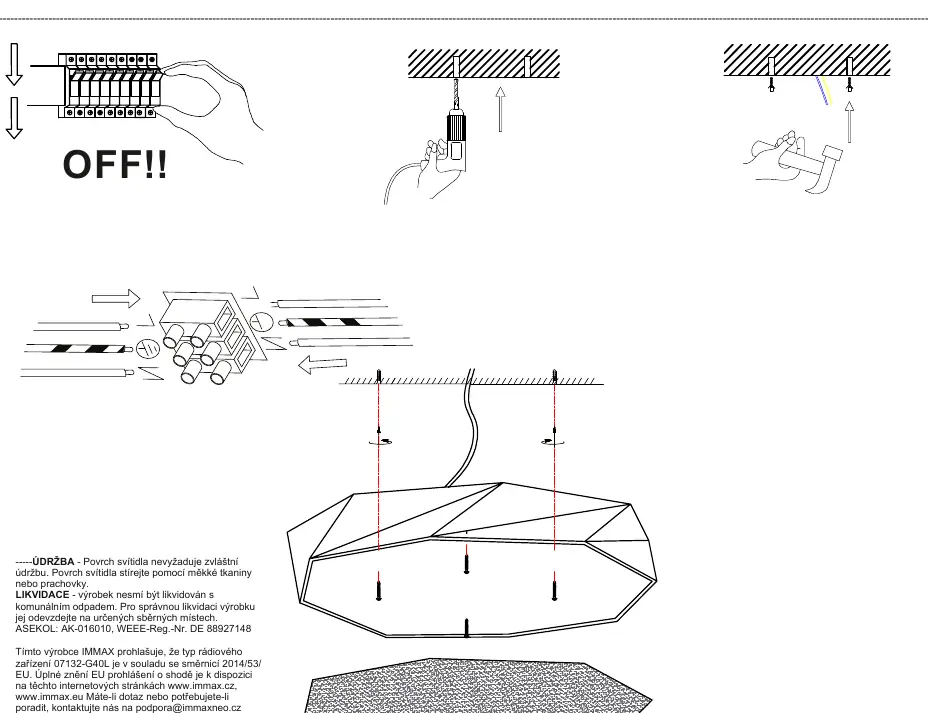
- Turn off the power: Always switch off the main circuit breaker before starting any electrical work.
- Prepare the ceiling: Drill the necessary holes according to the mounting bracket dimensions.
- Wiring: Connect the power supply wires to the terminal block on the fixture. Ensure the Live (L) and Neutral (N) wires are securely connected.
- Mounting: Secure the fixture to the ceiling using the provided mounting hardware.
- Finalize: Ensure all connections are tight and the fixture is securely attached before turning the power back on.
Technical Specifications
- Protocol: Zigbee 3.0
- Input Voltage: AC 230-240V, 50-60Hz
- Power Consumption: 31W / 43W / 60W (depending on model)
- Luminous Flux: 1850lm / 3450lm / 4450lm
- Color Temperature: 2700-6500K
- Lifespan: 50,000 hours
- CRI (Ra): >86
Maintenance and Disposal
The surface of the luminaire does not require special maintenance. Clean the surface using a soft cloth or duster. Do not use harsh chemicals. The product must not be disposed of with municipal waste. Please take it to a designated collection point for electronic waste.
Support
If you have questions or need advice, contact the manufacturer at [email protected]. For the full EU Declaration of Conformity, visit www.immax.cz or www.immax.eu.
Official resources from the manual
Manufacturer information
Immax
Practical help
Common problems
Light not connecting to smart home system
Ensure your Zigbee 3.0 gateway is active, within range, and in pairing mode.
Installation safety
Always verify that the main power supply is disconnected at the circuit breaker before touching any wiring.
Before use
- Turn off the main power supply
- Verify voltage compatibility (230-240V)
- Ensure Zigbee gateway is ready for pairing
- Check mounting surface stability
Specs in practice
- Color Temperature
- 2700-6500K (Adjustable from warm to cool white)
Images and diagrams
- The diagram illustrates the standard wiring process for a ceiling light.
- Ensure the power is OFF before beginning installation.
- The fixture requires a standard 230-240V AC connection.
Model compatibility
- Requires a Zigbee 3.0 compatible gateway for smart features.

Manual page author
Michael Turner
Technical manual editor
Reviews PDF manuals for structure, safety notes, and practical product details so readers can find the right information quickly.