Lighting / Fixtures
User Manual for Immax NEO LITE Smart LED Strip 10m
Quick guide for the Immax NEO LITE Smart LED Strip 10m, covering installation, app pairing via Bluetooth or Wi-Fi, music mode settings, and remote control operation.
Table of contents
Manual images
Jump to the sectionQuick guide from the manual
This document provides essential instructions for installing and configuring the Immax NEO LITE Smart LED Strip. Key operations include connecting the device to the Immax NEO PRO app, utilizing music synchronization modes, and operating the included IR remote control.
Installation
- Use only the provided 12V DC power adapter.
- Ensure the controller is not placed under metal objects to avoid Wi-Fi signal interference.
- Use the 3M adhesive tape to fix the LED strip in place.
- Verify that the power supply, controller, and LED strip are connected correctly before powering on.
- Do not cover the power supply, controller, or LED strip to prevent overheating.
App Pairing
To pair the device, ensure your mobile device is connected to a 2.4 GHz Wi-Fi network. Reset the LED strip by turning it on and off 3 times or by holding the controller button for over 5 seconds until it flashes rapidly.
Pairing via Bluetooth
- Enable Bluetooth on your mobile device.
- The app will automatically detect the device.
- Follow the on-screen prompts to add the device and enter your Wi-Fi credentials.
Pairing without Bluetooth
- In the Immax NEO PRO app, go to the Room tab and tap the + icon.
- Select the product from the list.
- Enter your Wi-Fi network credentials and confirm to complete the pairing.
Operation and Features
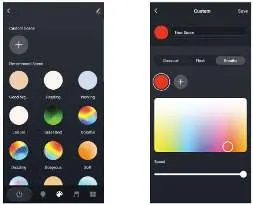
- White Light: Adjust brightness and color temperature.
- Color Light: Select RGB colors and adjust brightness/saturation.
- Scenes: Choose from preset modes or create custom scenes.
- Music Modes: Synchronize lighting with sound using the controller's built-in microphone (Local mode) or your phone's microphone (APP mode).
Remote Control
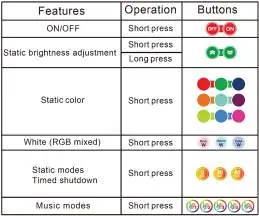
The included 24-button IR remote allows for direct control of brightness, static colors, and music modes. Ensure the remote is within the line of sight of the controller. Note: The remote does not function while the controller is in pairing mode.
Maintenance and Safety
- Clean the device with a soft cloth; do not use aggressive chemicals or solvents.
- Keep out of reach of children due to small parts.
- Do not disassemble the product to avoid electric shock.
- Dispose of the product and batteries at designated recycling centers.
Manufacturer information
Immax
Practical help
Common problems
Remote control is not working
Ensure the controller is not in pairing mode and that the remote is within the line of sight of the controller.
Wi-Fi signal is weak or unstable
Ensure the controller is not placed under metal objects, which can block the signal.
Device not pairing
Ensure you are connected to a 2.4 GHz Wi-Fi network and that the device is in pairing mode (flashing rapidly).
Before use
- Verify the power adapter is 12V DC.
- Ensure the LED strip is unfolded to prevent overheating.
- Check that all cables are connected to the correct ports.
- Ensure your smartphone is connected to a 2.4 GHz Wi-Fi network.
- Remove the PVC sheet from the remote control battery compartment.
Specs in practice
- Protocol: Wi-Fi
- Requires a 2.4 GHz Wi-Fi network for app connectivity.
- Frequency: 2400MHz~2483.5MHz
- Standard operating frequency for Wi-Fi smart devices.
- Max RF Output: 20dBm
- The maximum signal strength for wireless communication.
Images and diagrams
- Port 1: Output for LED strip connection.
- Port 2: Input for 12V DC power supply.
- Button 3: Function button for ON/OFF (two short clicks) and reset/pairing (long press > 5s).
Model compatibility
- Requires Immax NEO PRO app.
- Supports 2.4 GHz Wi-Fi networks only.
- Compatible with IR remote control included in the package.

Manual page author
David Miller
Documentation analyst
Organizes user manual content into clear summaries, with attention to model details, product context, and everyday usability.