Electronics / Headphones Earbuds
User Manual for anko 17LY67 Bluetooth Headphones
Quick guide for the anko 17LY67 Bluetooth headphones. Learn how to pair, charge, control playback, and troubleshoot your device.
Table of contents
Manual images
Click an image to enlargeQuick guide from the manual
This document provides essential instructions for operating the anko 17LY67 Bluetooth headphones. Key operations include powering on, pairing with mobile devices, managing playback, and charging the battery. Ensure the headphones are fully charged before first use.
Overview
The headphones feature the following controls and ports:
- Power Button: Used for power on/off and pairing.
- LED Indicator: Displays status (flashing blue/red for pairing).
- Microphone: Located on the earcup.
- USB Charging Port: Micro-USB port for charging.
- VOL- / PREV: Volume down and previous track.
- VOL+ / NEXT: Volume up and next track.
- Line in: Aux-in port for wired connection.
Power and Pairing
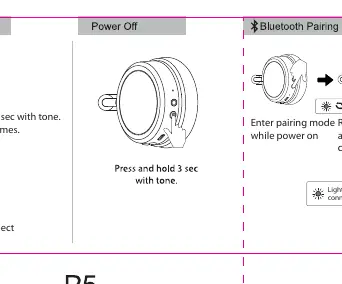
To power on the device, press and hold the power button for 3 seconds until the blue LED flashes 3 times. To enter pairing mode, ensure the device is powered on; the red and blue LEDs will flash alternately. Select "anko headphone" in your mobile device's Bluetooth settings to connect. The LED will turn off once the connection is successful.
Playback and Calling
Playback Controls:
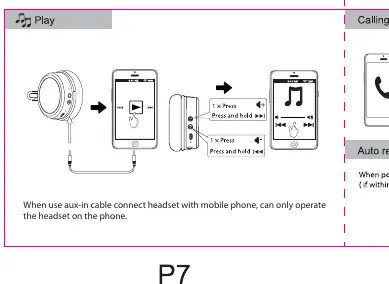
- Play/Pause: Press the power button once.
- Next Track: Press and hold the VOL+ / NEXT button.
- Previous Track: Press and hold the VOL- / PREV button.
Calling Mode:
- Answer Call: Press the power button once.
- Hang Up: Press the power button once.
- Decline Call: Press and hold the power button for 1 second.
Charging
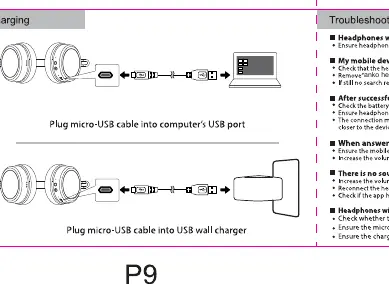
Connect the provided micro-USB charging cable to the headphones' charging port and the other end to a computer's USB port or a USB wall charger. Ensure the cable is fully seated.
Troubleshooting
If you encounter issues, check the following:
- Headphones won't turn on: Ensure the device is fully charged.
- Cannot find headphones: Check that the device is in pairing mode (Red and Blue LED flashing).
- Pairing disconnects: Ensure the headphones are within range of the mobile device and there are no obstructions.
- No sound: Check the volume level on both the mobile device and the headphones. Ensure the app is playing.
Safety Warnings
- Working temperature: 0 - 45°C.
- Battery safety: Do not subject the battery to extreme temperatures, high altitude, or mechanical damage (crushing/cutting) as this may cause an explosion or leakage.
Manufacturer information
Anko
Practical help
Common problems
Headphones will not turn on
Ensure the headphones are fully charged before attempting to turn them on.
Mobile device cannot find the headphones
Check that the headphones are in pairing mode (Red and Blue LED flashing alternately).
Pairing disconnects
Ensure the headphones are within range of the mobile device and there are no obstructions. Reconnect if necessary.
No sound when listening to music
Increase the volume on your mobile device and the headphones. Ensure the app is playing and not paused.
Before use
- Charge the headphones fully using the provided micro-USB cable.
- Ensure Bluetooth is enabled on your mobile device.
- Verify the headphones are in pairing mode (Red and Blue LED flashing).
- Keep the headphones within range of the mobile device during pairing.
Specs in practice
- Working temperature
- 0 - 45°C. Do not operate outside this range.
- Charging port
- Micro-USB port; compatible with standard computer USB ports or wall chargers.
Images and diagrams
- Power button: Press and hold for 3 seconds to power on.
- LED indicator: Flashes blue/red to indicate pairing mode.
- Charging port: Located on the earcup for micro-USB connection.
Model compatibility
- When using the aux-in cable, the headset can only be operated via the connected mobile phone.

Manual page author
Michael Turner
Technical manual editor
Reviews PDF manuals for structure, safety notes, and practical product details so readers can find the right information quickly.