Baby / Children Products
Anko 43099931 Bluetooth 2-in-1 360 Degree Speaker User Manual
Quick guide for the Anko 43099931 Bluetooth 2-in-1 360 Degree Speaker. Learn how to pair via Bluetooth, use TWS mode, assemble the units, and understand technical specifications.
Quick answers from the manual
Quick answer
- The Anko 43099931 is a 2-in-1 Bluetooth speaker that can be used as a single unit or separated into two speakers using TWS pairing. It features Bluetooth 5.0, IPX6 water resistance, and a 10-meter range. p. 1
Key actions
- Pairing via Bluetooth p. 1
- TWS Pairing p. 1
First start
- Charge the device, power on, and search for 'KM43099931' in your Bluetooth settings. p. 1
Problems and fixes
TWS pairing not working
Ensure both speakers are unpaired and press and hold '+' and '-' buttons on one unit.
p. 1Maintenance and reset
- Ensure the silicone cover is closed securely when used outdoors or near water to maintain IPX6 rating. p. 1
Technical specifications
| Parameter | Value | Meaning | Pages |
|---|---|---|---|
| Bluetooth Version | 5.0 | Wireless connectivity standard | p. 1 |
| Output | 2 x 5W | Audio power output | p. 1 |
| Charging Time | 3-4 hours | Time to fully charge the battery | p. 1 |
Where to find it in the PDF
- Operating Instructions p. 1
Table of contents
Manual images
Click an image to enlargeQuick guide from the manual
The Anko 43099931 is a versatile 2-in-1 Bluetooth speaker system. It can be used as a single combined unit or separated into two individual speakers using TWS (True Wireless Stereo) technology. The device supports Bluetooth, AUX input, and TF card playback.
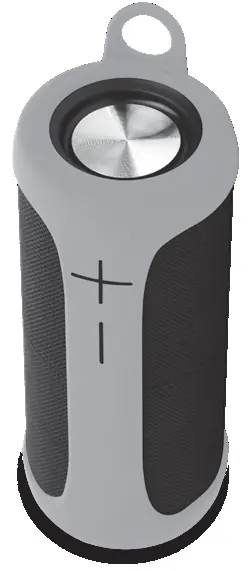
Assembly and Disassembly
The speaker consists of two units that can be joined or separated:
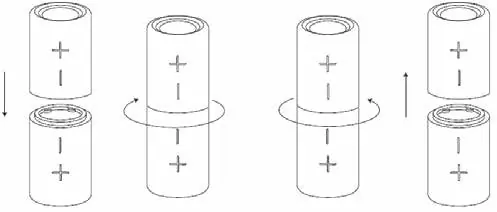
- To separate: Twist the two units in opposite directions and pull them apart.
- To join: Align the two units and twist them together until they lock into place.
Controls and Operation
The speaker features the following controls:
- Power: Press and hold the power button to turn on/off.
- Play/Pause: Press the button once.
- Volume: Press the '+' or '-' buttons to adjust volume. Press and hold to skip tracks.
- Mode Selection: Press the power button twice to switch between Bluetooth, TF Card, or AUX modes.
Bluetooth and TWS Pairing
Bluetooth Pairing:
- Turn on the speaker; the LED will flash.
- Search for 'KM43099931' in your device's Bluetooth menu and connect.
- If prompted for a password, enter '0000' or '1234'.
TWS Pairing (Connecting two speakers):
- Ensure both speakers are on and unpaired.
- Press and hold the '+' and '-' buttons on one of the speakers.
- You will hear a prompt sound when they are successfully paired.
- Once paired, connect your phone to the speaker via Bluetooth as usual.
Technical Specifications
- Bluetooth Version: 5.0
- Working Distance: 10 Meters
- Output: 2 x 5W
- Music Time: 4-5 hours at 100% volume, 7-8 hours at 50% volume
- Standby Time: Approx. 10 hours
- Charging Time: 3-4 hours
- Charging Voltage: 5V d.c.
Safety and Maintenance
- IPX6 Rating: The speaker is water-resistant. Ensure the silicone cover is closed securely when used outdoors or near water.
- Charging: Use the provided USB cable to charge. Connect to a standard 5V charging source.
Manufacturer information
Anko
Practical help
Common problems
Speaker not pairing via Bluetooth
Ensure the speaker is in pairing mode (LED flashing). If already paired to another device, disconnect it first.
TWS pairing fails
Ensure both speakers are the same model and are not currently connected to another Bluetooth device. Press and hold '+' and '-' buttons on one unit to initiate pairing.
Before use
- Charge the speaker fully before first use.
- Ensure the charging port cover is closed if using near water.
- Check that your Bluetooth device is within 10 meters of the speaker.
- Verify the speaker is in the correct mode (Bluetooth/AUX/TF) for your intended use.
Images and diagrams
- The manual provides a visual guide on how to twist the two speaker units to separate them or lock them together.
Model compatibility
- Compatible with Bluetooth devices.
- Supports TF cards up to 32GB.
- Supports AUX input via 3.5mm cable.

Manual page author
David Miller
Documentation analyst
Organizes user manual content into clear summaries, with attention to model details, product context, and everyday usability.