Toys / RC Models & Drones
Arrma Quake 223S RC Monster Truck Parts Diagram
Official exploded view parts diagram for the Arrma Quake 223S RC Monster Truck. Use this guide to identify components, assembly order, and part numbers for maintenance and repairs.
Table of contents
Quick guide from the manual
This document is an exploded view diagram for the Arrma Quake 223S RC Monster Truck. It is designed to assist users in identifying individual components, understanding the assembly order, and locating specific part numbers required for maintenance, repairs, or upgrades.
Using the parts diagram
The diagram provides a visual breakdown of the entire vehicle. To use it effectively:
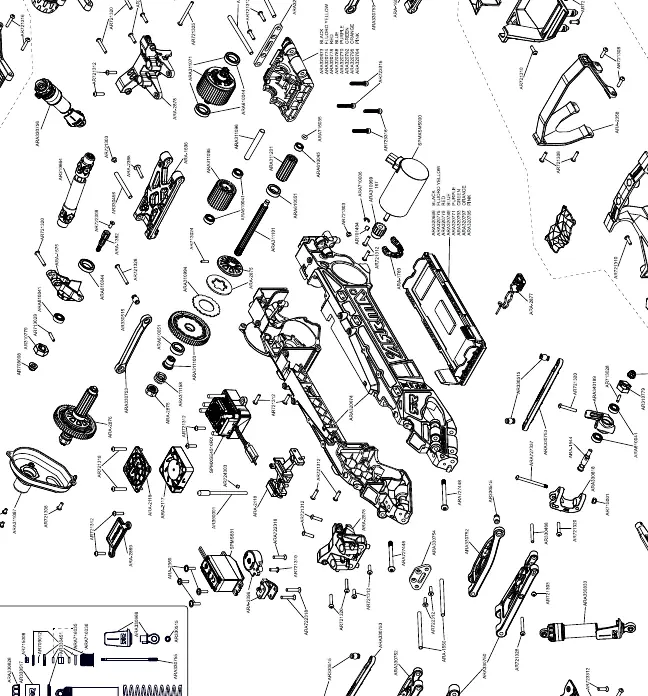
- Locate the part: Find the component you are working on in the diagram.
- Identify the part number: Each component is labeled with a specific part number (e.g., ARAxxxxxx).
- Assembly order: The diagram shows how parts fit together, including the placement of screws, bearings, and suspension components.
- Hardware: Use the diagram to identify the correct screw sizes and locations when reassembling the vehicle.
Maintenance and repair tips
When performing maintenance on your RC truck, refer to the diagram to ensure all parts are reinstalled correctly:
- Suspension: Ensure all suspension arms and shocks are assembled with the correct orientation as shown in the diagram.
- Drivetrain: Verify the gear mesh and drivetrain components are aligned properly.
- Fasteners: Always use the correct screw length and type as indicated by the part numbers in the diagram to avoid damaging plastic components.
Practical help
Common problems
Difficulty identifying a replacement part
Locate the part in the exploded view to find its specific part number (e.g., ARAxxxxxx) for ordering.
Unsure of assembly order during repair
Refer to the exploded view to see the correct sequence of parts, washers, and screws.
Before use
- Check that all suspension components are securely attached.
- Verify that all screws are tightened and not stripped.
- Ensure the drivetrain moves freely without obstruction.
- Inspect the body mounts and chassis for any cracks or damage.
Show more Show less
Images and diagrams
- The diagram displays the vehicle in an 'exploded' state, showing how individual parts connect to the main chassis.
- Part numbers are listed next to the components for easy identification.
Model compatibility
- Ensure you are using genuine Arrma replacement parts corresponding to the part numbers shown in the diagram.

Manual page author
Emily Carter
User documentation editor