Toys / RC Models & Drones
User Manual for Battat R/C Front End Loader
Quick guide for the Battat R/C Front End Loader. Learn how to install batteries, operate the remote control, troubleshoot connection issues, and follow safety guidelines.
Quick answers from the manual
Quick answer
- To start playing, ensure both the truck and remote are switched ON. Press the 'Lights & Sounds' button on the truck, then the 'Ignition' button on the remote. p. 1
Key actions
- Start Playing p. 1
- Wake from Sleep Mode p. 1
First start
- Install batteries and turn ON both units. p. 1, 2
Show 3 more answers Show less
Problems and fixes
Connection loss
Switch the vehicle and the controller OFF, then switch them back ON.
p. 1Technical specifications
| Parameter | Value | Meaning | Pages |
|---|---|---|---|
| Truck Batteries | 4 x AA (1.5V) | Included | p. 1, 2 |
| Remote Batteries | 2 x AA (1.5V) | Not included | p. 1, 2 |
| Load Capacity | 300g | Maximum load for shovel arm | p. 2 |
Where to find it in the PDF
- Operating Instructions and Battery Replacement p. 1
- Safety and Regulatory Information p. 2
Table of contents
Quick Start Guide
To begin playing with your R/C Front End Loader, follow these steps:
- Ensure the ON/OFF switch on both the front-end loader and the remote control are set to the ON position.
- Press the Lights & Sounds button on the front-end loader.
- Press the Ignition button on the remote control.
The vehicle will automatically enter sleep mode after 2 minutes of inactivity to save power. To wake it up, repeat the process of pressing the Lights & Sounds button on the truck followed by the Ignition button on the remote.
Battery Installation
The toy requires batteries for both the vehicle and the remote control:
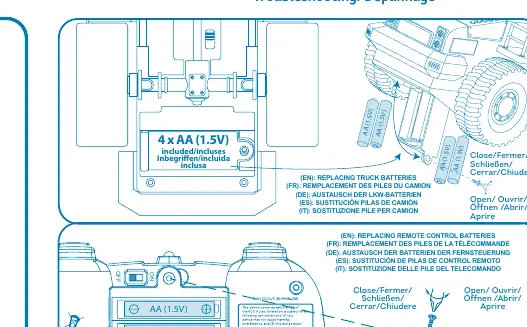
- Front-End Loader: Requires 4 x AA (1.5V) batteries (included).
- Remote Control: Requires 2 x AA (1.5V) batteries (not included).
Important Battery Advice:
- Do not mix old and new batteries or different types of batteries.
- Insert batteries with the correct polarity (+/-).
- Remove exhausted batteries from the toy immediately.
- Do not short-circuit the supply terminals.
Usage Guidelines and Limitations
- Indoor Use Only: Do not use near seawater or in dirty, dusty, or wet environments.
- Load Limit: Do not load more than 300g onto the shovel to avoid damaging the shovel arm.
- Storage: If the remote control does not work after long storage, replace the batteries in both the vehicle and the remote.
Troubleshooting
If the front-end loader disconnects from the controller:
- Switch both the vehicle and the controller to the OFF position.
- Switch both units back to the ON position.
- Repeat the start-up sequence (press Lights & Sounds on the truck, then Ignition on the remote).
Safety Information
- Choking Hazard: Contains small parts. Not suitable for children under 3 years.
- Epilepsy Warning: This toy produces flashing lights that may trigger epilepsy in sensitized individuals.
Practical help
Common problems
Vehicle disconnected from controller
Turn both the vehicle and the controller OFF, then back ON. Repeat the start-up sequence.
Vehicle not responding after storage
Replace batteries in both the truck (4x AA) and the remote (2x AA).
Shovel arm not lifting or damaged
Do not load over 300g on the shovel.
Before use
- Ensure ON/OFF switches are in the ON position
- Install 4x AA batteries in the truck
- Install 2x AA batteries in the remote
- Check for small parts (choking hazard)
- Verify environment is dry and indoor
Show more Show less
Specs in practice
- Max Radio Power
- 5dBm
Images and diagrams
- Fig 1 & 2: Battery compartment locations for truck and remote
- Fig 3: Remote control ignition button location
- Fig 4: Truck lights & sounds button location
Model compatibility
- Requires alkaline batteries for longer play time
- For indoor use only

Manual page author
David Miller
Documentation analyst