Lighting / Fixtures
User Manual for Artika Vera LED Flush Mount Light 13FM-VA-BL
Comprehensive installation and user guide for the Artika Vera LED Flush Mount Light (models 13FM-VA-BL and 13FM-VA-CH). Includes step-by-step wiring instructions, hardware list, safety warnings, and warranty details.
Table of contents
Manual images
Click an image to enlargeQuick Guide and Safety Information
The Artika Vera LED Flush Mount Light is designed for indoor, residential use only. Before beginning installation, ensure the main electrical supply is turned off at the circuit breaker panel to prevent electrical shock. We strongly recommend that this product be installed by a certified electrician in accordance with local building and electrical codes. If you intend to use a dimmer switch, it must be compatible with LED lighting.
Included Hardware
Ensure all the following components are present before starting the installation:
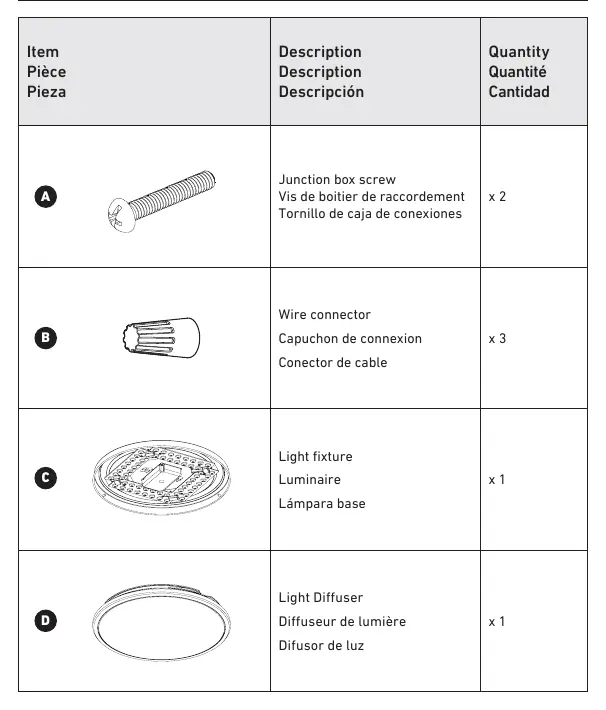
- A: Junction box screws (x2)
- B: Wire connectors (x3)
- C: Light fixture (x1)
- D: Light diffuser (x1)
You will also need a screwdriver to complete the installation.
Installation Steps
1. Mounting Screws Installation
Secure the mounting screws (A) into your junction box using a screwdriver. Ensure they are firmly in place to support the fixture.
2. Connecting the Wires
Using the provided wire connectors (B), connect the fixture wires to the house supply wires:
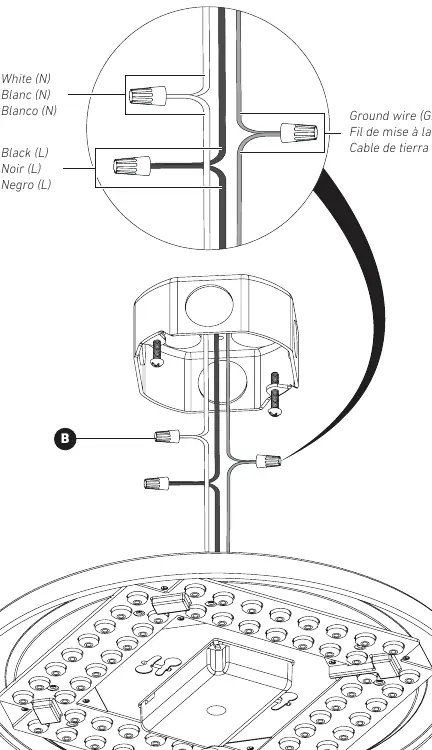
- Connect the White (Neutral) wire from the fixture to the White (Neutral) wire from the junction box.
- Connect the Black (Live) wire from the fixture to the Black (Live) wire from the junction box.
- Connect the Ground (GND) wire from the fixture to the Ground wire from the junction box.
3. Light Fixture Installation
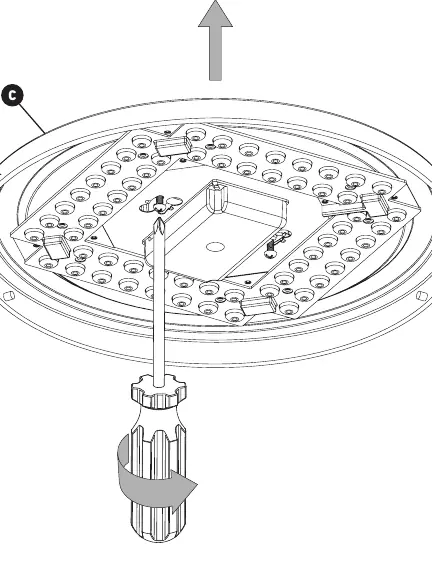
Align the light fixture (C) with the mounting screws installed in the junction box. Secure the fixture by rotating it or tightening the screws as indicated in the diagram.
4. Final Installation
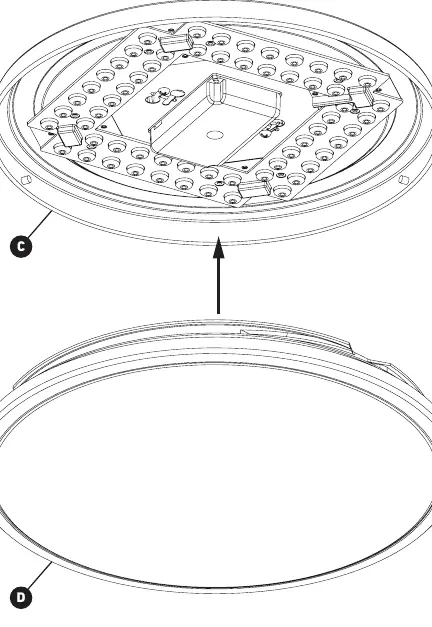
Attach the light diffuser (D) to the light fixture (C) to complete the assembly.
Warranty and Support
Artika For Living Inc. offers a three-year limited warranty on manufacturing defects for residential use. The warranty is non-transferable and requires the original sales receipt. It does not cover improper installation, misuse, or normal wear and tear. For customer service, you can contact Artika at 1-866-661-9606 or via email at [email protected]. Support is available Monday to Friday, 9 am - 5 pm EST.
Manufacturer information
Artika
Practical help
Common problems
Light does not turn on
Verify that the circuit breaker is turned on and that all wire connections are secure and correctly matched.
Flickering light
Ensure that the dimmer switch being used is specifically compatible with LED lighting.
Before use
- Turn off the main electrical supply at the circuit breaker.
- Verify that the junction box is secure and capable of supporting the fixture.
- Ensure you have a screwdriver available.
- Confirm that your dimmer switch (if applicable) is LED compatible.
- Read all safety warnings regarding electrical shock.
Specs in practice
- Indoor Use Only
- The fixture is not rated for outdoor environments or exposure to moisture.
- Residential Use Only
- The product is intended for home use and not for commercial or industrial applications.
Images and diagrams
- The wiring diagram illustrates the standard connection of White (Neutral), Black (Live), and Ground wires using the provided wire connectors.
- The installation sequence shows the progression from mounting the screws to attaching the diffuser.
Model compatibility
- Requires an LED-compatible dimmer switch if dimming functionality is desired.
- Must be installed in accordance with local electrical and building codes.

Manual page author
Emily Carter
User documentation editor
Prepares concise manual descriptions and highlights the most useful setup, operation, and maintenance information for readers.