Lighting / Fixtures
User Manual for Artika Skylight LED Flush Mount Light
Quick guide for the Artika Skylight LED Flush Mount Light. Includes installation steps, wiring instructions, color temperature adjustment, and safety warnings.
Table of contents
Manual images
Click an image to enlargeQuick guide from the manual
This document provides instructions for the installation and operation of the Artika Skylight LED Flush Mount Light. The fixture features Selectable White Technology, allowing you to adjust the color temperature, and supports 360-degree rotation for final positioning.
Safety warnings
- Electrical Shock Hazard: Always turn off the main electrical supply at the fuse box or circuit breaker before starting installation or performing maintenance.
- Indoor Use Only: This product is designed for indoor residential use only. Do not use outdoors.
- Dimmer Compatibility: If using a dimmer switch, it must be LED compatible.
- Professional Installation: It is recommended that this product be installed by a certified electrician, as required by local building codes in some regions.
Included hardware
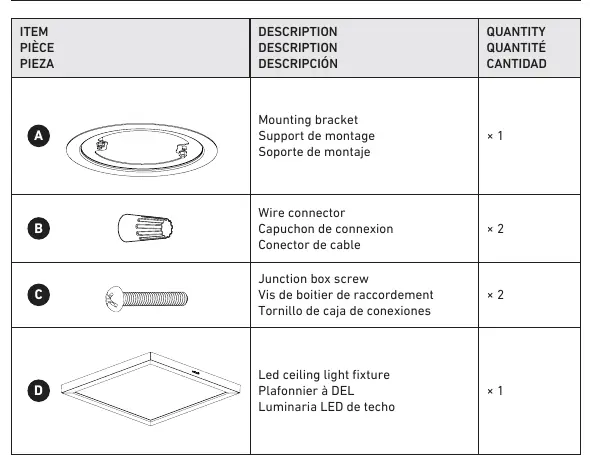
- Mounting bracket
- Wire connectors
- Junction box screws
- LED ceiling light fixture
Installation steps
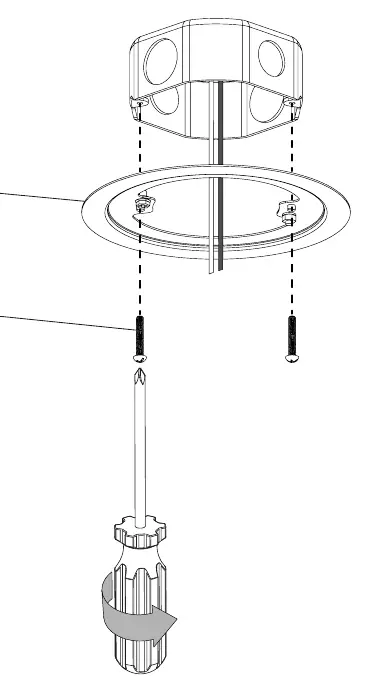
- Mounting Bracket Installation: Secure the mounting bracket to the junction box using the provided junction box screws.
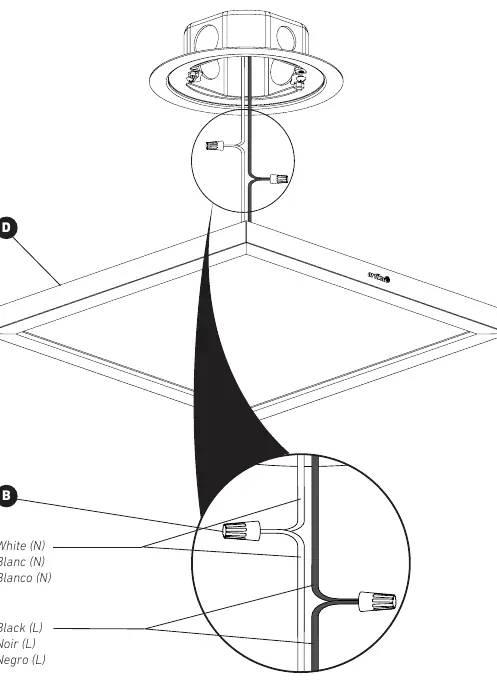
- Wiring Connection: Connect the fixture wires to the house supply wires using the provided wire connectors. Ensure the white (neutral) wire is connected to the white supply wire and the black (live) wire is connected to the black supply wire.
- Selectable White Technology: Before final installation, use the switch on the fixture to select your desired color temperature (2700K, 3000K, 3500K, 4000K, or 5000K).
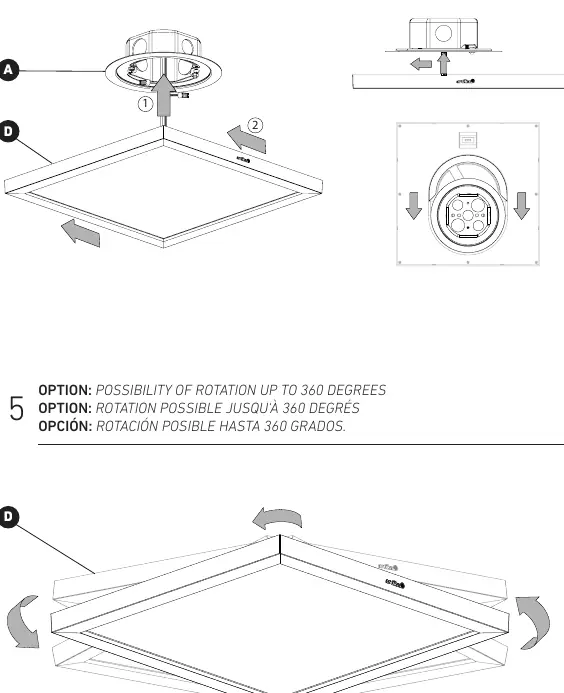
- Final Installation: Attach the fixture to the mounting bracket. The fixture can be rotated up to 360 degrees to achieve the desired orientation.
Warranty and support
Artika For Living Inc. offers a five-year limited warranty on manufacturing defects for residential use. The warranty is non-transferable and requires the original sales receipt. For customer service, you can contact Artika at 1-866-661-9606 or via email at [email protected]. Service is available Monday to Friday, 9 am to 5 pm EST.
Manufacturer information
Artika
Practical help
Common problems
Light does not turn on or flickers.
Ensure the dimmer switch is LED compatible. Verify that all wire connections are secure and correctly matched (Black to Black, White to White).
Fixture is loose or not flush with the ceiling.
Check that the mounting bracket is securely fastened to the junction box and that the fixture is properly locked onto the bracket.
Before use
- Turn off the main electrical supply at the circuit breaker.
- Ensure you have a screwdriver.
- Verify that your dimmer switch is LED compatible.
- Read all safety instructions provided in the manual.
- Confirm the desired color temperature setting before final mounting.
Specs in practice
- Selectable White Technology
- Allows the user to choose between 2700K, 3000K, 3500K, 4000K, and 5000K color temperatures.
Images and diagrams
- The wiring diagram shows the connection of the fixture's black and white wires to the corresponding house supply wires using wire connectors.
- The installation diagram illustrates the mounting bracket being screwed into the junction box.
Model compatibility
- For indoor residential use only.
- Requires an LED-compatible dimmer switch if dimming is desired.

Manual page author
David Miller
Documentation analyst
Organizes user manual content into clear summaries, with attention to model details, product context, and everyday usability.