Tools / Drills
Owner's Manual for Bauer 1781C-B1 Cordless Impact Driver
Quick guide for the Bauer 1781C-B1 Cordless Impact Driver. Includes setup instructions, operation steps, maintenance tips, and safety warnings.
Quick answers from the manual
Quick answer
- The Bauer 1781C-B1 is a 20V cordless impact driver. It requires 1/4" hex shank impact-rated bits and features variable speed control and a trigger lock. p. 1, 7
Key actions
- Installing bits p. 8
- Operating direction p. 9
First start
- Charge the battery pack after unpacking and before using the tool. p. 8
Problems and fixes
Tool does not operate
Check battery charge and ensure the direction switch is not in the center lock position.
p. 9Maintenance and reset
- Wipe external surfaces with a clean cloth after use. p. 10
Technical specifications
| Parameter | Value | Meaning | Pages |
|---|---|---|---|
| Battery Rating | 20V / 1.5Ah | Power and capacity | p. 7 |
| No Load Speed | 0-2900 RPM | Speed range | p. 7 |
| Chuck Size | 1/4" Hex | Bit compatibility | p. 7 |
Where to find it in the PDF
- Safety Information p. 2, 3, 4, 5
- Specifications and Functions p. 7
- Operating Instructions p. 8, 9
- Maintenance p. 10
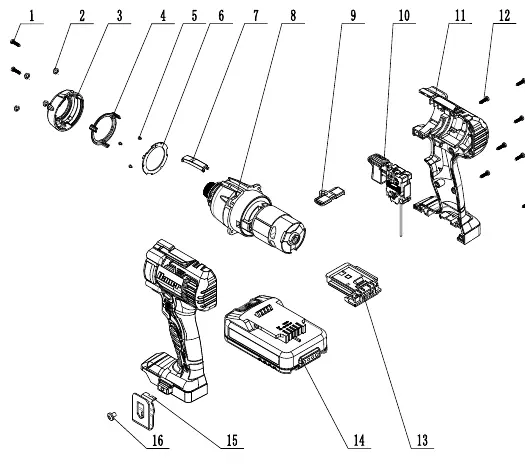
- Parts List p. 11
Table of contents
Manual images
Click an image to enlargeQuick guide from the manual
The Bauer 1781C-B1 is a 20V cordless impact driver designed for driving fasteners. Before using the tool, ensure the battery is fully charged. Always wear appropriate eye protection and keep the work area clean and well-lit. Use only 1/4" hex shank bits specifically designed for impact use.
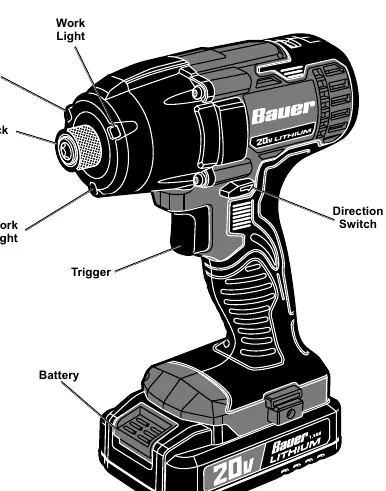
Setup
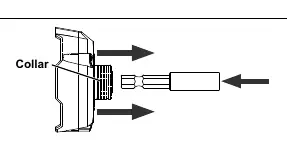
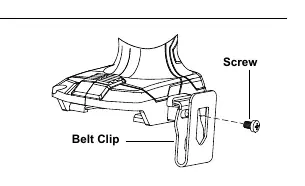
To install or remove accessories, pull the chuck collar forward, insert or remove the bit, and release the collar. Ensure the bit is securely held in place. The belt clip can be attached to either side of the handle using the provided screw.
Operation
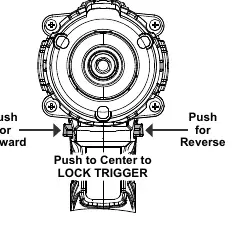
The tool features a direction switch located above the trigger. Push the switch to the right for forward (clockwise) rotation and to the left for reverse (counter-clockwise) rotation. Push the switch to the center position to lock the trigger. The tool has variable speed; apply more pressure to the trigger to increase speed and less pressure to decrease it.
Maintenance
Before each use, inspect the tool for loose hardware, cracked or broken parts, and signs of battery damage. After use, wipe the external surfaces with a clean cloth. Store the tool, battery, and charger in a dry, indoor area, away from children and metal objects that could cause short circuits.
Safety
Do not expose the tool to rain or wet conditions. Keep the battery pack dry and do not expose it to temperatures above 140°F. If the tool vibrates excessively or makes abnormal noises, stop use immediately and have it inspected by a qualified technician.
Practical help
Common problems
Tool will not start
Ensure the battery is charged, the trigger is not locked (direction switch in center), and the battery is properly connected.
Bit falls out of chuck
Ensure you are using a 1/4" hex shank bit and that the collar is fully released and locked after insertion.
Excessive vibration or noise
Stop use immediately. Inspect for damaged parts, loose hardware, or a damaged battery pack.
Before use
- Charge the battery pack fully
- Inspect tool for loose hardware or cracks
- Ensure work area is clean and well-lit
- Wear ANSI-approved eye protection
- Verify bit is impact-rated and 1/4" hex shank
Images and diagrams
- Exploded view of tool components for parts identification
- Direction switch positions for forward, reverse, and lock
- Collar operation for bit installation
- Belt clip attachment points
Model compatibility
- Use only 1/4" hex shank bits designed for impact use.
- Do not use extension cords with the charger.

Manual page author
Michael Turner
Technical manual editor
Reviews PDF manuals for structure, safety notes, and practical product details so readers can find the right information quickly.