Tools / Drills
User Manual for Bauer 1992C-B 1/2" Compact Hammer Drill
Comprehensive user guide for the Bauer 1992C-B 1/2" Compact Hammer Drill. Includes detailed instructions on setup, battery charging, bit installation, drilling modes, maintenance, and troubleshooting.
Quick answers from the manual
Quick answer
- The Bauer 1992C-B is a 20V cordless hammer drill. To operate, insert a charged battery, select the appropriate mode (Drilling, Driving, or Hammer Drilling), set the speed, and adjust the torque if driving screws. Always lock the trigger when not in use. p. 7, 8, 9
Key actions
- Install a drill bit p. 8
- Select drilling mode p. 8
First start
- Charge the battery pack fully before first use. p. 8
Problems and fixes
Tool will not start
Check battery connection and charge status.
p. 11Maintenance and reset
- Wipe external surfaces with a clean cloth after use. p. 11
Technical specifications
| Parameter | Value | Meaning | Pages |
|---|---|---|---|
| Battery Type | Bauer 20V Li-ion 57007 | Compatible battery model. | p. 7 |
| No Load Speed | 0-450 / 0-1,700 /min | Rotational speed range. | p. 7 |
| BPM | 0-7,200 / 0-27,200 | Beats per minute for hammer mode. | p. 7 |
Where to find it in the PDF
- Safety Information p. 2, 3, 4, 5
- Specifications p. 7
- Operating Instructions p. 8, 9, 10
- Maintenance p. 11
Table of contents
Manual images
Click an image to enlargeQuick guide from the manual
This manual provides essential safety and operating instructions for the Bauer 1992C-B 1/2" Compact Hammer Drill. Before using the tool, ensure the battery is fully charged and you have read all safety warnings, particularly regarding lithium battery handling and vibration safety. Always wear appropriate personal protective equipment, including eye and ear protection.
Product overview and functions
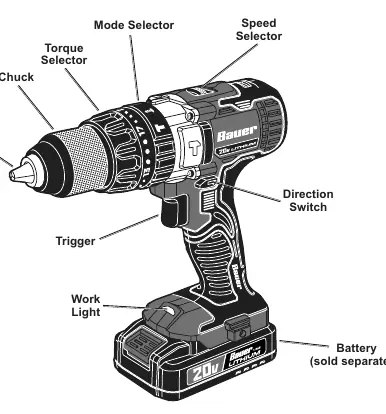
The drill features a 1/2" chuck, torque selector (1-17 settings), mode selector (Drilling, Driving, Hammer Drilling), speed selector (1 or 2), and a direction switch. A work light is integrated to illuminate the work area when the trigger is pressed.
Setup and installation
- Battery Charging: Charge the battery pack after unpacking and before initial use. Follow the instructions provided with your specific battery charger.
- Bit Installation: Rotate the chuck's collar counterclockwise to open the jaws. Insert the bit into the center of the jaws. Hand-tighten the collar clockwise until the bit is held securely.
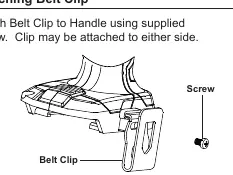
- Belt Clip: Attach the belt clip to the handle using the supplied screw. It can be mounted on either side of the tool.
Operating instructions
Before performing any adjustments, ensure the trigger is in the off-position and the battery pack is removed.
Mode Selection
Rotate the mode selector to the desired setting:
- Drilling Mode: For drilling in wood and metal.
- Driving Mode: For driving screws, bolts, and installing nuts.
- Hammer Drilling Mode: For drilling in masonry.
Speed and Torque
- Speed Selection: Use the speed selector to choose between Low Speed (1) and High Speed (2).
- Setting Torque: In Driving Mode, use the numbered torque settings (1-17) to control the force applied. Start with a lower setting to avoid over-driving screws.
General Use
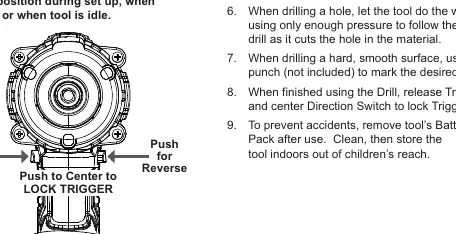
Set the direction switch to forward (right side) or reverse (left side). Use the center position to lock the trigger when the tool is idle or during bit changes. Always let the tool do the work; do not force it.
Drilling techniques
- Wood: Use high-speed bits. Place a block of wood behind the workpiece to prevent ragged edges on through-holes.
- Metal: Use high-speed bits. Start at a low speed to prevent slipping. Lubricate with oil for large holes.
- Masonry: Use carbide or specialty bits. Start with regular drilling and switch to Hammer Drilling mode once the surface is pierced. Do not add water to the hole.
Maintenance and troubleshooting
Regularly inspect the tool for loose hardware, cracked parts, or damaged battery packs. Wipe external surfaces with a clean cloth after use. If the tool fails to start, check the battery connection and charge level. If performance decreases, check for worn carbon brushes or dull bits.
Practical help
Common problems
Tool will not start
Check if the battery pack is properly connected and charged. If it still fails, the battery may need replacement or the tool may require professional service.
Tool operates slowly
Do not force the tool; allow it to work at its own rate. Check if the battery pack is wearing out.
Excessive noise or rattling
This may indicate internal damage or wear (e.g., bearings or carbon brushes). Have the tool serviced by a qualified technician.
Overheating
Ensure you are not forcing the tool. Check if the bit is dull or if motor housing vents are blocked.
Before use
- Charge the battery pack fully.
- Inspect the tool for cracked parts or loose hardware.
- Ensure the trigger is in the off-position before inserting the battery.
- Wear ANSI-approved safety goggles and hearing protection.
- Select the correct bit for the material (wood, metal, or masonry).
- Set the direction switch to the center (lock) position during setup.
Specs in practice
- No Load Speed
- The rotational speed of the chuck without a load (0-450 / 0-1,700 RPM).
Images and diagrams
- The Functions diagram on page 7 identifies the Chuck, Jaws, Torque Selector, Mode Selector, Speed Selector, Direction Switch, Trigger, and Work Light.
- The Direction Switch diagram on page 9 illustrates how to push the switch for Forward, Reverse, and Center (Lock) positions.
Model compatibility
- Requires Bauer 20V Li-ion battery (57007) and charger (57006), sold separately.
- Do not use extension cords with the charger.

Manual page author
David Miller
Documentation analyst
Organizes user manual content into clear summaries, with attention to model details, product context, and everyday usability.