Electronics / Audio
User Manual for Behringer UL 1000G2 Wireless In-Ear Monitoring System
Quick start guide and user manual for the Behringer UL 1000G2 UHF Wireless In-Ear Monitoring System. Includes setup, controls, rack mounting, and technical specifications.
Table of contents
Manual images
Click an image to enlargeQuick Start Guide
This guide provides essential information for setting up and operating the Behringer UL 1000G2 Wireless In-Ear Monitoring System. For detailed safety instructions, please refer to the full manual.
Connection and Setup
To connect the UL 1000G2 to your system:
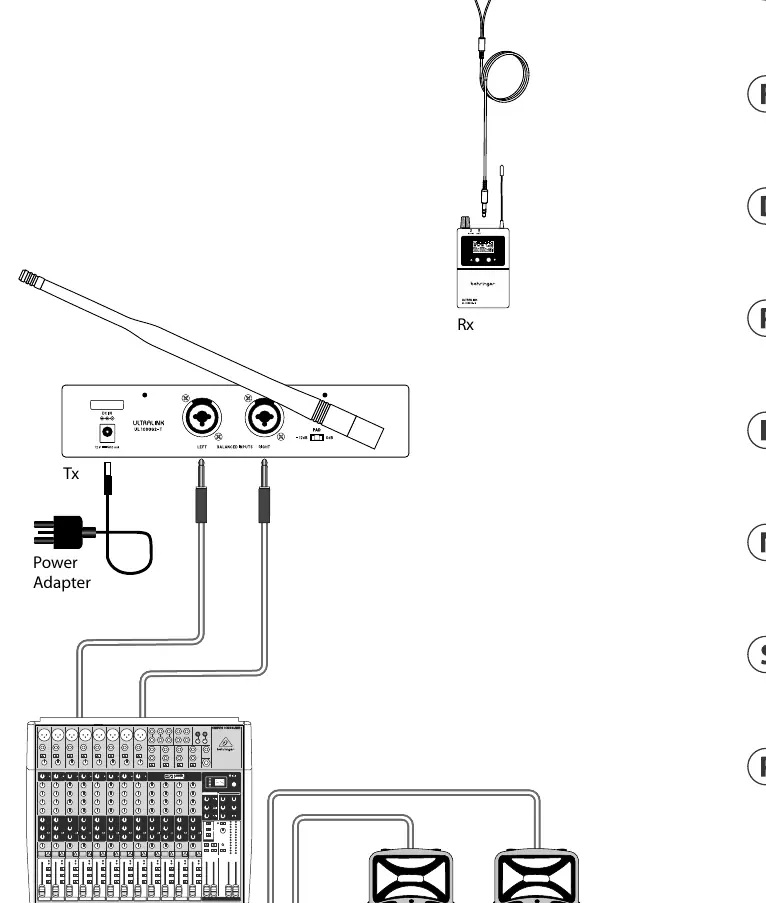
- Position the transmitter at a minimum height of 1 meter and point the antenna upwards for optimal signal transmission.
- Ensure antennas do not touch or cross if using multiple wireless systems.
- Keep the transmitter away from metal objects and digitally controlled devices (e.g., computers, digital consoles).
- Maintain a direct line of sight between the transmitter and receiver.
- Connect headphones to the transmitter and adjust the volume gradually.
- Use the INPUT GAIN knob to adjust audio levels, monitoring the L/R levels on the LCD.
- Apply the rear panel -12 dB Pad switch if the input signal is too strong.
Transmitter and Receiver Controls
The system features a transmitter and a belt-pack receiver. Key controls include:
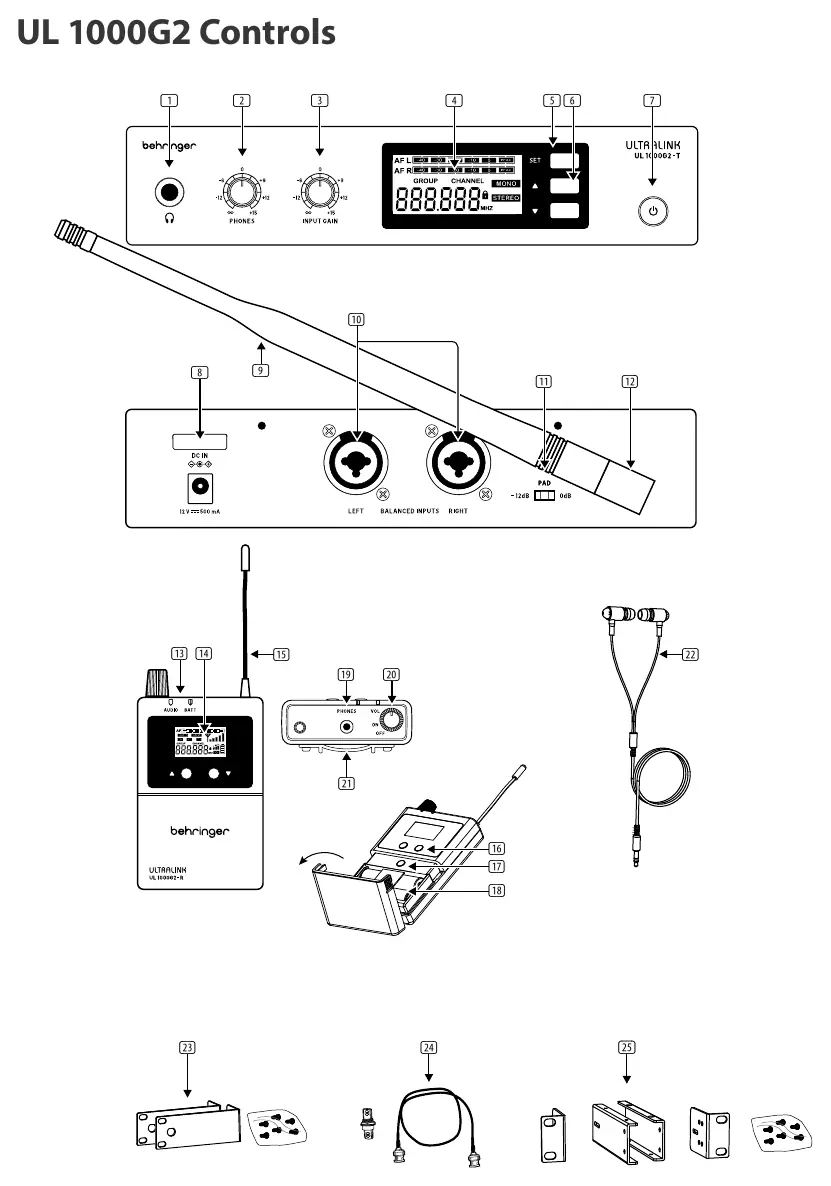
- Power ON/OFF: Turns the unit on or off.
- SET: Used to select menu items.
- MENU UP/DOWN: Used to navigate menus.
- INPUT GAIN (Transmitter): Adjusts audio input levels.
- VOLUME (Receiver): Adjusts headphone volume and turns the receiver off.
- PAD (Transmitter): Attenuates input signals by 0 dB or -12 dB.
System Configuration
Frequency and Channel Selection
To select a frequency group and channel:
- Press the SET button until GROUP flashes on the display.
- Use the UP/DOWN buttons to select the desired frequency group.
- Press SET repeatedly until CHANNEL flashes.
- Use the UP/DOWN buttons to select the desired channel.
Note: For simultaneous operation of multiple systems, ensure each system uses a different channel within the same frequency group. It is recommended not to use more than 12 sets in close proximity.
Operating Modes
The transmitter supports MONO and STEREO modes. In MONO mode, only the audio from the LEFT INPUT is transmitted.
Locking the System
To prevent accidental changes, the system can be locked:
- Press SET until the LOCK icon flashes.
- Select LOCK ON or LOCK OFF.
- Note: LOCK ON is enabled automatically after 5 seconds of inactivity. To disable, press and hold SET for 2 seconds.
Rack Mounting
The UL 1000G2 includes kits for rack mounting:
- Rack Mount Kit: For mounting a single transmitter.
- Rack Mount Kit 2: For mounting two transmitters side-by-side.
- Antenna Kit: Allows front-mounting of the antenna when using the rack mount kit.
Technical Specifications
- RF Frequency Range: 584-608MHz / 823-832 MHz / 863-865 MHz
- Working Distance: Up to 60 m (200 ft)
- Audio Inputs: Balanced XLR / 1/4 inch TS combination
- Limiter: Limits audio signal to 400mV to protect hearing
- Receiver Battery: 2 x 1.5 VDC (AA)
Manufacturer information
Behringer
Practical help
Common problems
No audio in receiver
Check if the transmitter is in MONO mode; in this mode, only the LEFT INPUT is transmitted.
Interference or signal dropouts
Ensure antennas do not touch or cross. Keep the transmitter away from metal objects and digital devices.
Buttons are unresponsive
The system is likely locked. Press and hold the SET button for 2 seconds to disable the LOCK function.
Before use
- Position transmitter at least 1 meter high.
- Ensure direct line of sight between transmitter and receiver.
- Check battery levels (4 bars on receiver).
- Ensure the same frequency group and channel are selected on both units.
- Ensure audio source is connected to the correct inputs.
Specs in practice
- RF Frequency range
- The operating frequency bands (584-608MHz, 823-832 MHz, 863-865 MHz).
- Working distance
- Maximum effective range of up to 60 meters (200 feet).
Images and diagrams
- Transmitter controls: Power, Input Gain, Pad switch, and LCD menu.
- Receiver controls: Volume, Squelch, and Battery compartment.
Model compatibility
- Recommended to use no more than 12 sets in close proximity to avoid interference.

Manual page author
Michael Turner
Technical manual editor
Reviews PDF manuals for structure, safety notes, and practical product details so readers can find the right information quickly.