Electronics / Audio
User Guide for Eventide TriceraChorus Plug-in
A comprehensive user guide for the Eventide TriceraChorus plug-in. Learn how to configure chorus and detune parameters, use performance controls like the Ribbon and Hotswitch, manage presets, and integrate MIDI functionality.
Table of contents
Quick guide from the manual
The Eventide TriceraChorus is a chorus and detuning effect plug-in inspired by classic tri-choruses and stompboxes from the 1970s and 1980s. It combines BBD-style tri-chorusing with Eventide MicroPitch detuning. The plug-in features a three-phase LFO to modulate delay times for Left, Center, and Right voices, creating lush chorus sounds.
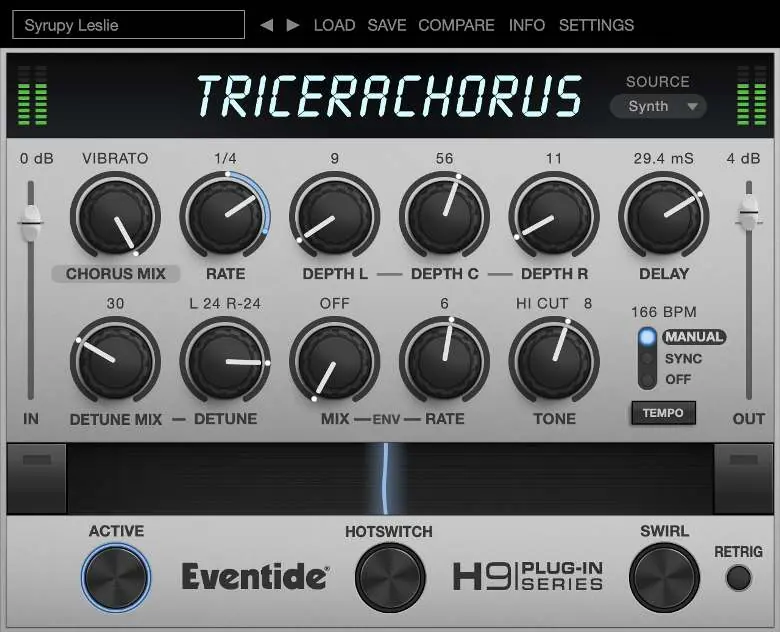
Levels and Monitoring
The plug-in provides precise control over signal levels:
- In: Controls the input level from -60 dBfs to +12 dBfs for both wet and dry signals.
- Out: Controls the output level from -60 dBfs to +12 dBfs after the mix control.
- Meters: Display audio levels before and after the algorithm to assist with gain staging.
TriceraChorus Parameters
The plug-in offers several parameters to shape the sound:
- Source: Optimizes algorithms for specific instruments (General, Synth, Bass, Guitar).
- Chorus/Chorale Mode: Toggles between standard Chorus Mode and the richer, rackmount-inspired Chorale Mode.
- Chorus/Chorale Mix: Adjusts the dry/wet balance. At 100%, the effect becomes vibrato.
- Rate: Sets the base frequency of the chorus modulation (0.1 to 20 Hz) or syncs to tempo.
- Depth L/C/R: Controls modulation depth for individual voices. Setting a depth to OFF removes that voice from the mix.
- Delay: Sets the delay range (0.39 ms to 200 ms). In Chorale Mode, this interacts with the Depth settings.
- Detune: Controls pitch shift (+/- 40 cents) for left and right channels.
- Envelope Mix/Rate: Uses the input signal's amplitude to modulate the mix levels or LFO speed.
- Tone: Shapes the high or low end of the wet signal path (HICUT or LOCUT).
Performance Controls
Advanced controls allow for dynamic manipulation:
- Ribbon: Allows you to program two settings for any combination of knobs and morph between them. It can also follow MIDI CC #1 (Modulation Wheel).
- Active: Toggles the effect on or off (MIDI CC #2).
- Hotswitch: Toggles between two different sound settings (MIDI CC #3).
- Swirl: Adds a stereo frequency shifter after the detune section for an intense throbbing effect (MIDI CC #4).
- Retrigger: Resets the tremolo and secondary modulation LFOs to the beginning of their cycles.
Preset Bar
The Preset Bar at the top of the interface allows for:
- Load and Save: Manage presets with the .tide extension. It is recommended to save presets in the default Eventide folder for accessibility.
- Compare: Toggle between current settings and the last saved/loaded preset.
- Settings: Access scaling options to change the overall size of the plug-in.
Practical help
Common problems
The modulation rate sounds different than the Rate knob setting.
Check the Env Rate control; if it is active, it may be modulating the LFO speed. Set Env Rate to OFF to hear the raw Rate knob value.
Chorus effect is too subtle or too intense.
Adjust the Chorus/Chorale Mix knob. Values near 50% provide a typical blend, while 100% results in a vibrato effect.
Stereo image feels unbalanced.
Ensure the Chorus/Chorale Mix is not at 50% if you are using specific voice configurations, as the plug-in automatically adjusts spatial positioning.
Before use
- Register the product online to receive software updates.
- Ensure your DAW supports the plug-in format.
- Check input levels using the IN control (-60 to +12 dBfs).
- Verify that the Source setting matches your input instrument (General, Synth, Bass, or Guitar).
Specs in practice
- Envelope Mix
- Modulates mix levels based on input amplitude (Range: OFF, -100 to 100).
Images and diagrams
- The interface features large knobs for parameter control, a Ribbon for morphing between settings, and a Preset Bar at the top.
Model compatibility
- Presets are saved with a .tide extension.
- Supports MIDI Continuous Control (CC) for Ribbon (CC #1), Active (CC #2), Hotswitch (CC #3), and Swirl (CC #4).

Manual page author
Emily Carter
User documentation editor
Prepares concise manual descriptions and highlights the most useful setup, operation, and maintenance information for readers.