Electronics / Audio
User Manual for Behringer FCV100 Foot Pedal
Quick start guide and user manual for the Behringer FCV100 foot pedal. Learn how to use NORM and CV modes, connect instruments, adjust volume, and power the device.
Table of contents
Manual images
Click an image to enlargeQuick Guide from the Manual
The Behringer FCV100 is an ultra-flexible dual-mode foot pedal designed for volume and modulation control. It can be used to control the volume of two individual instruments (NORM mode) or as a CV (Control Voltage) controller for other instruments (CV mode).
Operating Modes
NORM Mode: In this mode, the FCV100 acts as a volume controller for two separate instruments. Signals from INPUT 1/2 are routed to OUTPUT 1/2. You can control the volume level in both channels simultaneously using the pedal.
CV Mode: In this mode, the FCV100 controls modulation and volume levels of other musical instruments. Connect OUTPUT 2 to the volume or modulation input of the target instrument. When OUTPUT 2 is in use, INPUT/OUTPUT 1 can still be used to control the volume of another instrument, similar to NORM mode.
Controls and Connections
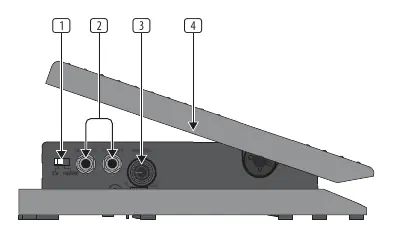
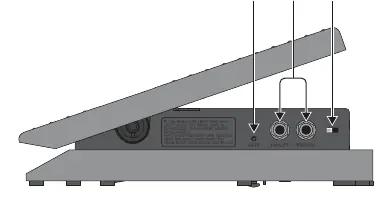
- INPUT 1/2: Connect your instruments here.
- OUTPUT 1/2: Connect to your amplifiers or other instruments.
- MIN VOL: Turning this control clockwise increases the volume at the minimum pedal position, allowing you to set the volume range.
- POLARITY Switch: Selects between TRS (tip-ring-sleeve) or RTS (ring-tip-sleeve) operation for the EXP jack to ensure compatibility with a wide range of products.
Power Supply
The FCV100 can be powered by a 12V DC power adapter or a 9V battery (Type 6LR91). If both are connected, the unit will prioritize the power adapter to save battery life. If the battery LED indicator dims or fails to light, replace the battery.
Specifications
- Input/Output Type: 2 x 1/4" TS, unbalanced
- Input Impedance: 300 kΩ
- Attenuation Range: 0 - 70 dB
- Power Consumption: 7 mA
- Dimensions: 113 x 117 x 248 mm
- Weight: 1.15 kg
Manufacturer information
Behringer
Practical help
Common problems
Battery LED indicator is dim or not lit.
The battery is likely depleted. Replace the 9V battery (Type 6LR91).
No control signal in CV mode.
Ensure you are using OUTPUT 2 for the control signal, as INPUT 2 is disabled in CV mode.
Before use
- Determine if you need NORM mode (volume control) or CV mode (modulation/remote control).
- Ensure you have a 12V DC power adapter or a fresh 9V battery.
- Verify your instrument cables are standard 1/4" TRS plugs.
- Set the POLARITY switch on the rear panel to match your equipment (TRS or RTS).
Specs in practice
- Input Impedance (300 kΩ)
- Standard impedance for instrument-level signals to ensure signal integrity.
- Attenuation Range (0 - 70 dB)
- The range of volume reduction the pedal can achieve, from full volume to complete silence.
- Power Consumption (7 mA)
- Very low power draw, ensuring long battery life.
Images and diagrams
- The diagram on page 8 illustrates the side and rear panels of the FCV100.
- Labels 1-4 identify the input/output jacks and the MIN VOL control knob.
- Labels 5-8 identify the battery indicator, power input, and polarity switch.
Model compatibility
- Compatible with 12V DC power adapters.
- Supports 9V battery (Type 6LR91) operation.
- The POLARITY switch allows compatibility with both TRS and RTS expression pedal standards.

Manual page author
David Miller
Documentation analyst
Organizes user manual content into clear summaries, with attention to model details, product context, and everyday usability.