Electronics / Audio
User Manual for Behringer FCV100 Foot Controller
Quick start guide and user manual for the Behringer FCV100 Foot Controller. Learn how to use NORM and CV modes, connect instruments, and manage power settings.
Table of contents
Quick guide from the manual
The Behringer FCV100 is an ultra-flexible dual-mode foot pedal designed for volume and modulation control. This guide provides essential information on operating the device in its two primary modes: NORM and CV.
Device Controls
The FCV100 features several key controls and connection points:
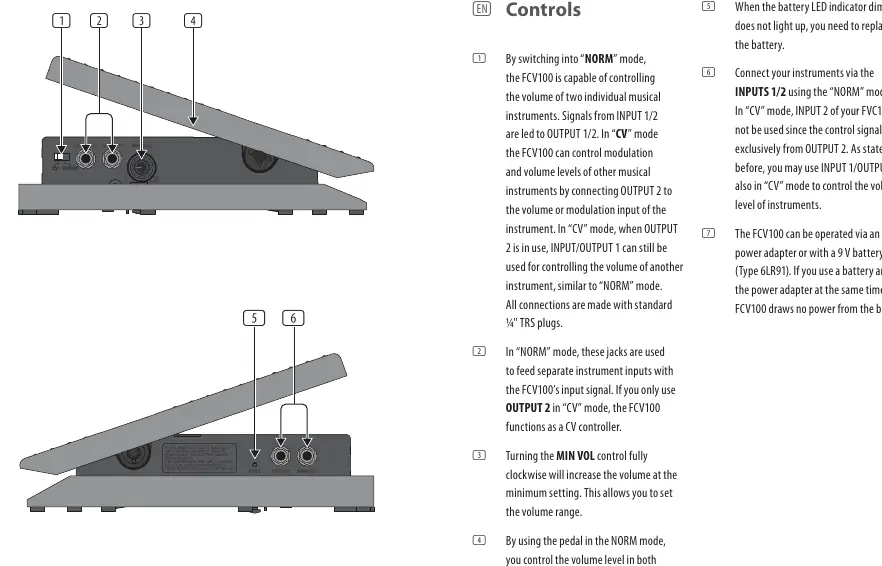
- NORM/CV Switch: Toggles between the two operating modes.
- INPUT 1/2: Used for connecting your instruments.
- OUTPUT 1/2: Used for sending signals to your instruments or amplifiers.
- MIN VOL Control: Adjusts the minimum volume level when the pedal is in the closed position, allowing you to set the volume range.
- Battery LED Indicator: Indicates the status of the 9V battery. If it dims or does not light up, the battery needs replacement.
Operating Modes
NORM Mode
In NORM mode, the FCV100 acts as a volume controller for two individual musical instruments. Signals from INPUT 1/2 are routed to OUTPUT 1/2. The pedal controls the volume level in both channels simultaneously.
CV Mode
In CV (Control Voltage) mode, the FCV100 can control modulation and volume levels of other musical instruments. Connect OUTPUT 2 to the volume or modulation input of the target instrument. When OUTPUT 2 is in use, INPUT/OUTPUT 1 can still be used to control the volume of another instrument, similar to NORM mode.
Power Supply
The FCV100 can be powered in two ways:
- 12V DC Power Adapter: Recommended for continuous use.
- 9V Battery (Type 6LR91): Provides portability.
Note: If both a battery and a power adapter are connected simultaneously, the FCV100 will draw power from the adapter, preserving the battery.
Safety Instructions
- Do not open the device; there are no user-serviceable parts inside.
- Keep the device away from water, moisture, and heat sources.
- Use only high-quality professional speaker cables with 1/4 inch TS or twist-locking plugs.
- Ensure the device is connected to a mains socket with a protective earthing connection.
- Dispose of the product and batteries according to local environmental regulations.
Manufacturer information
Behringer
Practical help
Common problems
Battery LED indicator is dim or not lit
The 9V battery is depleted and needs to be replaced.
No control signal in CV mode
Ensure you are using OUTPUT 2 for the control signal, as INPUT 2 cannot be used in CV mode.
Before use
- Ensure you have a 12V DC power adapter or a fresh 9V battery (Type 6LR91).
- Verify you have standard 1/4 inch TRS cables for all connections.
- Set the NORM/CV switch to the desired operating mode before connecting instruments.
- Check that the MIN VOL control is set to your preferred volume range.
Specs in practice
- Input Impedance
- 300 kΩ - Determines how the pedal interacts with instrument signals.
- Attenuation range
- 0 - 70 dB - The range of volume reduction available.
- Power consumption
- 7 mA - Low power usage, suitable for battery operation.
Images and diagrams
- The controls diagram illustrates the NORM/CV switch, INPUT/OUTPUT jacks, and the MIN VOL knob.
- The diagram also highlights the battery compartment and LED indicator location.
Model compatibility
- Compatible with 12V DC power adapters.
- Uses 9V battery (Type 6LR91).

Manual page author
Michael Turner
Technical manual editor
Reviews PDF manuals for structure, safety notes, and practical product details so readers can find the right information quickly.