Electronics / Headphones Earbuds
User Manual for Behringer HC 2000B Wireless Headphones
Quick start guide and user manual for the Behringer HC 2000B wireless headphones. Learn how to pair via Bluetooth, charge the battery, use the AUX input, and troubleshoot common issues.
Quick answers from the manual
Quick answer
- The Behringer HC 2000B is a wireless headphone set with Bluetooth connectivity. It features a built-in microphone for calls, an AUX input for wired use, and is charged via Micro USB. p. 1
Key actions
- Pairing via Bluetooth p. 4
- Charging the battery p. 4
First start
- Charge the built-in battery for at least four hours before using the device for the first time. p. 4
Problems and fixes
No power
Long press to turn ON the unit; make sure the battery is charged.
p. 4
Bluetooth device cannot pair or connect
Activate Bluetooth on your device; disconnect from other paired devices.
p. 4Technical specifications
| Parameter | Value | Meaning | Pages |
|---|---|---|---|
| Battery | 3.7 V 185 mAh | Lithium-polymer battery | p. 13 |
| Bluetooth Version | 5.0 | Bluetooth connectivity | p. 13 |
Where to find it in the PDF
- Controls Diagram p. 1
- Getting Started p. 4
Table of contents
Quick Guide
The Behringer HC 2000B are studio-quality wireless headphones with Bluetooth connectivity. This guide provides instructions for charging, pairing, and operating the device.
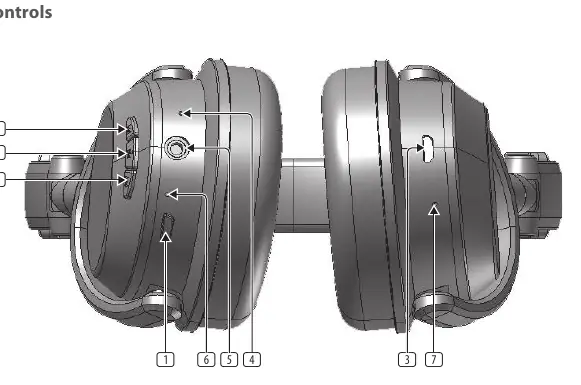
Getting Started
The unit is powered by a built-in lithium-polymer rechargeable battery. Charge the battery for at least four hours before using the device for the first time.
- Connect the smaller end of the supplied USB cable to the MICRO USB jack on the headphones.
- Connect the other end to a powered USB jack on your computer or an AC power supply (not included).
- The CHARGE LED will turn red during charging and blue when fully charged.
Turning the Unit On/Off
- Power On: Long press the POWER button. The BLUETOOTH LED will light up.
- Power Off: Long press the POWER button again. The BLUETOOTH LED will turn off.
Bluetooth Pairing
- Turn the unit on by long-pressing the POWER button. The BLUETOOTH LED will blink blue and red alternately, indicating pairing mode.
- Enable Bluetooth on your audio device and select "HC 2000B" from the device list.
- If prompted for a passcode, enter "0000".
- Once paired, you will hear an indication sound.
Note: If pairing is not successful within 10 minutes, the headphones will turn off automatically. To connect to a different device, disconnect the current device first.
Using Bluetooth
- Play/Pause: Press the PLAY/PAUSE button.
- Volume Adjustment: Short press the FORWARD/VOLUME or BACK/VOLUME buttons.
- Track Selection: Long press the FORWARD/VOLUME or BACK/VOLUME buttons.
Receiving Phone Calls
- Answer Call: Press the FORWARD button.
- End Call: Press the FORWARD button again.
- Reject Call: Press and hold the BACK button.
- Transfer Audio: Press and hold the PLAY/PAUSE button during a call to switch between headphones and mobile phone.
Using the AUX IN Jack
The headphones can be used as wired headphones via the 3.5 mm AUX IN jack.
- Insert one end of an audio cable into the LINE OUT or headphone jack of your external device.
- Connect the other end to the AUX IN jack on the headphones.
- The headphones will automatically turn off (if in ON mode) and function as normal wired headphones.
Troubleshooting
- No Power: Ensure the battery is charged and the unit is turned on.
- Pairing Issues: Ensure Bluetooth is enabled on your source device. If the headphones are already paired with another device, disconnect that device first.
Safety Information
- Do not use the apparatus near water.
- Clean only with a dry cloth.
- Do not expose the product to fire or excessive heat (e.g., direct sunlight).
- Do not disassemble or modify the product.
- To prevent hearing damage, do not listen at high volume levels for long periods.
Manufacturer information
Behringer
Practical help
Common problems
No power
Ensure the battery is charged and the unit is turned on by long-pressing the power button.
Bluetooth device cannot pair or connect
Ensure Bluetooth is activated on your device. If the headphones are already paired with another device, disconnect that device first.
Before use
- Charge the battery for at least 4 hours before first use.
- Ensure the headphones are within range of the Bluetooth source.
- Check that the battery is not low (indicated by a beep every 20 seconds).
Specs in practice
- Charging time
- Approximately 2-3 hours.
- Operating time
- Up to 7 hours after fully charged.
- Bluetooth Version
- Version 5.0.
- Working distance
- Up to 10 meters in open space.
Images and diagrams
- 1: POWER button
- 2: PLAY/PAUSE button
- 3: MICRO USB charging jack
- 4: MICROPHONE
- 5: AUX IN stereo jack
Model compatibility
- Compatible with Bluetooth-enabled mobile phones and audio devices.
- Supports wired connection via 3.5mm stereo cable.

Manual page author
David Miller
Documentation analyst
Organizes user manual content into clear summaries, with attention to model details, product context, and everyday usability.