Electronics / PA Systems
User Manual for Behringer EUROPORT PPA2000BT/PPA500BT Portable PA System
Quick start guide and user manual for the Behringer EUROPORT PPA2000BT and PPA500BT portable PA systems. Includes setup, connection, control, and troubleshooting instructions.
Quick answers from the manual
Quick answer
- The EUROPORT PPA2000BT/PPA500BT is a portable PA system featuring a mixer, amplifier, and speakers. It includes Bluetooth connectivity, a KLARK TEKNIK multi-FX processor, and FBQ feedback detection. p. 1
Key actions
- Release the top and side latches to access the mixer and speakers. p. 10
- Connect speakers using the included speaker cables. p. 10
Where to find it in the PDF
- Quick Start Guide p. 1
- Safety Instructions p. 2, 3, 4
- Controls p. 12, 14
Table of contents
Manual images
Click an image to enlargeQuick guide from the manual
This document provides essential instructions for setting up and operating the Behringer EUROPORT PPA2000BT and PPA500BT portable PA systems. It covers physical setup, audio connections, control adjustments, and troubleshooting common issues like feedback and clipping.
Safety instructions
- Do not remove the top cover or rear section; no user-serviceable parts inside.
- Do not expose the apparatus to rain or moisture.
- Use only high-quality professional speaker cables with 1/4" TS or twist-locking plugs.
- Ensure the apparatus is connected to a mains socket with a protective earthing connection.
- Do not block ventilation openings or install near heat sources.
System setup
To set up the system:
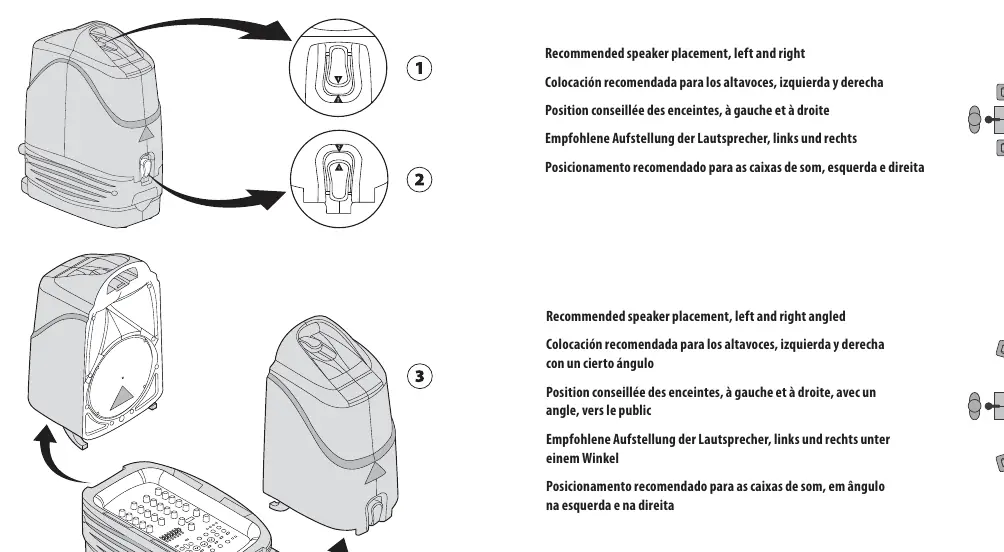

- Release the top latch beneath the carrying handle.
- Release the side latches by pressing and lifting them.
- Remove the speakers and place them in appropriate locations.
- Stand the mixer upright, ensuring the included speaker cables can reach both speakers.
Hook-up
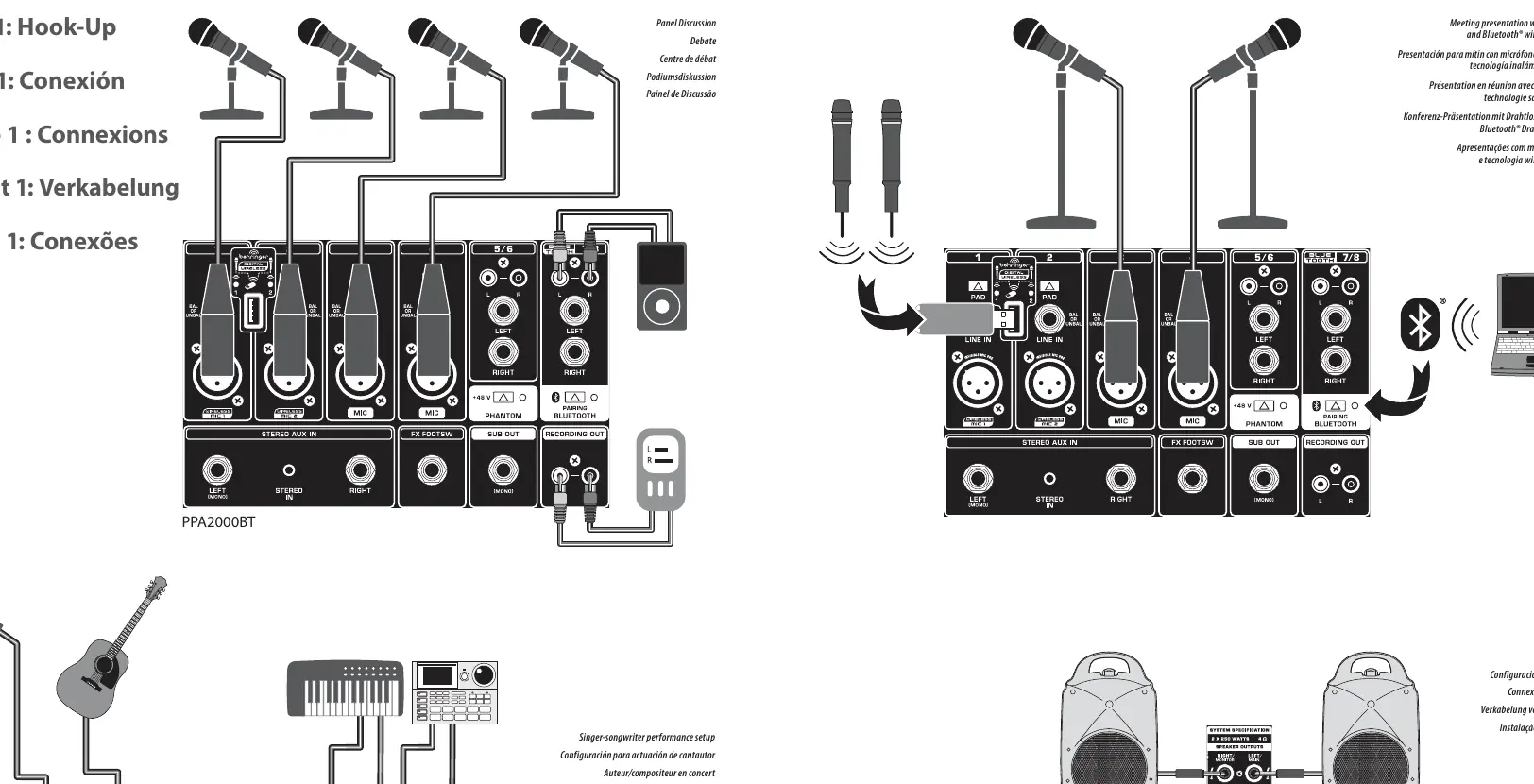
Connect your audio sources (microphones, instruments, CD players) to the appropriate inputs on the mixer. Use the provided speaker cables to connect the mixer's rear SPEAKER OUTPUTS to the speakers. Do not use instrument cables for speaker connections.
Controls
The mixer features channel strips with:
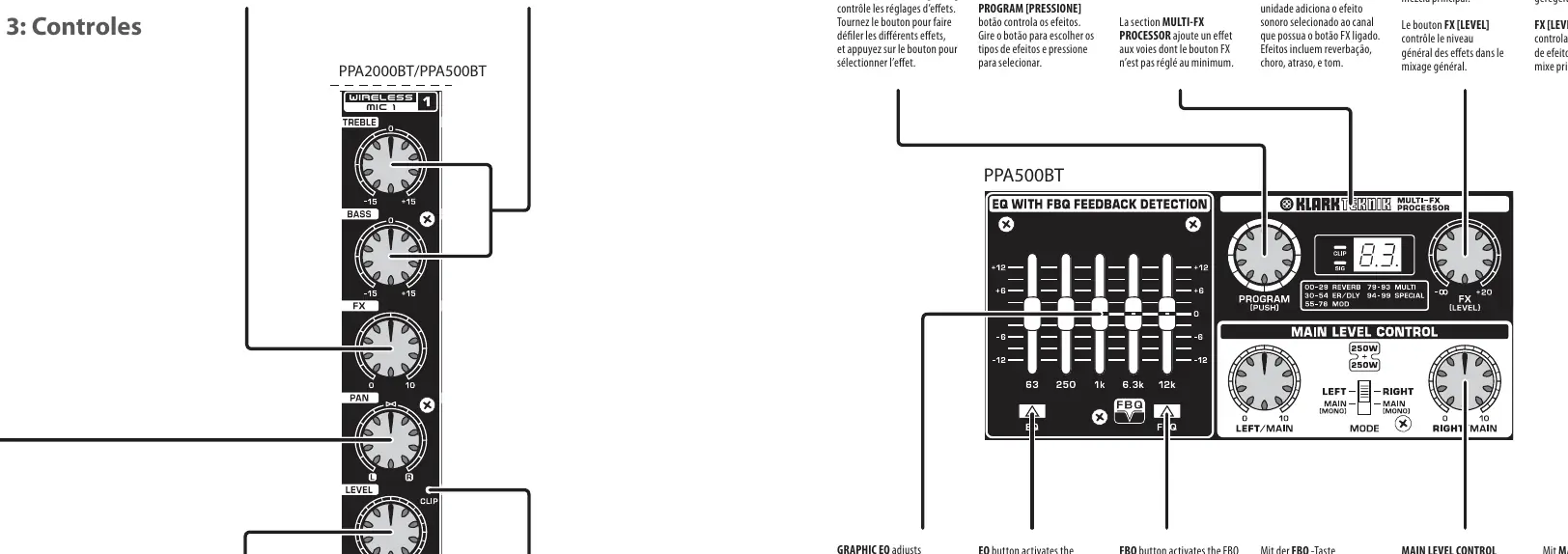
- EQ Knobs: Boost or cut low/high frequencies by 15 dB.
- FX Knob: Determines the amount of channel signal sent to the effects processor.
- PAN Knob: Positions the channel in the stereo field.
- LEVEL Knob: Adjusts the volume of the individual channel.
- CLIP LED: Lights up when the input signal overloads the channel.
Getting started
- Set all channel controls to neutral (TREBLE, BASS, PAN centered; FX and LEVEL fully counter-clockwise).
- Center the GRAPHIC EQ faders.
- Set the MAIN LEVEL CONTROL knobs to minimum.
- Power up external devices, then power up the PPA unit.
- Slowly turn the MAIN LEVEL CONTROL knobs up to 1/3.
- Adjust relative levels of microphones and instruments using the channel LEVEL knobs.
- If a channel's CLIP LED lights, press the PAD button or turn the LEVEL knob down.
Adding effects
To add effects:
- Set the FX [LEVEL] knob on the MULTI-FX PROCESSOR to approximately 75%.
- Scroll through effects using the PROGRAM [PUSH] knob.
- Press the PROGRAM [PUSH] knob to select the effect.
- Turn the channel FX knob clockwise to add the desired amount of effect to that channel.
Feedback detection
If feedback occurs:
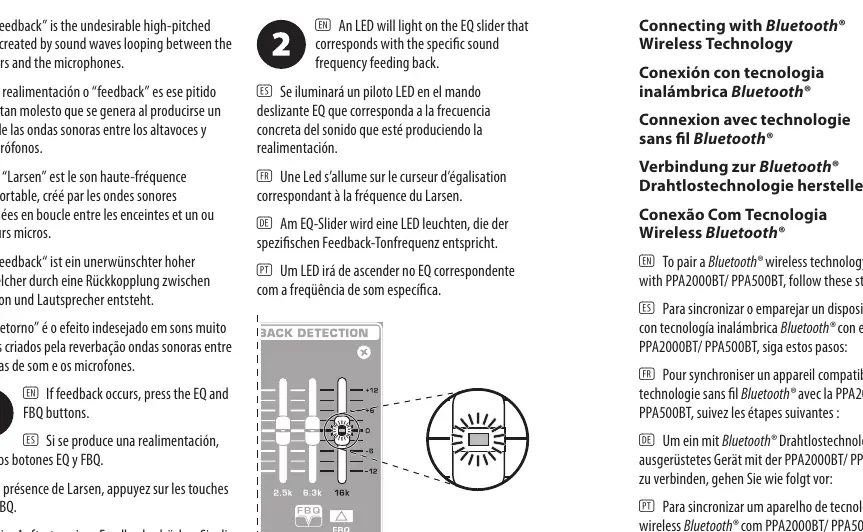
- Press the EQ and FBQ buttons.
- An LED will light on the EQ slider corresponding to the feedback frequency.
- Lower the lit EQ slider until the feedback stops.
Bluetooth pairing
- Press and hold the BLUETOOTH PAIRING button until the LED flashes quickly.
- Activate Bluetooth on your device and connect to the unit.
- Enter PIN code 0000 if prompted.
- When the LED lights solid, the unit is paired.
Manufacturer information
Behringer
Practical help
Common problems
Feedback (high-pitched squeal)
Press the EQ and FBQ buttons, then lower the EQ slider that lights up.
Channel signal is clipping (CLIP LED lights)
Press the PAD button for that channel. If already engaged, turn the LEVEL knob down.
Bluetooth pairing fails
Ensure the unit is in pairing mode (LED flashing quickly) and enter PIN 0000 if required.
Before use
- Release top and side latches to remove speakers.
- Ensure speaker cables are connected to rear SPEAKER OUTPUTS.
- Do not use instrument cables for speaker connections.
- Set all channel controls to neutral/centered before powering on.
- Check that mains voltage matches the unit's requirements.
Specs in practice
- FBQ Feedback Detection
- System to identify and eliminate feedback frequencies.
- Bluetooth 3.0
- Wireless connectivity for audio streaming.
Images and diagrams
- The hook-up diagram shows connections for microphones, instruments, and speakers.
- The set-up diagram illustrates how to release the latches to access the mixer and speakers.
- The control panel diagram identifies all knobs and buttons for channel and master control.
Model compatibility
- Supports BEHRINGER ULM wireless microphones via USB.
- Bluetooth version 2.0 and above does not require a PIN code.
- PPA500BT does not include roller wheels.

Manual page author
David Miller
Documentation analyst
Organizes user manual content into clear summaries, with attention to model details, product context, and everyday usability.