Electronics / Audio Mixers
User Guide for Behringer Pro Mixer Series VMX1000USB/VMX300USB/VMX200USB/VMX100USB
Quick start guide for Behringer Pro Mixer Series (VMX1000USB, VMX300USB, VMX200USB, VMX100USB). Includes setup, connection diagrams, control explanations, and technical specifications.
Quick answers from the manual
Quick answer
- The Behringer Pro Mixer Series (VMX1000USB/VMX300USB/VMX200USB/VMX100USB) are professional DJ mixers with USB/Audio interfaces. This guide covers setup, connection, and operation. p. 1
Key actions
- Connecting devices p. 13
- Powering on p. 13
- Adjusting levels p. 13
First start
- Ensure all devices are off, make connections, turn on mixer with volume down, then turn on audio sources. p. 13
Problems and fixes
Audio distortion
Lower the GAIN knob.
p. 13Technical specifications
| Parameter | Value | Meaning | Pages |
|---|---|---|---|
| Sample rate | 48 kHz | USB audio sample rate | p. 15 |
| Converter | 16-bit | USB audio bit depth | p. 15 |
Where to find it in the PDF
- Safety Instructions p. 2, 3, 4, 5
- Hook-up Diagrams p. 7, 8
- Controls p. 9, 10, 11, 12
- Getting Started p. 13, 14
- Specifications p. 15
Table of contents
Manual images
Click an image to enlargeQuick guide from the manual
This guide provides essential instructions for setting up and operating the Behringer Pro Mixer Series (VMX1000USB, VMX300USB, VMX200USB, VMX100USB). Always ensure all devices are powered off before making connections to prevent damage.
Getting started
- Connections: Make all appropriate power, audio, USB, and speaker connections to the mixer while all devices are powered off.
- Powering on: With the MAIN OUT knob(s) turned all the way down, switch the mixer on.
- Audio sources: Turn on your audio sources and begin playing audio into the mixer.
- Level adjustment: Raise the MAIN OUT and PFL/PHONES knobs to the desired level.
- Gain staging: Raise the GAIN knob on each channel receiving a signal. If the red clip LED lights up on any channel meter, lower the GAIN knob.
Controls overview
The mixer features various controls for shaping sound and managing the mix:
- GAIN: Adjusts the input signal level for each channel.
- EQ knobs: Adjust high, mid (VMX300/VMX1000), and low frequencies by -32 dB to +12 dB.
- TALK: Adjusts the volume reduction of music when speaking into the microphone.
- PFL (Pre-Fader Listen): Allows monitoring of specific channels in headphones.
- CROSSFADER: Fades between sound sources. Use the CURVE knob to determine the slope of the crossfade.
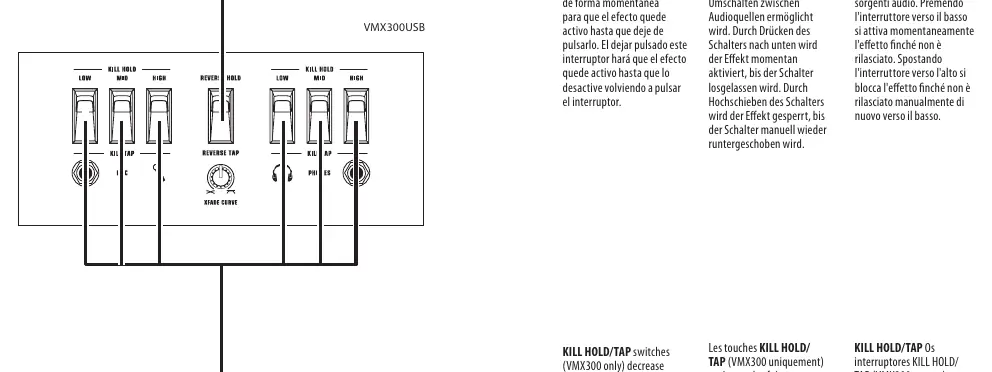
- KILL HOLD/TAP (VMX300 only): Switches that decrease high, mid, and low frequencies by 32 dB.
- REVERSE HOLD/TAP: Inverts the direction of the crossfader for rapid switching.
Hook-up
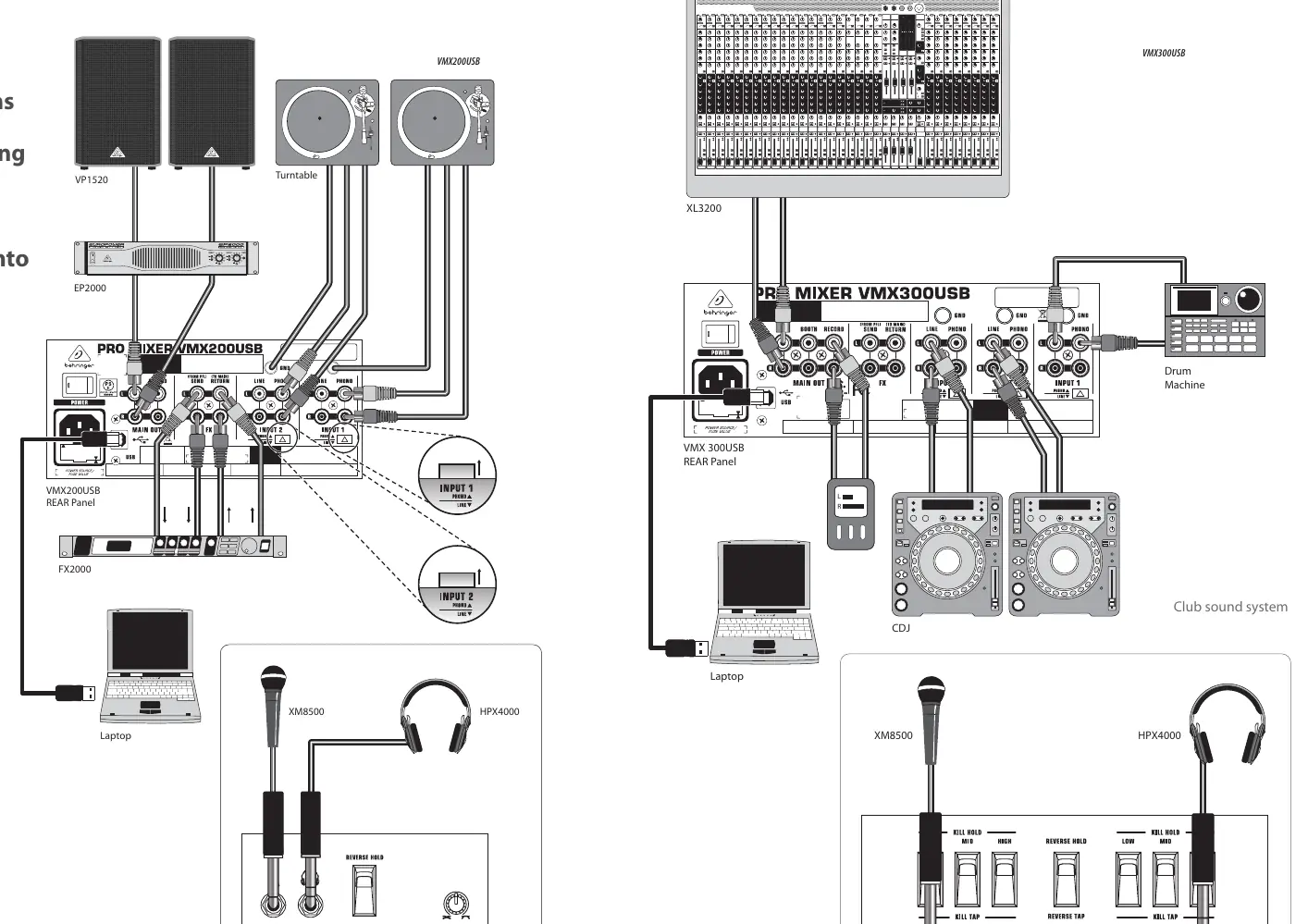
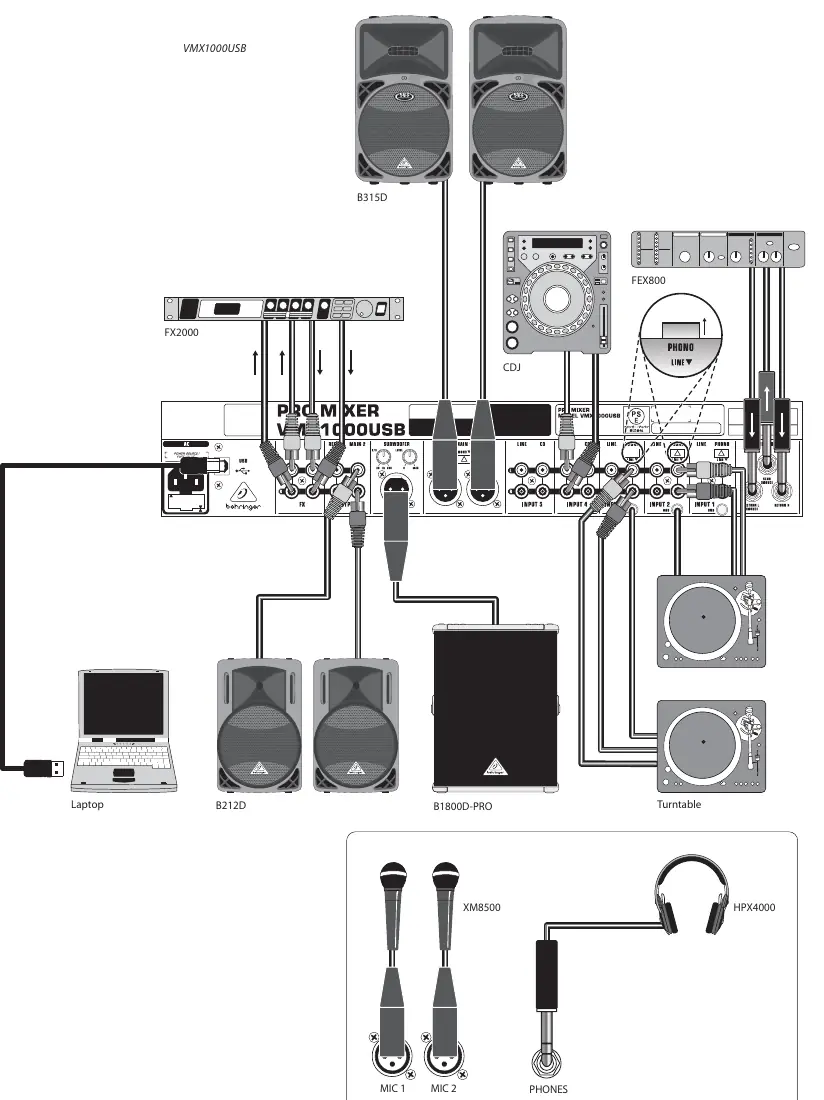
The mixer supports various inputs including turntables, CDJs, laptops, and microphones. Ensure you use high-quality professional cables (e.g., 1/4" TS or twist-locking plugs) for speaker connections. Refer to the hook-up diagrams in the manual for specific routing configurations for your model.
Technical specifications
The mixer series includes a USB/Audio interface (16-bit, 48 kHz). Detailed specifications for inputs, outputs, and equalizer ranges are provided in the technical data section of the manual. Always verify that the mains voltage matches your local power supply before connecting the unit.
Safety
Do not remove the top cover or rear section as there are no user-serviceable parts inside. Refer all servicing to qualified personnel. Do not expose the apparatus to rain or moisture. Ensure proper ventilation and do not install near heat sources.
Manufacturer information
Behringer
Practical help
Common problems
Audio distortion
Lower the GAIN knob on the channel receiving the signal.
Tempo display jumping rapidly
Press the SYNC LOCK button to stabilize the tempo display.
Clip LED is lit
Reduce the GAIN knob on the corresponding channel.
Before use
- Ensure all devices are powered off before making connections.
- Check that the mains voltage matches your local power supply.
- Ensure the mixer is placed on a stable surface.
- Verify all cables (audio, USB, power) are high-quality.
- Check that ventilation openings are not blocked.
Specs in practice
- Kill Low/Mid/High
- Frequency attenuation (up to -54 dB) for specific frequency bands (VMX300 only).
Images and diagrams
- Hook-up diagrams show connections for turntables, CDJs, laptops, microphones, and sound systems.
- Front panel diagrams illustrate the layout of EQ, Gain, and Fader controls.
- Rear panel diagrams show power and I/O ports.
Model compatibility
- USB interface is compatible with standard audio software.
- Requires standard IEC power cable.

Manual page author
Emily Carter
User documentation editor
Prepares concise manual descriptions and highlights the most useful setup, operation, and maintenance information for readers.