Electronics / Studio Monitors
User Manual for Behringer TRUTH B2031A/B2030A Studio Monitor
Quick start guide and user manual for the Behringer TRUTH B2031A and B2030A active 2-way reference studio monitors. Includes control descriptions, technical specifications, and safety instructions.
Quick answers from the manual
Quick answer
- The Behringer TRUTH B2031A/B2030A are active 2-way reference studio monitors. This manual provides instructions on controls, safety, and technical specifications. p. 1
Key actions
- Powering on the unit p. 13
- Adjusting input sensitivity p. 13
First start
- Ensure the POWER switch is in the 'Off' position before connecting to the mains. p. 13
Problems and fixes
LIMIT LED is lit
One of the built-in protections is activated. Reduce the input signal level.
p. 13Technical specifications
| Parameter | Value | Meaning | Pages |
|---|---|---|---|
| RMS Power (B2031A) | 140 W | Continuous power output | p. 18 |
| RMS Power (B2030A) | 70 W | Continuous power output | p. 18 |
Where to find it in the PDF
- Safety Instructions p. 2, 3, 4, 5
- Controls p. 12, 13, 14, 15
- Specifications p. 18
Table of contents
Quick Start Guide
The Behringer TRUTH B2031A and B2030A are active 2-way reference studio monitors. This guide provides essential information for setup, operation, and maintenance. Always ensure the POWER switch is in the "Off" position before connecting the unit to the mains.
Controls Overview
The rear panel of the monitors features several controls to adapt the sound to your environment:
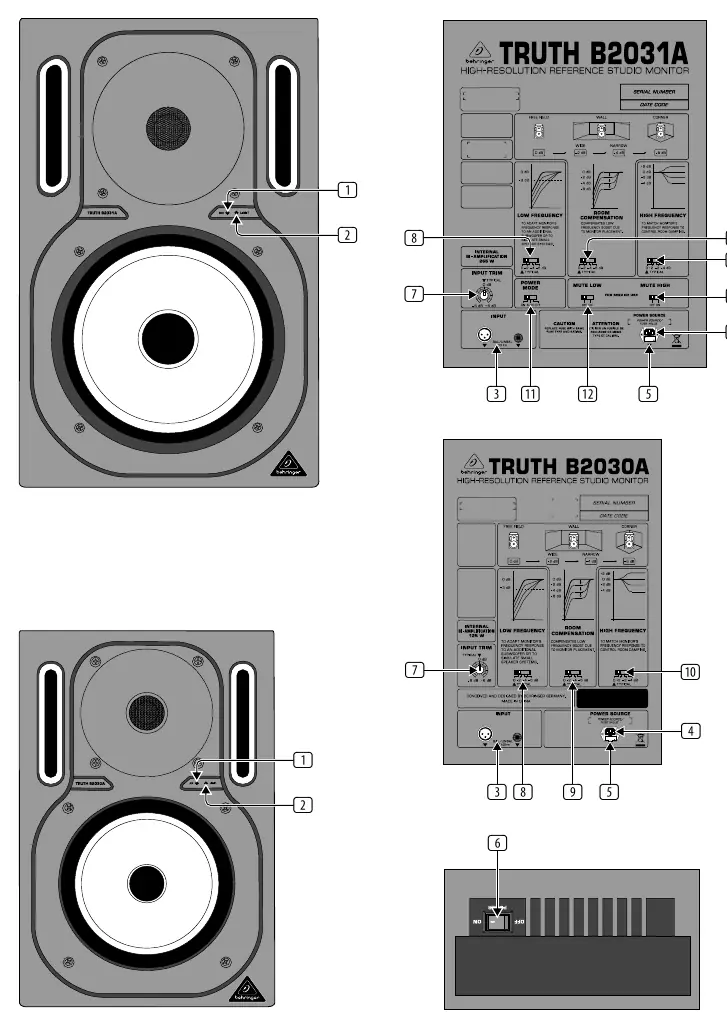
- ON: LED indicator showing the speaker is powered on.
- LIMIT: LED indicator that lights up when built-in protection is activated.
- INPUT: Balanced inputs using 1/4" TRS and XLR connectors.
- POWER: Main power switch.
- INPUT TRIM: Adjusts input sensitivity to match the signal source.
- LOW FREQUENCY: Adapts the woofer for subwoofer systems or emulates smaller speaker characteristics.
- ROOM COMPENSATION: Adjusts the speaker response based on its setup position.
- HIGH FREQUENCY: Adapts frequency response to the damping characteristics of the control room.
- POWER MODE: Toggles between "ON", "OFF", and "AUTO" power-up modes.
- MUTE LOW / MUTE HIGH: Disables the woofer or tweeter respectively for servicing and maintenance.
Technical Specifications
The monitors differ in power and component size:
- B2031A: 140W RMS power, 8 3/4" woofer, 1" tweeter.
- B2030A: 70W RMS power, 6 3/4" woofer, 3/4" tweeter.
- Crossover: Active, 4th order Linkwitz-Riley at 2 kHz.
- Frequency Response: 50 Hz to 21 kHz.
Safety and Maintenance
To ensure safe operation and longevity of your equipment:
- Do not remove the top cover or rear section; there are no user-serviceable parts inside.
- Do not expose the apparatus to rain or moisture.
- Ensure the mains connection is made via the standard IEC connector.
- If a fuse needs replacement, use only the same type and rating.
- Register your product online at musictribe.com to facilitate repair claims.
Official resources from the manual
Manufacturer information
Behringer
Practical help
Common problems
No sound output
Check that the POWER switch is ON, verify the input signal source, ensure cables are securely connected, and check the INPUT TRIM setting.
LIMIT LED is lit
The built-in protection circuit is activated. Reduce the input signal level to prevent distortion and damage.
Before use
- Ensure the mains voltage matches the requirement for your specific model.
- Set the POWER switch to 'Off' before connecting to the mains.
- Use high-quality professional speaker cables (1/4" TS or XLR).
- Ensure the unit is not installed in a confined space (e.g., bookshelf).
- Verify that the ventilation openings are not blocked.
Specs in practice
- Crossover Frequency
- The frequency point (2 kHz) where the audio signal is split between the woofer and the tweeter.
- Input Impedance
- 10 kΩ, indicating the load the input presents to the signal source.
Images and diagrams
- The rear panel contains the power input, fuse compartment, and various sound adjustment switches.
- The front panel features the ON and LIMIT status LEDs.
Model compatibility
- Compatible with standard IEC power cables.
- Inputs support balanced 1/4" TRS and XLR connectors.

Manual page author
Emily Carter
User documentation editor
Prepares concise manual descriptions and highlights the most useful setup, operation, and maintenance information for readers.