Furniture / Beds & Mattresses
Owner's Manual for Bestway AlwayzAire Air Mattress
Quick guide for the Bestway AlwayzAire air mattress. Learn how to inflate, deflate, use the built-in dual pump, understand light indicators, and perform basic maintenance.
Quick answers from the manual
Quick answer
- The Bestway AlwayzAire air mattress features a built-in dual pump for automatic inflation and deflation. It includes light indicators for pressure status and USB ports for charging. p. 1, 2
Key actions
- Inflate/Deflate p. 2
- Repair Puncture p. 3
First start
- Plug the pump into a wall socket, turn the knob to inflate, and wait for the green light to indicate optimal pressure. p. 2
Problems and fixes
Flashing green and blue lights
Check the air mattress to ensure the valve is tightened and there is no air leak.
p. 2Technical specifications
| Parameter | Value | Meaning | Pages |
|---|---|---|---|
| USB Output | 5V 1A | Output for USB-A and USB-C ports. | p. 2 |
| Max Motor Run Time | 5 minutes | Maximum continuous operation time for the pump. | p. 1 |
Where to find it in the PDF
- Safety and Warnings p. 1
- Pump Operation p. 2
- Maintenance and Storage p. 3
Table of contents
Manual images
Click an image to enlargeQuick Guide
The Bestway AlwayzAire air mattress features a built-in dual pump system designed for automatic inflation and deflation. The pump includes light indicators to monitor pressure and USB ports for charging devices. Ensure the mattress is placed on a flat surface and kept away from water, rain, and fire.
Safety Warnings
- Motor Usage: The motor is for short-time operation only. Do not exceed 5 minutes of continuous run time for inflation or deflation.
- Supervision: Children aged 8 and above may use the appliance under supervision. Do not allow children to play with the airbed or valve.
- Environment: Household use only. Not intended for commercial use. Keep away from fire and sharp objects.
- Electrical Safety: Do not expose the pump to water or rain to avoid electric shock.
Pump Operation
The pump is controlled via a knob and provides visual feedback through light indicators:
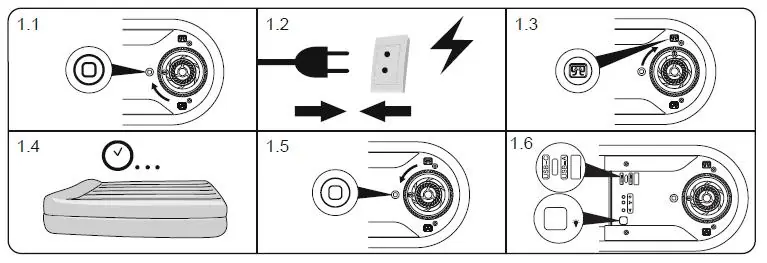
- Green Light (Steady): The air mattress has reached optimal air pressure. Turn the knob to the off position.
- Green Light (Flashing): The airbed is ready to be inflated.
- Blue Light (Steady): The secondary pump is active.
- Green and Blue Lights (Flashing): Alarm mode. This indicates the mattress cannot reach the designated pressure. Check that the valve is tightened and inspect for air leaks.
- USB Ports: USB-A and USB-C ports (5V 1A) are available for use when the pump is plugged into a wall socket.
Maintenance and Repair
If a puncture occurs, use the included repair patch:
- Clean the area around the puncture.
- Apply the repair patch.
- Press firmly on the patch for 30 seconds.
- Wait 30 minutes before inflating.
Storage
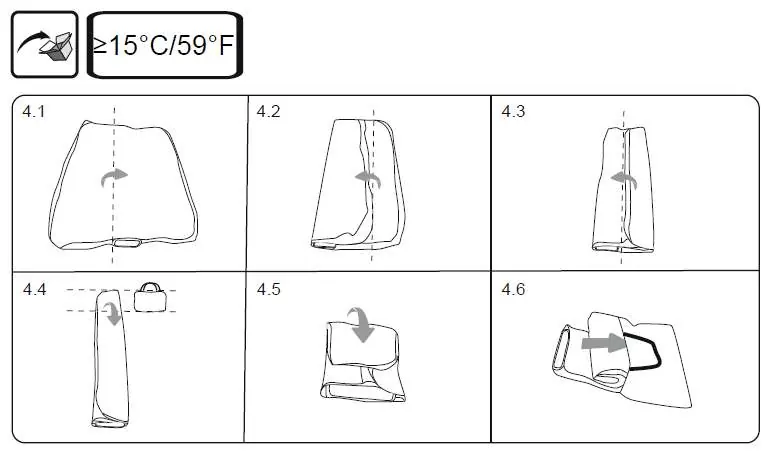
To store the air mattress, ensure it is clean and dry. Follow the folding sequence to fit the mattress into the provided storage bag. Keep the pump plugged in if you wish to utilize the dual pump's automatic maintenance features, or unplug for long-term storage.
Manufacturer information
Bestway
Practical help
Common problems
Flashing green and blue lights
This is an alarm indicating the mattress cannot reach the designated pressure. Check that the valve is tightened and inspect the mattress for air leaks.
Motor overheating
The motor is designed for short-time operation. Do not run the motor for more than 5 minutes at a time.
Before use
- Ensure the mattress is placed on a flat, level surface.
- Check that the valve is properly tightened before inflation.
- Verify the power source is compatible with the pump.
- Ensure the area is free of sharp objects that could puncture the bed.
Images and diagrams
- 1.1-1.6: Pump control knob positions and USB port usage.
- 4.1-4.6: Step-by-step folding instructions for storage.
Model compatibility
- Household use only.
- Not for commercial use.
- Keep away from water and rain.

Manual page author
David Miller
Documentation analyst
Organizes user manual content into clear summaries, with attention to model details, product context, and everyday usability.