Garden / Swimming Pools
User Manual for Bestway AlwayzAire Airbed 67624
Quick guide for the Bestway AlwayzAire Airbed 67624. Includes setup, inflation/deflation instructions, LED indicator meanings, maintenance, and repair steps.
Quick answers from the manual
Quick answer
- The Bestway 67624 is an airbed with a built-in AC pump. It features dual inflation/deflation functions, a USB charging port, and automatic pressure maintenance. p. 1, 28, 30
Key actions
- Inflate/Deflate p. 28
Problems and fixes
Green and blue lights flashing
The airbed cannot reach the designated pressure. Check that the valve is tightened and there are no leaks.
p. 29, 30Maintenance and reset
- Clean with a damp cloth, do not use harsh detergents. Store in a cool, dry place. p. 1
Technical specifications
| Parameter | Value | Meaning | Pages |
|---|---|---|---|
| Max Load | 300kg / 661lbs | Maximum weight capacity | p. 1 |
Where to find it in the PDF
- Safety and Maintenance p. 1
- Operation Diagrams p. 28
- LED Indicator Guide p. 29, 30
Table of contents
Quick Guide
The Bestway AlwayzAire Airbed 67624 features a built-in AC pump for automatic inflation and deflation. It includes an automatic pressure maintenance system and a USB charging port. Always ensure the airbed is placed on a flat surface away from sharp objects.
Safety Warnings
- Motor Usage: Do not run the motor for more than 5 minutes. Allow the motor to cool for 5 minutes between uses.
- Water/Rain: To avoid electric shock, do not expose the pump to water or rain.
- Children: This is not a toy. Children should be supervised to ensure they do not play with the airbed or valve.
- Fire: Keep the product away from fire.
Operation
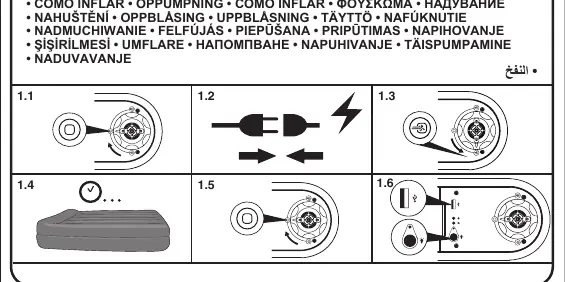
The airbed features a dual-function pump for inflation and deflation. Refer to the diagrams on page 28 for the specific control settings. The pump will automatically stop when the optimal pressure is reached.
LED Indicators
The airbed uses LED lights to indicate status:
- Green light: Inflation is complete and optimal pressure is reached.
- Green light flashing: Power is on and the airbed is inflating.
- Blue light: The secondary pump is active to maintain pressure.
- Green and Blue lights flashing: The airbed cannot reach the designated pressure. Check that the valve is tightened and there are no leaks.
USB Port
The airbed includes a USB port (5V 1A) that can be used to charge devices when the pump is plugged into a power socket.
Maintenance and Repair
Cleaning: Use a clean, damp cloth to wipe the surface. Do not use harsh detergents. Ensure the product is completely dry before folding and storing.
Repair: If the surface is damaged, use the provided repair patch:
- Completely deflate the airbed.
- Clean and dry the damaged area.
- Apply the repair patch and smooth out any air bubbles.
Manufacturer information
Bestway
Practical help
Common problems
Airbed not reaching designated pressure
Check that the valve is tightened and ensure there are no leaks in the airbed.
Motor overheating
Do not run the motor for more than 5 minutes. Allow it to cool for 5 minutes between uses.
Before use
- Ensure the airbed is on a flat surface.
- Keep away from sharp objects.
- Check for any visible damage.
- Ensure the power cord is not damaged.
Specs in practice
- Motor Run Time
- Max 5 minutes, then 5 minutes cool down
Images and diagrams
- Page 28 shows the inflation and deflation control diagrams.
- Page 29 and 30 explain the LED indicator light meanings.
Model compatibility
- Not intended for commercial use.

Manual page author
Emily Carter
User documentation editor
Prepares concise manual descriptions and highlights the most useful setup, operation, and maintenance information for readers.