Electronics / Wireless Audio Adapters
User Manual for Beyerdynamic USB WL Adapter
Quick guide for the Beyerdynamic USB WL Adapter (202-SMJ088). Learn how to connect, pair with Bluetooth devices, use the sync button, and understand LED indicators.
Quick answers from the manual
Quick answer
- The USB WL Adapter enables advanced Bluetooth features (HFP/A2DP) on PCs and laptops. Plug it into a USB port, hold the Sync button for 3 seconds to pair, or 10 seconds to clear the device list. p. 1, 2
Key actions
- Pairing: Hold Sync button for 3 seconds. p. 1, 2
- Clear paired devices: Hold Sync button for 10 seconds. p. 1, 2
Problems and fixes
Device list full or need to reset
Hold Sync button for 10 seconds to clear the list of connected devices.
p. 1, 2Maintenance and reset
- Clear paired devices by holding the Sync button for 10 seconds. p. 1, 2
Technical specifications
| Parameter | Value | Meaning | Pages |
|---|---|---|---|
| Frequency | 2.400 - 2.4835 GHz | ISM band | p. 1, 2 |
Where to find it in the PDF
- Product Overview p. 1
Table of contents
Quick guide from the manual
The Beyerdynamic USB WL Adapter is designed to provide advanced Bluetooth functionality (HFP and A2DP profiles) for PCs and laptops that may lack native support for specific headset features, such as call control or high-quality audio synchronization. This adapter allows you to connect up to three Bluetooth-enabled Beyerdynamic devices.
Product Overview
The device features two main components:
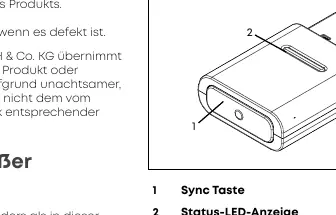
- Sync button: Used for pairing and clearing the device list.
- Status LED display: Indicates the connection and pairing status.
Installation
The adapter is plug-and-play on supported operating systems (Windows 10 and later, macOS 10.14.6 and later). Simply insert the USB WL Adapter into an available USB port on your PC or laptop. The computer will recognize it as "USB WL Adapter".
Bluetooth Pairing
To connect a compatible Beyerdynamic Bluetooth device:
- Ensure both the PC/laptop and the Bluetooth device are switched on.
- Plug the USB WL Adapter into the USB port.
- Press and hold the Sync button on the adapter for 3 seconds. The LED will flash blue and red.
- Follow the pairing instructions provided in the manual of your specific Beyerdynamic Bluetooth device.
- Once successfully paired, the LED on the adapter will flash blue and white three times.
Managing Connections
If you need to clear the list of already connected devices (maximum of 3):
- Press and hold the Sync button on the adapter for 10 seconds.
- The LED will flash yellow, indicating the list has been cleared.
Technical Data
- Frequency range: 2.400 to 2.4835 GHz (ISM band)
- Transmitting power: 2.5 mW (Class 2)
- Dimensions: 31 x 17 x 6 mm
- Weight: 3 g
Practical help
Common problems
Device not pairing
Ensure both the PC and the Bluetooth device are turned on. Hold the Sync button for 3 seconds until the LED flashes blue and red.
Need to clear paired devices
Hold the Sync button for 10 seconds until the LED flashes yellow to clear the memory of connected devices.
Before use
- Ensure PC/Laptop is turned on
- Ensure Bluetooth device is turned on
- Check for available USB port
Specs in practice
- Frequency Range
- 2.400 to 2.4835 GHz (ISM band)
- Transmitting Power
- 2.5 mW (Class 2)
Images and diagrams
- 1: Sync button
- 2: Status LED display
Model compatibility
- Supports Windows 10 (32/64bit) and future releases
- Supports macOS 10.14.6 (Mojave), 10.15.7 (Catalina) and future releases
- Supports HFP and A2DP Bluetooth profiles

Manual page author
Emily Carter
User documentation editor
Prepares concise manual descriptions and highlights the most useful setup, operation, and maintenance information for readers.