Automotive / Car Audio
User Manual for Caliber PMR 207BT Bluetooth Transmitter & Receiver
Quick guide for the Caliber PMR 207BT Bluetooth transmitter and receiver. Learn how to switch between TX and RX modes, pair devices, manage calls, and charge the unit.
Quick answers from the manual
Quick answer
- The Caliber PMR 207BT is a 2-in-1 Bluetooth transmitter and receiver. Use the side switch to select TX mode to send audio to wireless headphones, or RX mode to receive audio from your phone to wired speakers. p. 2
Key actions
- Switching Modes p. 3, 4
- Charging p. 5
First start
- Power on the device using the ON/OFF switch, then select the desired mode (TX or RX) using the mode switch. p. 4
Problems and fixes
Cannot pair Bluetooth devices
Press the main button to re-search for devices.
p. 4Technical specifications
| Parameter | Value | Meaning | Pages |
|---|---|---|---|
| Bluetooth Version | 4.2 | Wireless connectivity standard | p. 2 |
| Working Time | 10 hours | Battery life per charge | p. 2 |
| Charging Time | 2 hours | Time to fully charge battery | p. 2 |
Where to find it in the PDF
- Introduction and Features p. 2
- Appearance and Precautions p. 3
- Operation Instructions p. 4, 5
Table of contents
Manual images
Click an image to enlargeQuick guide from the manual
The Caliber PMR 207BT is a 2-in-1 Bluetooth adapter. It functions as a transmitter (TX) to send audio from non-Bluetooth devices to wireless headphones/speakers, or as a receiver (RX) to stream audio from Bluetooth devices to wired speakers or car stereos. The device features a physical switch to toggle between these modes and a built-in rechargeable battery.
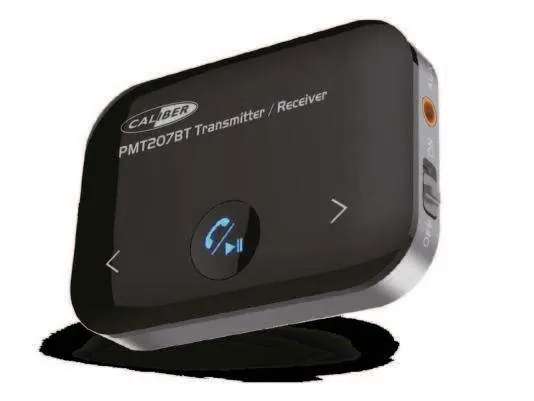
Device Overview
The device includes the following controls and ports:
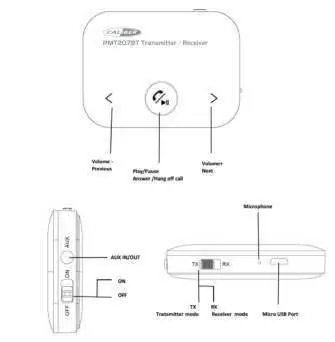
- Power Switch: Located on the side, toggles the device ON or OFF.
- Mode Switch: Located on the side, selects between TX (Transmitter) and RX (Receiver) modes.
- Aux Port: 3.5mm jack for audio input (TX) or output (RX).
- Main Button: Located on the front, handles Play/Pause, Answer/Hang up calls, and re-searching for devices.
- Volume/Track Buttons: Marked with < and > symbols for volume adjustment and track selection.
Operation Instructions
Transmitting (TX) Mode
Use this mode to send audio from a TV, CD player, or PC to Bluetooth headphones or speakers.
- Switch the device to TX mode.
- The device will automatically search for available Bluetooth devices. The LED will flicker in white.
- Once paired, the LED will remain solid white.
- Use the < and > buttons to adjust volume.
Receiving (RX) Mode
Use this mode to stream audio from a smartphone or tablet to a wired speaker or car stereo.
- Switch the device to RX mode.
- The device will automatically search for Bluetooth devices. The LED will flicker in blue.
- Once paired, the LED will remain solid blue.
- Use the < and > buttons to adjust volume or skip tracks (short press for previous/next song).
- The device can be used as a hands-free car kit. Short press the main button to answer or hang up calls.
Charging
When the battery is low, the device will indicate it needs charging. Connect the device using the provided Micro USB cable. The LED will remain solid red while charging and will turn off when the charging process is complete.
Precautions
- Do not use the device in moist or underwater conditions.
- Avoid placing the device near heaters or in high-temperature environments.
- Keep away from direct, strong sunshine.
- Do not drop the device.
- Do not dismantle the product, as this may void the warranty.
Manufacturer information
Caliber Europe
Practical help
Common problems
Device fails to pair with Bluetooth devices
Press the main button once to re-search for available Bluetooth devices.
Device powers off unexpectedly
The device automatically powers off if no Bluetooth device is paired within 10 minutes. Slide the ON/OFF switch to reopen.
Before use
- Ensure the device is fully charged before first use.
- Check the side switch to ensure it is set to the desired mode (TX or RX).
- Ensure the audio cable is securely connected to the Aux port.
- Keep the device within 8 meters of the paired Bluetooth device.
Specs in practice
- Bluetooth 4.2
- The wireless communication standard used for pairing.
Images and diagrams
- The device has a side switch for Power (ON/OFF) and Mode (TX/RX).
- The front panel features a main button for Play/Pause/Call functions and two side buttons for Volume/Track control.
Model compatibility
- Compatible with any Bluetooth-enabled device.
- Only one Bluetooth device can be connected at a time.

Manual page author
Michael Turner
Technical manual editor
Reviews PDF manuals for structure, safety notes, and practical product details so readers can find the right information quickly.