Home Appliances / Vacuum Cleaners
Bissell Bolt 1313/1315 Series 2-in-1 Cordless Vacuum
A comprehensive guide for the Bissell Bolt 1313 and 1315 series 2-in-1 cordless vacuum. Includes instructions for assembly, charging, operation, filter maintenance, brush roll care, and troubleshooting.
Quick answers from the manual
Quick answer
- The Bissell Bolt 1313/1315 is a 2-in-1 cordless vacuum. Charge it for 8 hours before first use. It features a removable hand vacuum and a 2-way folding handle. p. 5
Key actions
- Charge the vacuum p. 5
- Empty the dirt cup p. 6
- Clean the filter p. 7
First start
- Charge the unit for 8 hours before first use. p. 5
Show 4 more answers Show less
Problems and fixes
Vacuum won't turn on
Charge battery or check charger.
p. 9
Brush roll not turning
Remove obstruction or reset.
p. 9Maintenance and reset
- Brush roll reset p. 8
Technical specifications
| Parameter | Value | Meaning | Pages |
|---|---|---|---|
| Charging time | 8 hours | Time required for battery to regain full capacity. | p. 5 |
Where to find it in the PDF
- Product View p. 4
- Assembly and Charging p. 5
- Operations and Maintenance p. 6
Table of contents
Manual images
Click an image to enlargeQuick guide from the manual
The Bissell Bolt 1313/1315 series is a 2-in-1 cordless vacuum cleaner. Before first use, ensure the unit is fully charged for approximately 8 hours. The vacuum features a removable hand vacuum for versatile cleaning and a 2-way folding handle for storage and cleaning under furniture. Always turn the unit off before performing any maintenance.
Product Overview
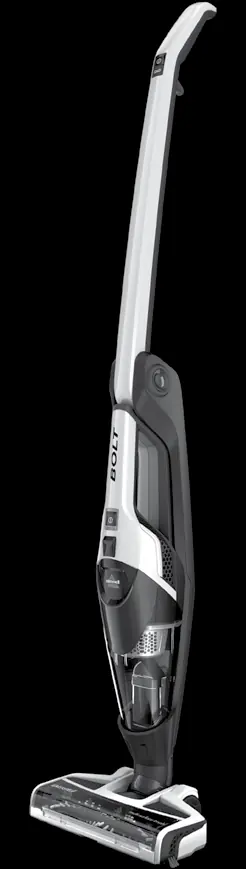
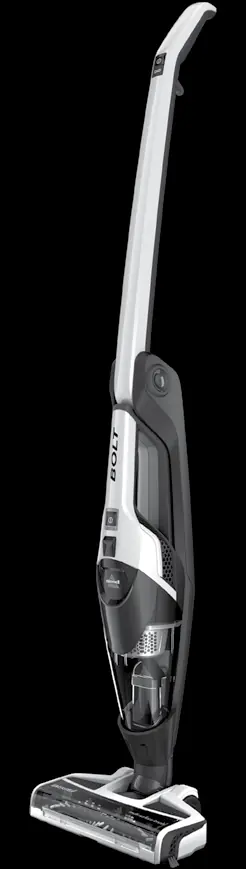
The vacuum consists of a main body with a swivel head, a detachable hand vacuum, and a dirt cup. Key controls include the power/brush roll button on the handle and the hand vacuum power button. The 1315 series includes an additional suction control button for Normal/High settings.
Assembly and Charging
No tools are required for assembly. Simply insert the foot into the body of the unit until you hear a click. To charge, plug the adapter into the charging port on the back of the unit or the charging base. The power LED lights will illuminate during charging. A full charge takes approximately 8 hours.
Operations
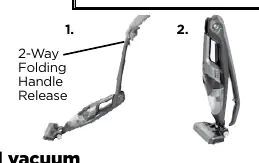
To operate the vacuum, push the power button on the handle. Use the brush button to activate the brush roll for hard floors and low-pile carpets. The 1315 series allows you to toggle suction power. The 2-way folding handle can be released by pulling the trigger on the back of the handle to bend it forward for cleaning under furniture or backward for storage.
Maintenance and Care
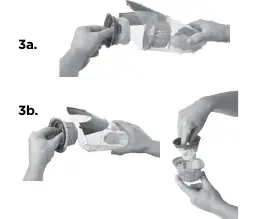
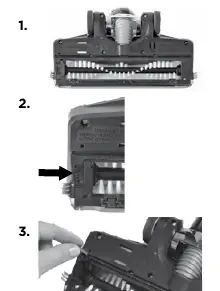
To maintain performance, empty the dirt cup before debris reaches the FULL line. Remove the hand vacuum, press the release button, and remove the filter cup to empty. Clean the filter by twisting it counterclockwise to remove it from the filter cup, tapping it against a waste container, and washing it with warm water and mild detergent if necessary. Ensure the filter is completely dry before reinstallation. For brush roll maintenance, turn the unit over, slide the lock tab, and remove the brush roll to clear hair and debris.
Troubleshooting
If the vacuum won't turn on, check the battery charge or ensure the correct charger is being used. If the brush roll is not turning, check for obstructions or reset the brush roll. If suction is low, empty the dirt cup, clean or replace filters, and check for clogs in the foot area.
Manufacturer information
Bissell Inc.
Practical help
Common problems
Vacuum won't turn on
Charge the battery fully or ensure you are using the correct charger supplied with the product.
Brush roll not turning
Remove obstructions from the brush roll, reset the brush roll, or check if the belt is broken.
Low suction
Empty the dirt cup, clean or replace filters, ensure the foot is fully inserted, and check for clogs in the foot area.
Visible dirt escaping
Empty the dirt cup and ensure the filter and dirt cup are installed correctly.
Before use
- Ensure the unit is in the OFF position before charging.
- Charge the unit for 8 hours before first use.
- Ensure the dirt cup and filters are properly installed.
- Check that the foot is securely attached to the body.
Show more Show less
Specs in practice
- Charging Time
- Approximately 8 hours for a full charge.
- Battery Type
- Nickel Metal Hydride (NiMH) rechargeable batteries.
Images and diagrams
- 1: Power/Brush Roll On/Off/Suction Power Control
- 2: 2-Way Folding Handle Release
- 5: Detachable Hand Vacuum
- 8: Swivel Head
Model compatibility
- Use only genuine Bissell model 1313 & 1315 replacement filters.
- Use only the charger supplied by the manufacturer.

Manual page author
Emily Carter
User documentation editor