Home Appliances / Vacuum Cleaners
User Manual for Bissell MultiReach Active Pet 21.6V Cordless Vacuum
Quick guide for the Bissell MultiReach Active Pet 21.6V Cordless Vacuum (2907 Series). Includes assembly, charging, operation, and maintenance instructions.
PDF source: polski · summary: English
Quick answers from the manual
Quick answer
- The Bissell MultiReach Active Pet 21.6V is a cordless vacuum. It requires 5 hours to charge and features a removable dirt tank and washable filters. p. 1, 4
Key actions
- Emptying the dirt tank p. 6
- Cleaning the brush roll p. 8
First start
- Assemble the vacuum by clicking the wand into the foot, then charge the unit for 5 hours. p. 3, 4
Show 3 more answers Show less
Problems and fixes
Vacuum not charging
Check power connection.
p. 4Technical specifications
| Parameter | Value | Meaning | Pages |
|---|---|---|---|
| Charging time | 5 hours | Time to fully charge the battery | p. 4 |
Where to find it in the PDF
- Assembly p. 3
- Charging p. 4
- Maintenance p. 6, 7, 8
Table of contents
Manual images
Click an image to enlargeQuick guide from the manual
This document provides essential instructions for the Bissell MultiReach Active Pet 21.6V Cordless Vacuum (2907 Series). It covers initial assembly, charging, daily operation, and routine maintenance to ensure optimal performance.
Assembly
To assemble the vacuum:
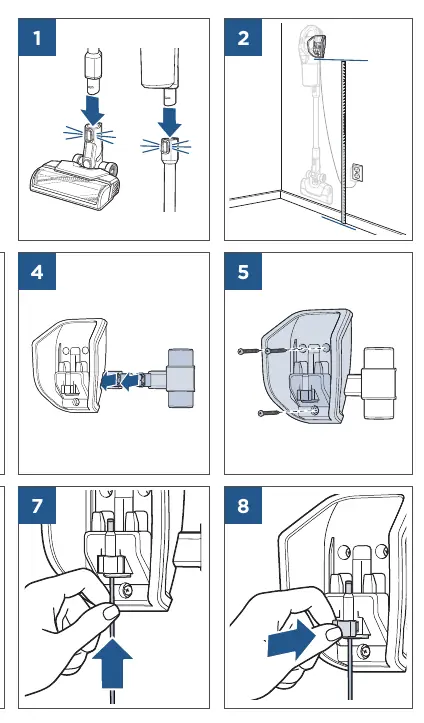
- Connect the wand to the motorized floor foot until it clicks into place.
- If using the wall mount, ensure it is installed level on the wall using the provided hardware.
- The wall mount allows for convenient storage and charging.
Charging
The vacuum requires a full charge before first use:
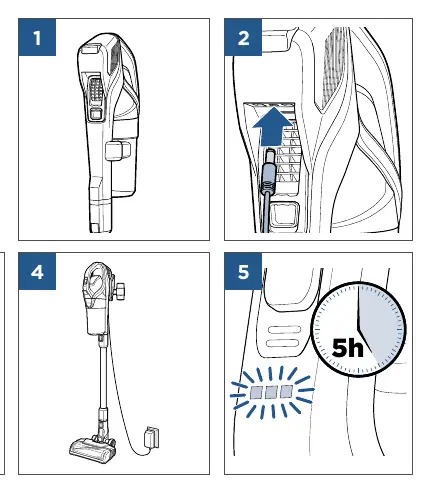
- Connect the charger to the charging port on the vacuum.
- Plug the charger into a wall outlet.
- A full charge takes approximately 5 hours.
Operation
To operate the vacuum:
- Press the power button to turn the unit on.
- Use the mode button to adjust suction settings as needed for different floor types.
- The vacuum can be used as a stick vacuum or a handheld unit by detaching the wand.
Maintenance
Regular maintenance is required to keep the vacuum functioning correctly:
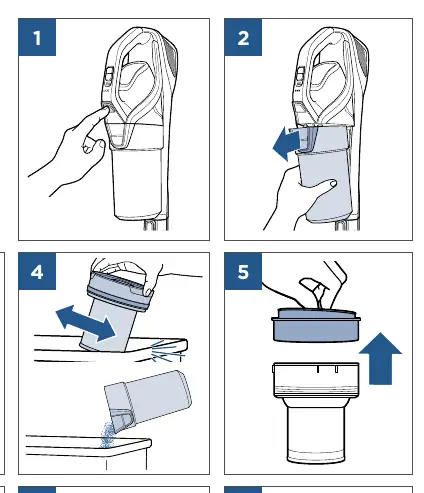
Emptying the Dirt Tank
- Press the release button on the handheld unit.
- Remove the dirt tank and empty the contents into a trash bin.
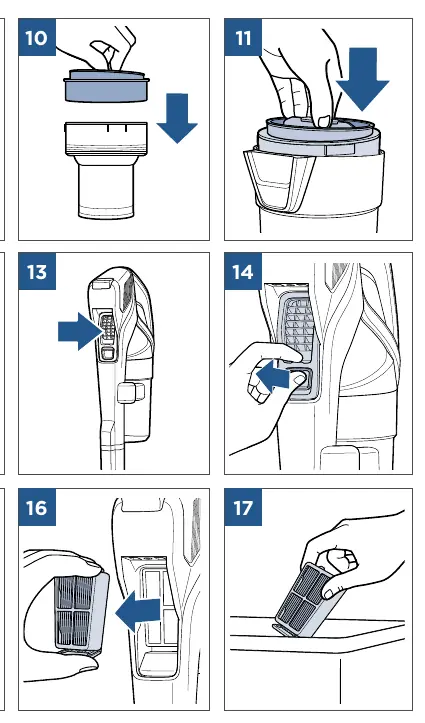
Cleaning Filters
- Remove the filter assembly from the dirt tank.
- Wash the filter with water.
- Important: Allow the filter to dry completely for 24 hours before reassembling.
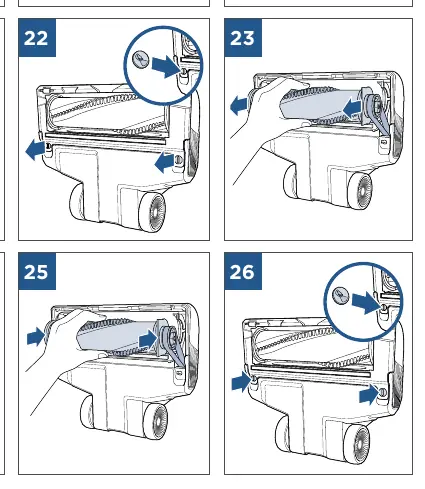
Cleaning the Brush Roll
- Use the release tabs on the foot to remove the brush roll.
- Clear any hair or debris wrapped around the brush.
- Reinsert the brush roll and secure the tabs.
Manufacturer information
Bissell Inc.
Practical help
Common problems
Vacuum not picking up debris
Check if the dirt tank is full, the filter is clogged, or the brush roll is obstructed by hair or debris.
Vacuum not charging
Ensure the charger is securely plugged into the wall outlet and the charging port on the vacuum.
Before use
- Ensure all parts are assembled correctly
- Charge the battery fully (5 hours)
- Check that the dirt tank is empty
- Verify the filter is clean and dry
Show more Show less
Specs in practice
- Charging time
- 5 hours required for a full battery charge
Images and diagrams
- Page 3: Wall mount installation steps
- Page 4: Charging procedure
- Page 6: Dirt tank removal and emptying
- Page 6-7: Filter cleaning and reassembly
- Page 8: Brush roll maintenance
Model compatibility
- Designed for 2907 Series models

Manual page author
David Miller
Documentation analyst