Home Appliances / Vacuum Cleaners
User Guide for Bissell PowerLifter ION Pet 2-in-1 Cordless Vacuum (2482 Series)
Comprehensive user guide for the Bissell PowerLifter ION Pet 2-in-1 Cordless Vacuum (2482 Series). This guide provides instructions for assembly, charging, operation, maintenance, and troubleshooting to ensure optimal performance.
Quick answers from the manual
Quick answer
- The Bissell PowerLifter ION Pet (2482 Series) is a 2-in-1 cordless vacuum. Charge it for 8 hours before first use. Maintenance involves emptying the dirt tank, cleaning the washable filters, and clearing debris from the brush roll. p. 5, 10, 11, 12
Key actions
- Charge the vacuum p. 5
- Empty the dirt tank p. 10
- Clean the filters p. 11
First start
- Assemble the vacuum by clicking the foot into the body, then charge for 8 hours. p. 5
Show 4 more answers Show less
Problems and fixes
Vacuum won't turn on
Charge battery or check charger.
p. 14
Brush roll not turning
Remove obstruction or reset.
p. 14Error codes
| Code | Meaning | Action | Pages |
|---|---|---|---|
| Solid red light (in use) | No Power | Charge unit | p. 6 |
| Blinking red light (in use) | Low Power | Charge unit | p. 6 |
| Solid red light, then unit shuts off | Brush Stall | Clear brush roll | p. 6, 12 |
Maintenance and reset
- Brush Roll Reset: Turn unit OFF, remove debris from Brush Roll and End Cap area, replace, and turn unit ON. p. 12
Where to find it in the PDF
- Safety Instructions p. 2
- Assembly p. 5
- Troubleshooting p. 14
Table of contents
Manual images
Click an image to enlargeQuick guide from the manual
The Bissell PowerLifter ION Pet 2-in-1 Cordless Vacuum is designed for household use. Before first use, the unit must be charged completely for 8 hours. Maintenance is key to performance: empty the dirt tank after use, clean the filters regularly, and clear debris from the brush roll to prevent stalls.
Product Overview
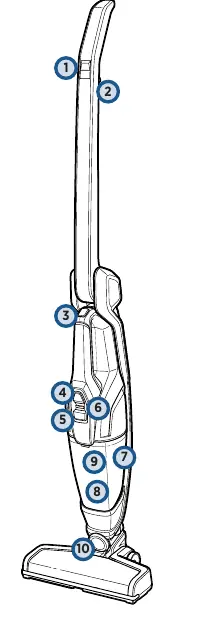
The vacuum features a detachable hand vacuum, a 2-way folding handle for storage and cleaning under low furniture, and a motorized brush roll. Controls include a power button and a brush roll on/off button.
Assembly and Charging
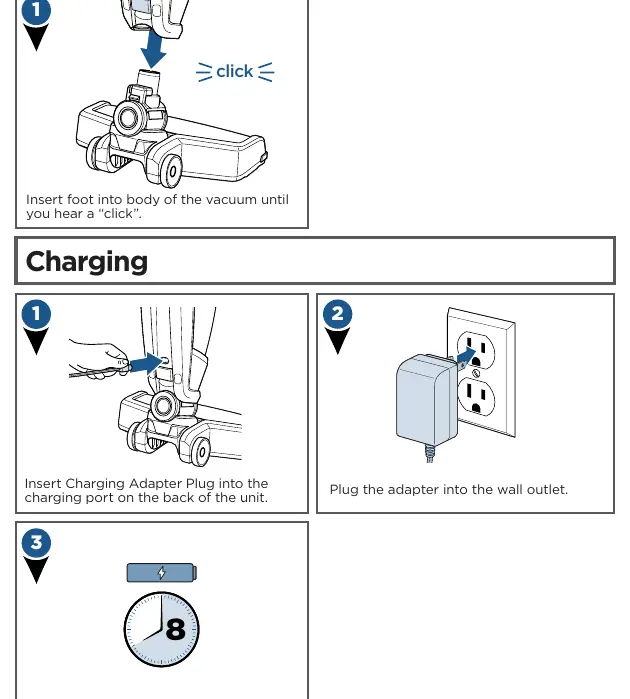
- Assembly: Insert the foot into the body of the vacuum until you hear a click. No tools are required.
- Charging: Insert the charging adapter plug into the port on the back of the unit and plug the adapter into a wall outlet. Charge for 8 hours before the first use.
Operation
- Power: Use the power button to turn the unit ON/OFF.
- Brush Roll: Use the brush button to toggle the motorized brush roll ON/OFF.
- Folding Handle: Pull the trigger under the handle to fold it forward for cleaning under low furniture or backward for storage.
- Hand Vacuum: Press the release button on the top handle to detach the hand vacuum.
Maintenance
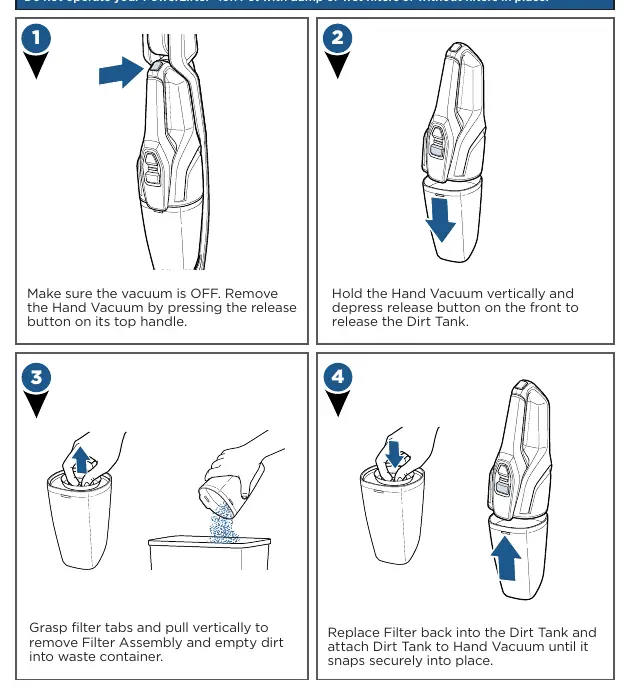
- Emptying the Dirt Tank: Remove the hand vacuum, hold it vertically, and press the release button on the front to release the dirt tank. Empty the contents into a waste container.
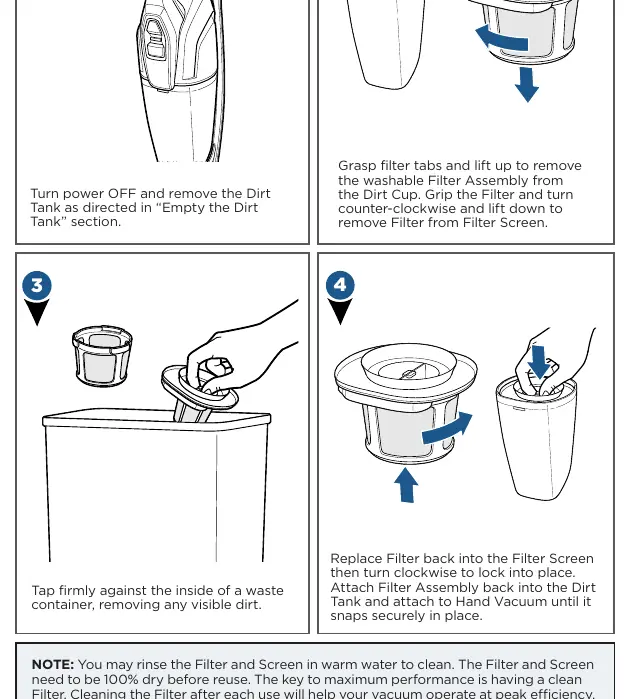
- Cleaning Filters: Remove the dirt tank, grasp the filter tabs, and pull vertically to remove the filter assembly. Rinse the filter and screen in warm water. Important: The filter and screen must be 100% dry before reuse.
- Brush Roll Maintenance: Turn the unit OFF. Use a coin to unlock the brush roll cover tab on the bottom of the foot. Remove the brush roll, clean off hair or debris, and replace it.
Troubleshooting
If the vacuum won't turn on, ensure it is fully charged and using the correct charger. If the brush roll is not turning, remove obstructions or reset the brush roll. If suction is low, check for a full dirt tank, clogged filters, or obstructions in the foot area.
Manufacturer information
Bissell Inc.
Practical help
Common problems
Vacuum won't turn on
Ensure the battery is fully charged and you are using the correct charger supplied with the product.
Brush roll not turning
Remove obstructions from the brush roll or perform a brush roll reset.
Low suction
Empty the dirt tank, clean or replace filters, and check the foot area for clogs.
Visible dirt escaping
Ensure the dirt tank is installed correctly and the filter assembly is properly in place.
Before use
- Charge the unit completely for 8 hours.
- Ensure the foot is clicked securely into the body.
- Verify the dirt tank and filters are properly installed.
- Check that the brush roll is free of debris.
Show more Show less
Images and diagrams
- Assembly: Click the foot into the main body.
- Charging: Connect the adapter to the unit and the wall outlet.
- Folding Handle: Pull the trigger to fold the handle for storage or low-profile cleaning.
- Filter Cleaning: Rinse filter and screen in warm water; dry completely.
Model compatibility
- Use only with charger SIL, Model ZD5F230030US.

Manual page author
David Miller
Documentation analyst