Power / Batteries Chargers
BlueBuilt 10,000mAh Power Bank User Guide
Comprehensive user guide for the BlueBuilt 10,000mAh power bank, covering charging instructions, battery status checks, safety precautions, and disposal information.
Table of contents
Product Overview
The BlueBuilt 10,000mAh power bank is a portable charging solution designed to keep your mobile devices powered on the go. It features a compact design with a side-mounted switch button and a clear battery level indicator. The device is engineered for convenience, automatically turning on when a device is connected and powering off once the connection is removed.
Checking Battery Level
To monitor the remaining capacity of your power bank, simply touch the switch button on the side once. The LED lights will illuminate to show the current charge level. For your convenience, these indicator lights will automatically switch off after 30 seconds to conserve energy.
Charging Your Devices
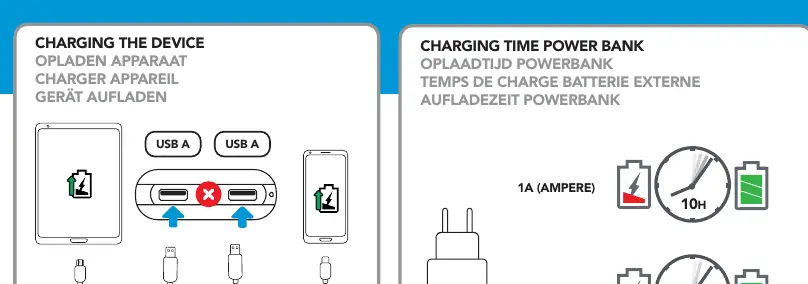
Charging your mobile devices is straightforward. Connect your device to the power bank using the appropriate USB cable. The power bank will detect the connection and begin charging automatically. Please ensure you use the cables provided with the power bank or the original cables that came with your specific device to ensure optimal performance and safety.
Charging the Power Bank
To recharge the power bank itself, use the USB-C port. The total charging time depends on the power output of your wall adapter. Using a 1A charger will take approximately 10 hours for a full charge, while a 2A charger will reduce the charging time to approximately 5 hours. Always monitor the charging process and do not leave the device unattended while charging or discharging.
Safety and Maintenance
Safety is paramount when using lithium-based batteries. Do not expose the power bank to extreme heat, direct sunlight, or fire, and avoid sudden temperature changes. Keep the device away from damp or wet environments and never use it near explosive gases or flammable materials. Do not attempt to burn or incinerate the unit. Avoid mechanical abuse such as dropping, crushing, shaking, or throwing the power bank. Ensure the device is not covered by objects during use to allow for proper heat dissipation. Keep the product out of reach of children. If the device is not in use, disconnect all cables.
Disposal
This product contains a battery and should not be disposed of with regular household waste. To prevent environmental pollution, please dispose of the power bank at a designated recycling center in accordance with local regulations.
Manufacturer information
BlueBuilt
Practical help
Common problems
Power bank does not charge devices
Ensure the cable is securely connected to both the power bank and your device. Try using a different cable.
Power bank takes too long to charge
Check the output of your wall adapter. Using a 2A charger will charge the power bank twice as fast as a 1A charger.
Before use
- Check the battery level by pressing the side button.
- Ensure you have a compatible USB cable.
- Verify the power bank is not damaged or deformed.
- Ensure the charging environment is dry and cool.
Images and diagrams
- The side button is for checking battery status, not for manual power control.
- LED lights indicate the remaining battery percentage.
- USB-C port is dedicated to recharging the power bank itself.
- USB-A ports are used to output power to your mobile devices.
Model compatibility
- Compatible with devices that charge via USB-A.
- Use only included cables or original device manufacturer cables.

Manual page author
David Miller
Documentation analyst
Organizes user manual content into clear summaries, with attention to model details, product context, and everyday usability.