Power / USB Chargers
User Manual for BlueBuilt Dual Port Charger PD / QC 20W
Quick guide for the BlueBuilt Dual Port Charger PD / QC 20W (model BBTL36Z). Learn how to safely connect your devices, understand output power specifications, and follow maintenance guidelines.
Quick answers from the manual
Quick answer
- The BlueBuilt BBTL36Z is a dual-port charger providing a total of 38W output (20W USB-C + 18W USB-A). It is designed for indoor use and supports worldwide voltage (100-240V). p. 1, 2
Key actions
- Connect the charger to a wall socket, then plug in your devices. p. 1
Problems and fixes
Device not charging
Check connections and ensure the charger is not damaged.
p. 2Maintenance and reset
- Disconnect from power before cleaning. p. 2
Technical specifications
| Parameter | Value | Meaning | Pages |
|---|---|---|---|
| Total Output | 38W | Combined power for both ports | p. 2 |
Where to find it in the PDF
- Product Overview p. 1
- Safety and Specs p. 2, 3
Table of contents
Quick guide from the manual
The BlueBuilt Dual Port Charger (BBTL36Z) is designed for efficient charging of mobile devices. It features two ports: a USB-C port (up to 20W) and a USB-A port (up to 18W), with a total combined output of 38W. Always ensure your connected devices do not exceed the total power capacity of the charger.
Product description
The charger is a compact power adapter suitable for worldwide use (100-240V). It includes:
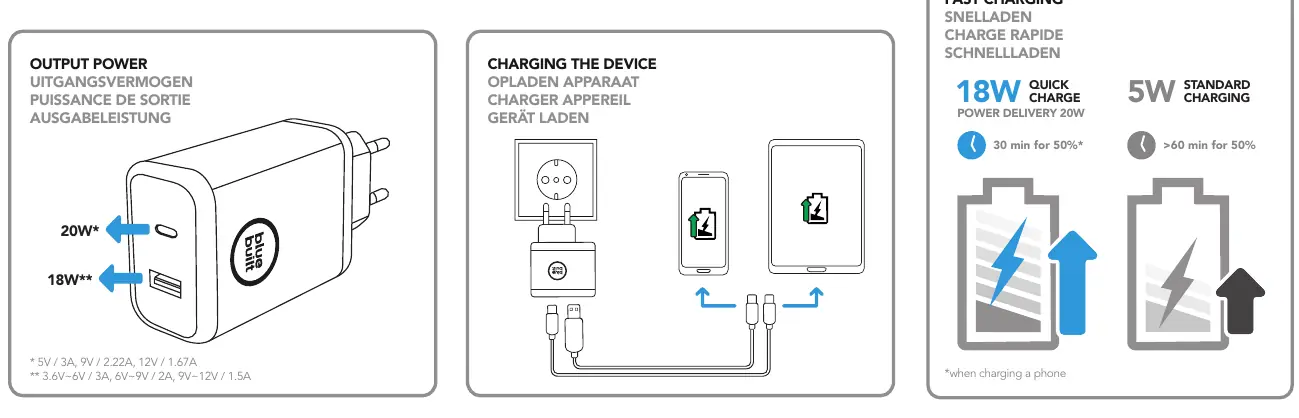
- USB-C Port: Supports Power Delivery (PD) up to 20W.
- USB-A Port: Supports Quick Charge (QC) up to 18W.
- Total Output: 38W when both ports are used simultaneously.
Usage instructions
- Ensure the charger is connected to a standard, approved wall socket.
- Connect your device to the appropriate port (USB-C or USB-A) using a compatible charging cable.
- The charger will automatically detect the power requirements of your device.
- Disconnect the charger from the power supply when not in use for extended periods.
Safety instructions
- Indoor use only: Do not use the product in moist environments or outdoors.
- Damage prevention: Do not use the charger if the adapter, cable, or mains cable is damaged.
- No modifications: Do not attempt to open, service, or repair the device yourself.
- Placement: Keep away from heat sources, direct sunlight, and out of the reach of children.
- Ventilation: Ensure the charger is not covered during operation.
Technical specifications
- Input Voltage: 100-240V, 50/60Hz.
- Output USB-C: 5V/3A (15W), 9V/2.22A (20W), 12V/1.67A (20W).
- Output USB-A: 3.6V-6V/3A (18W), 6V-9V/2A (18W), 9V-12V/1.5A (18W).
- Operating Temperature: 0°C to 40°C.
Maintenance and disposal
Disconnect the device from the power supply before cleaning. Use a dry cloth to wipe the exterior. Do not dispose of the product with household waste; take it to a designated recycling center to prevent environmental pollution.
Manufacturer information
BlueBuilt
Practical help
Common problems
Device not charging
Check if the charger is securely connected to the wall socket and the cable is intact.
Charger overheating
Ensure the charger is not covered and is used in a well-ventilated area within the specified temperature range (0°C-40°C).
Total power exceeded
Ensure the combined power of connected devices does not exceed 38W (20W USB-C + 18W USB-A).
Before use
- Check the charger for any visible damage.
- Ensure the wall socket is easily accessible.
- Verify that the total power of your devices does not exceed 38W.
- Use only in dry, indoor environments.
Specs in practice
- Input Voltage
- 100-240V, suitable for worldwide use (may require country-specific adapter).
- Total Output Power
- 38W combined (20W USB-C + 18W USB-A).
- Ambient Temperature
- Operating range is 0°C to 40°C.
Images and diagrams
- The charger features two ports: USB-C (20W) and USB-A (18W).
- Connect the charger to a wall outlet, then connect your devices using appropriate cables.
Model compatibility
- Compatible with devices requiring up to 20W (USB-C) or 18W (USB-A).
- Not suitable for high-power devices exceeding the 38W total limit.

Manual page author
David Miller
Documentation analyst
Organizes user manual content into clear summaries, with attention to model details, product context, and everyday usability.