Power / USB Chargers
BlueBuilt 20,000 mAh 20W Power Bank
A quick guide for the BlueBuilt 20,000 mAh 20W Power Bank, covering charging procedures for the power bank and connected devices, charging time specifications, and essential safety instructions.
Quick answers from the manual
Quick answer
- To charge the BlueBuilt 20,000 mAh 20W Power Bank, connect it to a power source via the USB-C port. Using an 18W charger will charge the bank in 11 hours, while a 10W charger will take 15 hours. p. 1
Key actions
- Charge the power bank p. 1
- Fast charge a device p. 1
Technical specifications
| Parameter | Value | Meaning | Pages |
|---|---|---|---|
| Charging Time (10W) | 15 hours | Time to fully charge the power bank with a 10W charger. | p. 1 |
| Charging Time (18W) | 11 hours | Time to fully charge the power bank with an 18W charger. | p. 1 |
Where to find it in the PDF
- Charging and Usage Instructions p. 1
- Safety Instructions p. 2
Table of contents
Manual images
Click an image to enlargeQuick guide from the manual
This document provides instructions for the BlueBuilt 20,000 mAh 20W Power Bank. It covers how to charge the power bank itself, how to charge your devices using the power bank, and important safety precautions to ensure proper usage and longevity of the battery.
Charging the Power Bank
To charge the power bank, use the USB-C port. The charging time depends on the power output of the charger used:
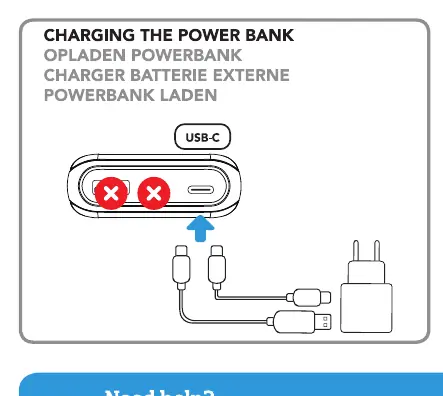
- 10W Charger: Approximately 15 hours to fully charge.
- 18W Charger: Approximately 11 hours to fully charge.
Charging Devices
The power bank features multiple ports to charge your devices:
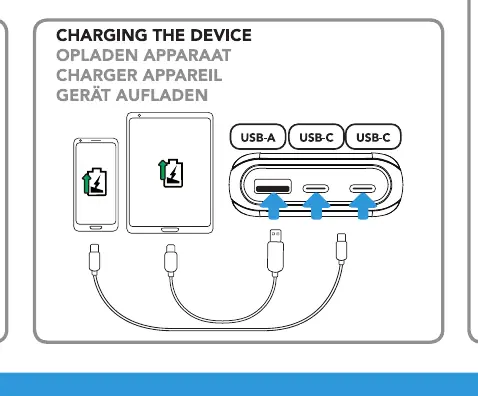
- USB-A and USB-C ports: Connect your device using the appropriate cable.
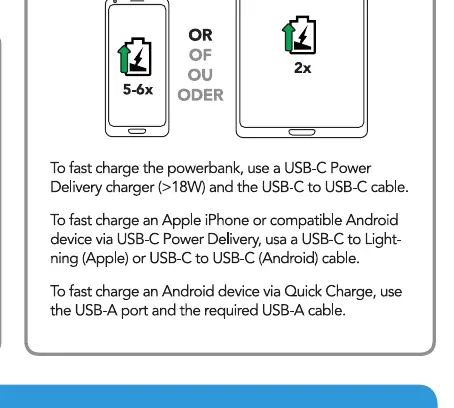
- Fast Charging: To fast charge the power bank, use a USB-C Power Delivery charger (>18W) and a USB-C to USB-C cable.
- Apple/Android Devices: Use a USB-C to Lightning (Apple) or USB-C to USB-C (Android) cable with USB-C Power Delivery for fast charging.
- Android Quick Charge: Use the USB-A port and the required USB-A cable.
Safety Instructions
Follow these guidelines to ensure safe operation:
- Do not expose the device to excessive heat, fire, or direct sunlight.
- Do not use or store in damp or wet environments.
- Do not use near explosive gases or flammable materials.
- Do not burn or incinerate.
- Avoid contact with battery chemicals.
- Do not throw, shake, vibrate, drop, crush, or mechanically abuse the device.
- Do not cover the device while in use to allow for heat dissipation.
- Disconnect the device when not in use.
- Do not charge and discharge the power bank at the same time.
- Keep out of reach of children.
Disposal
Do not dispose of the product with regular household waste. Please dispose of the product at a designated recycling center to avoid environmental damage.
Manufacturer information
BlueBuilt
Practical help
Common problems
Charging the power bank takes too long
Ensure you are using an 18W charger instead of a 10W charger to reduce charging time from 15 hours to 11 hours.
Device is not fast charging
Ensure you are using a USB-C Power Delivery charger (>18W) and the correct cable (USB-C to USB-C or USB-C to Lightning).
Before use
- Check that you have a compatible USB-C cable for charging the power bank.
- Verify the wattage of your wall charger (10W vs 18W) to estimate charging time.
- Ensure the environment is dry and not excessively hot.
- Check that the power bank is not being charged and discharged simultaneously.
Specs in practice
- USB-C Power Delivery
- Required for fast charging capabilities (>18W).
Images and diagrams
- The diagram illustrates the USB-C port usage for input (charging the bank) and output (charging devices).
- The charging time chart compares the efficiency of 10W vs 18W chargers.
Model compatibility
- Compatible with Apple devices using USB-C to Lightning cables.
- Compatible with Android devices using USB-C to USB-C cables.
- Supports Android Quick Charge via the USB-A port.

Manual page author
Michael Turner
Technical manual editor
Reviews PDF manuals for structure, safety notes, and practical product details so readers can find the right information quickly.