Wearables / Fitness Trackers
User Manual for Tekkiwear C11 Qi 15W Car Charger
Quick guide for the Tekkiwear C11 Qi 15W Car Charger. Learn how to install, operate the automatic induction arms, and troubleshoot charging issues.
Table of contents
Quick guide from the manual
The Tekkiwear C11 is an intelligent induction wireless car charger. It features automatic retractable clips that open when a phone is detected and close to secure the device. It supports fast charging for compatible Qi-enabled smartphones and requires a 5-9V DC power supply.
Functional components
The device consists of the following parts:
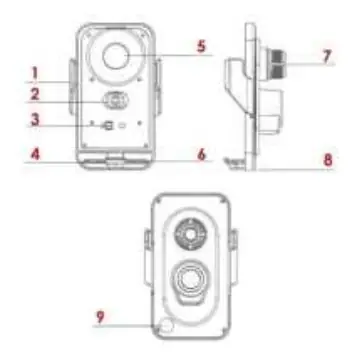
- Automatic retractable clip: Holds the phone in place.
- Intelligent sensor area: Detects the phone to trigger the arms.
- Magnetic head contact point: For devices without wireless charging.
- Magnetic induction charging area: The surface for wireless power transfer.
- Spherical base: Allows for angle adjustment.
- Sensitive touch button: Located on the bottom right of the back; touch to release the phone.
Instructions for use
- Connect the provided data cable to the charger and the vehicle's power interface (e.g., cigarette lighter converter).
- Attach the base clamp to the air conditioner outlet or another secure location.
- Once connected to a 5-9V DC power supply, the indicator light will turn on, and the bracket will lock.
- To insert your phone, bring it within 5cm-20cm of the sensor area. The device will automatically detect the phone, open the arms, and then close them to secure the device.
- Wireless charging will begin automatically for compatible phones.
- To remove the phone, touch the sensitive button on the bottom right corner of the back. The arms will open automatically.
Specifications
- Input voltage/current: DC5V/2A, DC9V/1.67A.
- Wireless output power: 15W, 10W, 7.5W (automatic identification).
- Charging distance: 0-5mm.
- Charging frequency: 110K-205khz.
- Material: ABS / PC + glass panel + plastic.
Safety and precautions
- Do not overtighten the equipment or strike it.
- Avoid using the device in high temperature, humidity, or corrosive environments to prevent circuit damage.
- The device includes built-in protections against over-voltage, over-temperature, magnetic field interference, and short-circuits.
- In case of malfunction, the device will automatically stop working.
Practical help
Common problems
Device not charging
Ensure your phone supports Qi wireless charging. If it does not, you must use the magnetic head connection.
Arms do not open
Verify that the device is connected to a 5-9V DC power source and the indicator light is on.
Charging stops unexpectedly
Check if the environment is too hot or humid, as this may trigger safety protections.
Before use
- Ensure the car charger is connected to a 5-9V DC power source.
- Verify the air vent mount is securely attached.
- Check if your phone supports Qi wireless charging.
- Ensure the charging distance between the phone and charger is within 0-5mm.
Specs in practice
- Input Voltage
- Requires DC5V/2A or DC9V/1.67A for optimal performance.
- Charging Distance
- The device charges effectively within 0-5mm.
- Output Power
- Automatically identifies and provides 15W, 10W, or 7.5W based on the device.
Images and diagrams
- The diagram illustrates the 9 functional components, including the sensor area and the touch release button.
- The spherical base allows for flexible positioning on the air vent.
Model compatibility
- Supports QC wireless fast charging for iPhone X/8+ and newer, Huawei P30/Mate series, and Samsung S6/S7/S8 series.
- Devices without wireless charging require a magnetic head connection.

Manual page author
Emily Carter
User documentation editor
Prepares concise manual descriptions and highlights the most useful setup, operation, and maintenance information for readers.