Power / USB Chargers
User Manual for Verbatim 15W Automatic Alignment Car Wireless Charging Bracket
Quick guide for the Verbatim 15W Automatic Alignment Car Wireless Charging Bracket. Learn how to install, use, and maintain your wireless car charger, including compatibility and safety instructions.
Table of contents
Quick guide from the manual
This document provides instructions for the Verbatim 15W Automatic Alignment Car Wireless Charging Bracket. To ensure optimal performance, use a car charger that supports QC3.0 fast charge. The device features automatic alignment for Qi-compatible smartphones and includes intelligent protection against over-voltage, over-current, and foreign objects.
Product Overview and Parts
The package includes the wireless charging holder, an air vent holder, a Type-C charging cable, and a dashboard/suction cup holder. Key components include:
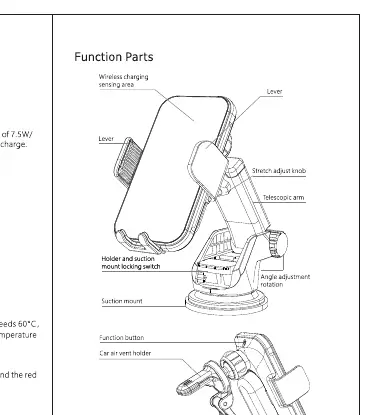
- Wireless charging sensing area
- Stretch adjust knob
- Telescopic arm
- Holder and suction mount locking switch
- Angle adjustment rotation
- Function button
- Air vent holder
- Type-C charging port
Installation
Assembly: Connect the wireless charger to the holder. You can choose between the air vent holder or the suction cup mount depending on your preference.
Fixed Products: Fix the assembled product and base holder to the appropriate position. Use the adjustment features to secure the device.
Connecting Power: Insert one end of the standard power cord into the input port of the wireless charger and the other end into a power supply that meets the requirements (QC3.0 recommended).
Usage Instructions
Automatic Alignment:
- Full automatic phone clip: Place the phone against the surface of the charger. The holder clip will automatically close to fix the phone.
- Remove the phone: While holding the phone with your hand, touch the button on the side. The holder will automatically open, allowing you to remove the phone.
LED Status Indicator:
- Standby/State: Red light ON.
- Charging: Blue light ON.
- Foreign Object Detection: Red light flashes and blue light flashes alternately.
Safety and Maintenance
- Do not use incompatible power supplies or chargers.
- Keep the product away from moisture and extreme temperatures (operating range: -10°C to +55°C).
- Do not use detergent, alcohol, or other cleaning products; use a dry, soft cloth to clean.
- Do not throw, knock, or pull the product components.
- Do not disassemble or modify the product without authorization.
Technical Specifications
- Input: DC12V/1.5A, 9V/2A, 5V/2A
- Output: DC9V/1.67A, 5V/1A
- Working Temperature: -10°C to 55°C
- Wireless Charging Distance: 6mm Max
- Charging Efficiency: 75-80%
Practical help
Common problems
Red light flashes
Indicates foreign object detection. Ensure no metal objects are between the phone and the charger.
Charging stops
Ensure the output current does not exceed 2A and the input power supply meets the requirements.
Phone falls off
Ensure the holder is securely mounted and the phone is placed correctly against the sensing area.
Before use
- Ensure your car charger supports QC3.0 fast charge for 10W/15W output.
- Verify your phone is Qi-compatible.
- Clean the mounting surface (air vent or dashboard) before installation.
- Check that the Type-C cable is securely connected.
Specs in practice
- Charging Efficiency
- The device operates at 75-80% efficiency.
- Working Temperature
- Operates safely between -10°C and 55°C.
Images and diagrams
- The diagram illustrates the assembly of the wireless charging holder with the telescopic arm and suction mount.
- It highlights the location of the stretch adjust knob and the function button for opening the holder.
Model compatibility
- Compatible with iPhone, Samsung, and Huawei series that support Qi wireless charging.

Manual page author
Michael Turner
Technical manual editor
Reviews PDF manuals for structure, safety notes, and practical product details so readers can find the right information quickly.