Power / USB Chargers
User Manual for Hama Charger Kit USB-C PD/QC 18W
Quick guide for the Hama Charger Kit (USB-C, PD/QC, 18W). Includes safety instructions, operating procedures, technical specifications, and maintenance tips.
Quick answers from the manual
Quick answer
- The Hama Charger Kit (00183326) is an 18W USB-C charger supporting Power Delivery (PD) and Quick Charge (QC) 3.0/2.0. It automatically configures voltage and power for connected devices. p. 4
Key actions
- Connect the USB-C cable to your device and the charger. p. 4
- Plug the charger into a wall socket. p. 4
Problems and fixes
Function not fully supported
Due to the large quantity of PD/QC-enabled terminal devices with different firmware versions, it can happen that the function is not fully supported.
p. 3Maintenance and reset
- Only use dry, soft cloths for cleaning. Disconnect from power before cleaning. p. 4
Technical specifications
| Parameter | Value | Meaning | Pages |
|---|---|---|---|
| Input Voltage | 100-240 V | Worldwide use | p. 4 |
| Output Power | 18.0 W | Maximum power output | p. 4 |
Where to find it in the PDF
- Operating Instructions p. 3, 4
Table of contents
Quick guide from the manual
The Hama Charger Kit (00183326) is designed for charging mobile devices via USB-C. It supports Power Delivery (PD) and Quick Charge (QC) 3.0/2.0 technologies, which automatically configure the required voltage and power for your device. No manual setup is required; simply connect your device and the charger to start the process.
Safety Notes
- Protect the product from dirt, moisture, and overheating. Use only in dry rooms.
- Do not drop the product or expose it to major shocks.
- Do not modify the device; doing so voids the warranty.
- Keep out of reach of children.
- Do not use in areas where electronic devices are not permitted.
- Do not open the device or operate if damaged.
- Always pull directly on the plug when disconnecting, never on the cable.
Operation
The charger is suitable for mains voltage of 100-240 V and can be used worldwide (a country-specific adapter may be required). Before connecting a device, ensure that the charger's power output is sufficient and that the device's power requirement does not exceed 18 W.
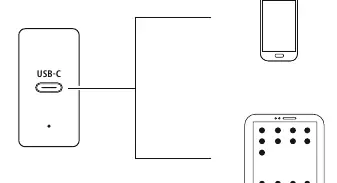
Steps to charge:
- Connect your terminal device to the USB charging socket using a suitable USB cable.
- Connect the charger to a properly installed and easily accessible power socket.
- The charging progress is displayed on your terminal device.
- Disconnect the terminal device from the charger when charging is complete or to interrupt the process.
- Disconnect the charger from the mains.
Care and Maintenance
Only use dry, soft cloths for cleaning. Disconnect the device from the power supply before cleaning or if it will not be used for a long period of time.
Technical Specifications
The charger supports the following output configurations: 5.0V DC / 3.0A / 15.0W; 9.0V DC / 2.0A / 18.0W; 12.0V DC / 1.5A / 18.0W. The ambient operating temperature is 0°C – 40°C.
Recycling Information
Electric and electronic devices, as well as batteries, must not be disposed of with household waste. Consumers are obliged by law to return electrical and electronic devices at the end of their service lives to public collecting points set up for this purpose or to the point of sale.
Manufacturer information
Hama GmbH & Co KG
Practical help
Common problems
Device not charging efficiently
Ensure your terminal device supports Power Delivery (PD) or Quick Charge (QC) 3.0/2.0. Compatibility may vary based on firmware versions.
Charger not working
Check if the wall socket is live and the cable is securely connected. Ensure the device power requirement does not exceed 18W.
Before use
- Check if the wall socket is compatible (100-240V).
- Ensure the device to be charged is compatible with USB-C.
- Verify that the device power requirement does not exceed 18W.
- Ensure the charger is not damaged before use.
Specs in practice
- Power Delivery (PD) / QC 3.0, 2.0
- Automatic voltage and power configuration for optimized charging.
- Output Power
- Maximum 18W total output capacity.
- Input Voltage
- 100-240V, suitable for worldwide use.
Images and diagrams
- The charger connects to a wall outlet and provides power via a USB-C cable to terminal devices like smartphones or tablets.
Model compatibility
- Requires a device that supports PD or QC 3.0/2.0 for optimal charging.
- Not all devices with different firmware versions may be fully supported.

Manual page author
Michael Turner
Technical manual editor
Reviews PDF manuals for structure, safety notes, and practical product details so readers can find the right information quickly.