Electronics / Speakers & Soundbars
User Manual for boAt AAVANTE BAR 1680D Soundbar
Quick guide for the boAt AAVANTE BAR 1680D 2.1CH Dolby soundbar. Learn about connections, remote control functions, input modes, wall mounting, and technical specifications.
Quick answers from the manual
Quick answer
- The boAt AAVANTE BAR 1680D is a 2.1CH Dolby soundbar with 120W RMS output. It supports HDMI(ARC), Optical, Coaxial, AUX, Bluetooth, and USB inputs, and includes a wired subwoofer. p. 1, 2, 4
Key actions
- Power on/off p. 6, 8
- Select input mode p. 6, 7, 8
- Pair Bluetooth p. 6, 9
First start
- Connect the soundbar to power and connect your TV or audio device using the preferred cable (HDMI, Optical, Coaxial, or AUX). p. 5, 8, 9
Show 3 more answers Show less
Problems and fixes
No sound
Check cable connections and ensure TV audio output is set to PCM.
p. 10Technical specifications
| Parameter | Value | Meaning | Pages |
|---|---|---|---|
| Output Power | 120W | Total RMS power | p. 4 |
| Bluetooth | 5.0+EDR | Wireless version | p. 4 |
| Dimensions | Soundbar 940x75x80mm, Subwoofer 305x145x425mm | Physical size | p. 4 |
Where to find it in the PDF
- Connections p. 5
- Soundbar Control p. 6
- Remote Control p. 7
- Wall Mounting p. 10
Table of contents
Manual images
Click an image to enlargeQuick guide from the manual
The boAt AAVANTE BAR 1680D is a 2.1CH Dolby soundbar designed to enhance TV audio. It features multiple input options including HDMI(ARC), Optical, Coaxial, AUX, Bluetooth, and USB. The system includes a wired subwoofer and supports three equalizer presets.
Package Contents
- 1N Aavante Bar 1680D
- 1N Remote
- 1N User Manual
- 1N Screws for wall mount
- 1N Aux in Cable
- 1N Power Cable
- 1N Warranty Card
- 1N Catalogue
Safety Precautions
- Do not expose the unit to high temperatures, wet environments, rain, or moisture.
- Do not remove the cabinet cover; contact a service professional for repairs.
- If liquids or foreign objects fall into the device, disconnect power immediately.
Connections
The rear panel of the soundbar features the following ports:
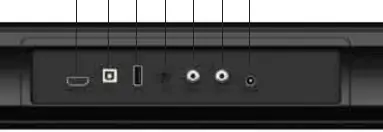
- HDMI(ARC): Connect to compatible devices using an HDMI cable.
- OPTICAL IN: Connect using a digital optical cable.
- COAXIAL IN: Connect using a digital coaxial cable.
- AUX IN: Connect using the provided 3.5mm stereo jack cable.
- USB IN: Connect a flash drive (FAT32 format, max 32GB) for MP3/WAV playback.
- SW OUT: Connect the wired subwoofer.
- AC IN: Connect the power supply.
Soundbar Control
The control panel on the soundbar allows for basic operation:
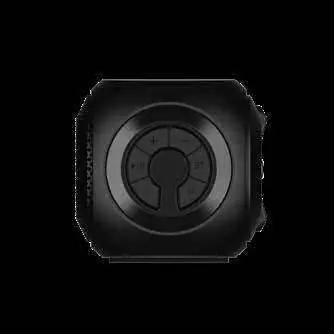
- M: Select input mode (HDMI/BT/OPTICAL/COAXIAL/AUX/USB).
- BT: Switch to Bluetooth pairing mode (hold for 3s to disconnect).
- - / +: Decrease/Increase volume.
- Play/Pause: Play or pause audio.
- Power: Short press to turn on, long press to turn off.
Remote Control
The remote provides full control over the soundbar, including:
- Power, Mute, Volume +/-
- Treble +/- and Bass +/- adjustments.
- Track navigation: Previous/Next track, Play/Pause.
- Mode selection: Dedicated buttons for BT, USB, AUX, COAX, HDMI(ARC).
- EQ: Cycle through equalizer presets.
- 3D: Toggle 3D surround sound.
- Repeat: USB repeat modes.
Input Functions
Ensure the TV audio output is set to PCM when playing non-Dolby video content. For Bluetooth, press the BT button; the LED will flash while pairing. For USB, insert a compatible drive, and the unit will automatically switch to USB mode.
Equalizer Modes
The soundbar features 3 EQ presets: Music (EQ1), Movie (EQ2), and News (EQ3). Press the EQ button on the remote to cycle through them.
Wall Mounting
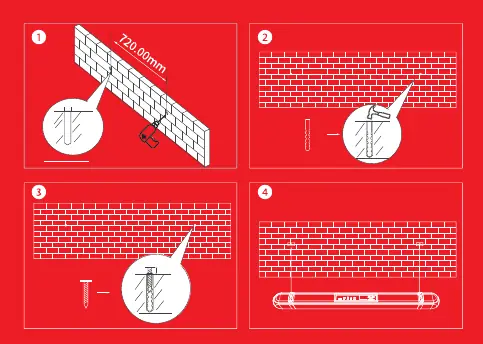
The soundbar has two keyhole slots on the back. Use the provided fixings or a compatible bracket to mount the unit on the wall. Ensure the mounting points are spaced correctly (720mm apart).
Technical Specifications
- Output Power RMS: 120W
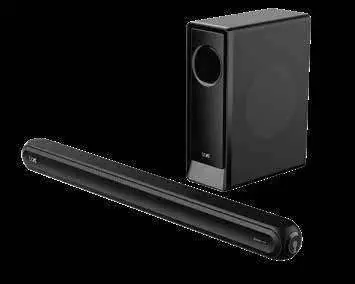
- Speaker drivers: 4 x 2.25" 15W units + 1 x 6.5" 60W subwoofer
- Frequency: 45Hz~20KHz
- SNR: >=80dB
- Bluetooth: 5.0+EDR (Range up to 10m)
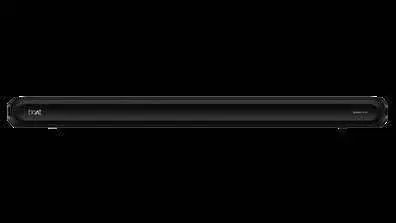
- Dimensions: Soundbar 940x75x80mm, Subwoofer 305x145x425mm
Manufacturer information
boAt Lifestyle
Practical help
Common problems
No sound from the soundbar
Check all cable connections, ensure the correct input mode is selected, and verify that the TV audio output is set to PCM.
Bluetooth pairing fails
Ensure the soundbar is in pairing mode (LED flashing) and the source device is within 10 meters.
USB playback not working
Ensure the USB flash drive is formatted to FAT32 and does not exceed 32GB capacity.
Before use
- Verify all package contents are present.
- Ensure the power supply voltage matches the local standard (110-240V).
- Set TV audio output to PCM for non-Dolby content.
- Check that the subwoofer is connected to the SW OUT port.
Show more Show less
Specs in practice
- Output Power RMS
- Total audio power output of 120W.
- Bluetooth 5.0+EDR
- Wireless connectivity standard for audio streaming.
Images and diagrams
- The connections panel shows the layout of HDMI, Optical, Coaxial, AUX, USB, Subwoofer, and Power ports.
- The wall mounting diagram illustrates drilling holes 720mm apart and inserting wall plugs.
Model compatibility
- USB drives must be FAT32 format and max 32GB.
- TV audio output must be set to PCM for non-Dolby video.

Manual page author
Michael Turner
Technical manual editor