Electronics / Speakers & Soundbars
User Manual for boAt Aavante Octave Plus Soundbar
Quick guide for the boAt Aavante Octave Plus soundbar. Learn how to set up, mount, connect via Bluetooth, HDMI ARC, USB, or AUX, and operate your device.
Quick answers from the manual
Quick answer
- The boAt Aavante Octave Plus is a 2.2-channel soundbar. You can connect it to your TV via HDMI (ARC), or to other devices via Bluetooth, USB, or AUX. Use the Input button on the remote or soundbar to switch modes. p. 7, 10, 11, 12
Key actions
- Wall Mounting p. 6
- Bluetooth Pairing p. 11
- Resetting the Soundbar p. 7, 9
First start
- Unpack the unit, connect the power cable, and press the Power button to enter standby mode. p. 5, 10
Show 4 more answers Show less
Problems and fixes
Soundbar not responding to remote
Check battery polarity and ensure no obstacles are blocking the sensor.
p. 9Maintenance and reset
- Long press the Play/Pause button on the soundbar or remote to reset to default settings and clear Bluetooth memory. p. 7, 9
Technical specifications
| Parameter | Value | Meaning | Pages |
|---|---|---|---|
| Output Power | 80W | Audio output capacity | p. 14 |
| Bluetooth | v5.3 | Wireless version | p. 14 |
Where to find it in the PDF
- Components List p. 2
- Wall Mounting p. 6
- Controls and Connections p. 7, 8
- Specifications p. 14
Table of contents
Manual images
Click an image to enlargeQuick guide from the manual
The boAt Aavante Octave Plus is a 2.2-channel soundbar with a built-in subwoofer, designed to enhance audio for movies, music, and games. This manual provides instructions for installation, connectivity, and operation. Ensure you have all components: Soundbar, Remote Control, AUX Cable, and Wall Mount Kit.
Safety and Warnings
- Do not dismantle the product or expose it to rain, moisture, or extreme temperatures.
- Ensure the power supply matches the unit's voltage (110-240V).
- Keep at least 20 cm of space above and 5 cm on each side of the unit for ventilation.
- Do not place the unit near water sources or strong magnetic fields.
- Clean only with a dry cloth; do not use chemical solvents.
Installation
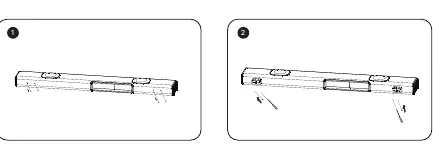
Free Standing
Place the soundbar horizontally on a flat, stable surface such as a TV unit or shelf. Align it centrally with the TV screen and ensure there is space between the soundbar and the wall for proper airflow.
Wall Mounting
Warning: If you are not confident in mounting the device, seek professional assistance. Install on a vertical, reinforced area.
- Measure 24.41 inches (620mm) and drill two parallel holes (¼ inch each).
- Insert dowels into the holes (for solid walls).
- Attach the soundbar to the screws and push to the right to lock it in place.
- Maintain at least 25mm (1 inch) distance between the soundbar and the TV for optimal performance.
Controls and Connections
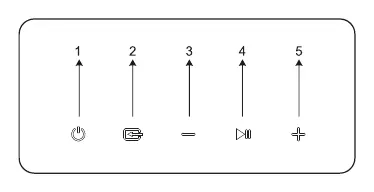
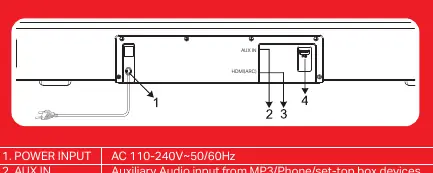
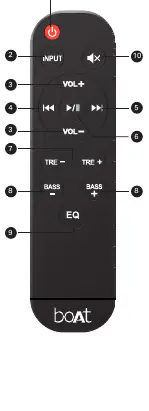
Soundbar Panel
- Power Button: Standby ON/OFF.
- Input Button: Switch between Bluetooth, HDMI(ARC), USB, and AUX.
- (-) Button: Decrease volume (short press); return to previous track (long press).
- Play/Pause/Reset Button: Play/pause (Bluetooth/USB); Mute/unmute (AUX/HDMI); Reset/Clear BT history (long press).
- (+) Button: Increase volume (short press); skip to next track (long press).
Rear Ports
- Power Input: AC 110-240V.
- AUX IN: For MP3/Phone/Set-top box devices.
- HDMI(ARC): Connect to TV.
- USB Input: For USB flash drives (MP3 files only).
Operation
Bluetooth Pairing
- Switch the soundbar to Bluetooth mode using the Input button.
- Search for "Aavante Octave Plus" on your media device and select it to pair.
- If prompted for a password, use "0000".
HDMI (ARC) Mode
Connect a high-speed HDMI cable from the soundbar's HDMI(ARC) port to the TV's HDMI(ARC) port. Ensure your TV supports HDMI-CEC and ARC, and set the TV audio output to PCM Stereo or Stereo 2.0.
USB and AUX
For USB, insert a drive with MP3 files; playback starts automatically. For AUX, connect the provided 3.5mm cable to the audio source and the soundbar, then select AUX mode.
Specifications
- Output Power: 80W
- Bluetooth: v5.3 (up to 10m range)
- Frequency Response: 40Hz-20kHz
- Dimensions: 710 x 89 x 75mm
- Weight: 1.781 kg
Manufacturer information
boAt Lifestyle
Practical help
Common problems
No sound via HDMI ARC
Ensure your TV supports HDMI-CEC and ARC, and that these functions are enabled in the TV settings. Set TV audio output to PCM Stereo or Stereo 2.0.
Bluetooth pairing fails
Ensure the soundbar is in Bluetooth mode. If the device was previously paired, long press the Reset button to clear Bluetooth memory and try again.
Remote control not working
Check that batteries are installed correctly according to polarity (+/-). Ensure there are no obstacles between the remote and the soundbar sensor.
Before use
- Remove all packaging material from the soundbar.
- Check that your local power supply voltage (110-240V) matches the unit.
- Install two AAA batteries in the remote control.
- Ensure the soundbar is placed on a stable surface or securely wall-mounted.
- If using HDMI ARC, ensure your TV settings are configured for external audio output.
Show more Show less
Specs in practice
- 80W Output Power
- The total audio power output of the soundbar system.
- Bluetooth v5.3
- The wireless connectivity version, supporting a range of up to 10 meters.
Images and diagrams
- Wall mounting requires drilling two holes spaced 620mm apart.
- The rear panel contains the Power Input, AUX IN, HDMI(ARC), and USB ports.
- The control panel buttons are located on the unit for Power, Input, Volume, and Playback control.
Model compatibility
- USB port supports MP3 audio files only.
- HDMI ARC requires an HDMI 1.4 compatible cable or higher.
- TV must support HDMI-CEC and ARC functions for HDMI audio return.

Manual page author
Michael Turner
Technical manual editor