Electronics / Speakers & Soundbars
User Manual for boAt PartyPal 600 Party Speaker
Quick guide for the boAt PartyPal 600 party speaker. Learn how to pair Bluetooth, use TWS mode, adjust LED effects, connect microphones, and manage charging and settings.
Quick answers from the manual
Quick answer
- The boAt PartyPal 600 is a portable party speaker with Bluetooth, USB, TF card, and AUX connectivity. It supports TWS pairing, microphone/guitar inputs, and LED light effects. p. 2, 4
Key actions
- Pairing Bluetooth p. 5
- Activating TWS Mode p. 7
- Resetting the Speaker p. 9
First start
- Charge the battery fully before first use. p. 11
Show 4 more answers Show less
Problems and fixes
Speaker does not respond
Press the reset button or power cycle the device.
p. 9Maintenance and reset
- Press the reset button on the control panel. p. 9
Technical specifications
| Parameter | Value | Meaning | Pages |
|---|---|---|---|
| Output Power | 220W RMS | Audio output power | p. 12 |
| Battery | 7500 mAh @12V | Battery capacity | p. 12 |
Where to find it in the PDF
- Control Panel Diagram p. 2
- Specifications p. 12
Table of contents
Manual images
Click an image to enlargeQuick guide from the manual
The boAt PartyPal 600 is a portable party speaker designed for versatile audio playback. Key features include Bluetooth connectivity, TWS (True Wireless Stereo) pairing for dual-speaker setups, microphone and guitar inputs, and customizable LED light effects. Before first use, it is recommended to fully charge the device.
Product Overview
The speaker features a comprehensive control panel located on the top. Key controls include:
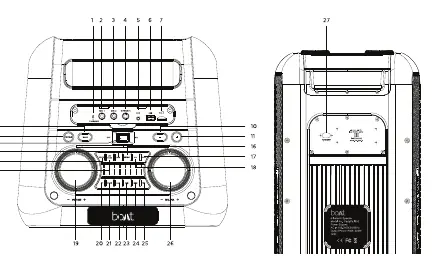
- Master Volume Knob: Adjusts overall sound level.
- Mode Button: Switches between Bluetooth, USB, TF Card, and AUX modes.
- Bass/Treble Buttons: Allows fine-tuning of sound profiles.
- TWS Button: Enables pairing with a second PartyPal 600 speaker.
- LED Mode Button: Cycles through 7 different light effects.
- Record Button: Manages recording functions to USB/TF storage.
Bluetooth & TWS Functionality
Bluetooth Pairing:
- Switch on the speaker.
- Press the Mode or BT button until the LED displays "BLUE".
- Enable Bluetooth on your smartphone and select "PartyPal 600" from the device list.
- If prompted for a passkey, enter "0000".
TWS Mode (Connecting two speakers):
- Ensure both speakers are powered on and not connected to other devices.
- Select Bluetooth mode on both units.
- Press the TWS button on the main speaker until it emits a tone.
- The speakers will automatically pair with each other.
Inputs and Modes
The speaker supports multiple audio sources:

- AUX Mode: Connect via 3.5mm cable; the speaker switches automatically.
- USB/TF Card: Insert storage media containing MP3 files. Ensure the device is formatted to FAT16 or FAT32.
- Microphone/Guitar: Connect wired microphones or guitars to the dedicated input jacks. Use the 'Play/Pause' button to activate microphone priority mode.
App Functionality
You can customize the speaker's display text and LED effects using the boAt Hearables App. The app allows you to change text color, animation speed, and preset animation modes. Settings reset to default when the speaker is turned off.
Charging and Maintenance
The speaker has a built-in rechargeable battery.
- Charging: Connect the provided power cable to the AC input. Charging takes approximately 7 hours. The LED indicator turns red while charging and blue when fully charged.
- Maintenance: If the speaker is not used for a long time, charge it at least every 3 months. Avoid using the speaker while it is charging.
- Cleaning: Use a soft or slightly damp cloth. Do not use chemicals.
Safety Warnings
- Do not disassemble, repair, or modify the product.
- Do not submerge in water or expose to extreme temperatures.
- Keep away from heat sources like radiators or stoves.
- Avoid listening at maximum volume for long periods to protect hearing.
Manufacturer information
boAt Lifestyle
Practical help
Common problems
Speaker does not turn on or respond.
Press the reset button on the control panel to clear connection history and reset settings. If the issue persists, power cycle the device.
Bluetooth pairing fails.
Remove 'PartyPal 600' from your phone's paired device list, bring the phone closer to the speaker, and attempt to pair again.
USB/TF card not recognized.
Ensure the storage device is formatted to FAT16 or FAT32 and contains MP3 files. External USB devices requiring >5V or >200mA are not supported.
Before use
- Fully charge the battery before first use.
- Ensure the power switch is in the OFF position when not in use.
- Check that the storage device is formatted to FAT16/FAT32.
- Ensure the speaker is within 5 meters of the second speaker for TWS pairing.
Show more Show less
Specs in practice
- Output Power
- 220W RMS, providing high-volume audio output.
- Charging Time
- Up to 7 hours for a full charge.
- Bluetooth Version
- v5.3 for stable wireless connectivity.
Images and diagrams
- The control panel features a master volume knob, mic volume knob, and various buttons for mode selection, playback control, and LED effects.
- The rear panel contains the AC input for charging.
Model compatibility
- Supports Bluetooth, USB, TF Card, AUX, and Guitar/Mic inputs.
- Compatible with boAt Hearables App for display customization.
- TWS function requires two PartyPal 600 units.

Manual page author
Emily Carter
User documentation editor