Electronics / Speakers & Soundbars
User Manual for boAt Aavante Bar 2500 Soundbar
Quick guide for the boAt Aavante Bar 2500 5.1 channel soundbar. Learn how to install, mount, connect via Bluetooth, HDMI, Optical, AUX, or USB, and operate your audio system.
Quick answers from the manual
Quick answer
- The boAt Aavante Bar 2500 is a 5.1 channel soundbar system. It supports Bluetooth, HDMI(ARC), Optical, AUX, and USB inputs. It can be placed on a surface or wall-mounted. p. 1, 2, 12
Key actions
- Pairing Bluetooth p. 10
- Wall Mounting p. 8, 9
First start
- Connect the power adapter, press the Power button to turn on, and select the desired mode. p. 10
Show 3 more answers Show less
Problems and fixes
No sound or connection issues
Check cable connections, ensure correct input mode is selected, or re-pair Bluetooth.
p. 10, 11Technical specifications
| Parameter | Value | Meaning | Pages |
|---|---|---|---|
| Total Output | 180W RMS | Total power output | p. 12 |
| Bluetooth | v5.0 + EDR | Wireless connectivity version | p. 12 |
Where to find it in the PDF
- Overview and Ports p. 4, 5
- Installation p. 7, 8, 9
Table of contents
Manual images
Click an image to enlargeQuick guide from the manual
The boAt Aavante Bar 2500 is a 5.1 channel soundbar system designed for immersive audio. This guide provides essential steps for installation, connectivity, and operation. Ensure you read the safety warnings before use, particularly regarding power routing and moisture exposure.
Components list
- Soundbar
- Wired Subwoofer
- Satellite Speakers (2x)
- Adaptor
- Remote Control
- AUX Cable
- Screws for Wall-Mount
- Warranty Card
- Catalogue
Safety & Warnings
- Keep the product away from heat sources like radiators or stoves.
- Do not expose the product to dripping, splashing, or excessive moisture (e.g., bathrooms, saunas).
- Do not insert objects into openings.
- Only use included accessories.
- Do not attempt to service the product yourself; refer to qualified personnel.
Overview and Ports
The soundbar features various input ports on the rear panel:
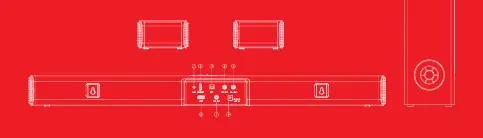
- AUX port: For 3.5mm stereo jack connection.
- HDMI(ARC) port: For compatible TV/media devices.
- Optical port: For digital audio connection.
- Satellite ports: Dedicated outputs for left and right satellite speakers.
- USB port: Supports FAT32 format, max 64GB for MP3 playback.
- Subwoofer out port: For connecting the wired subwoofer.
- DC in port: For power adapter connection.
Installation and Wall Mounting
Placement: Place the soundbar on a flat surface in front of the TV or mount it on the wall.
Wall Mounting Steps:
- Mark and drill two parallel holes 500mm apart on the wall.
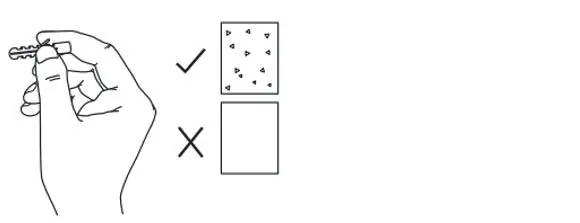
- Insert the supplied anchors (required for solid walls like brick, concrete, or wood; not for drywall/plaster).
- Secure the screws, ensuring they protrude 5mm from the wall.
- Hang the soundbar on the screws and push downward to lock it in place.
Operation
Power ON/OFF: Connect the power adapter to the DC port. Press the 'Power' button to switch on/off. The device enters standby mode automatically if no operation is performed for 15 minutes.
Bluetooth Connectivity:
- Turn on the soundbar; it defaults to 'bt' mode.
- Search for 'Aavante Bar 2500' on your media device.
- If prompted for a code, enter '0000'.
- The 'bt' indicator on the LED display will remain stable once connected.
Input Modes
Use the 'Mode' button to cycle through inputs. The LED display indicates the current mode:
- HDMI(ARC): Connect via HDMI cable.
- Optical: Connect via optical cable.
- AUX: Connect via 3.5mm cable.
- USB: Insert USB drive for direct playback.
Remote Control
The remote allows full control over the soundbar, including:
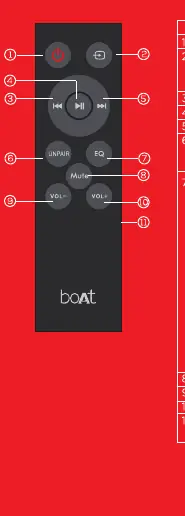
- Mode: Switch between BT, Aux, Optical, HDMI ARC, and USB.
- EQ: Cycle through 12 equalizer presets (Music, Movies, News, 3D, Flat, Classical, Rock, Pop, Jazz, Live, Club, Dance).
- Unpair: Disconnect the current Bluetooth device.
- Volume/Playback: Dedicated buttons for volume control and track navigation.
Technical Specifications
- Total Output: 180W RMS
- Drivers: 7 drivers total
- Bluetooth: Version 5.0 + EDR (Range up to 10m)
- USB Support: FAT32, max 64GB
Manufacturer information
boAt Lifestyle
Practical help
Common problems
Soundbar switches off automatically
The device automatically switches off if there is no operation performed for 15 minutes.
Bluetooth pairing fails
Ensure devices are within transmission range. If asked for a code, enter '0000'.
Before use
- Verify all components are present (Soundbar, Subwoofer, Satellites, Cables, Remote).
- Ensure a power outlet is available.
- Check wall type before mounting (anchors are for solid walls only).
- Ensure HDMI/Optical cables are available (not provided).
Show more Show less
Images and diagrams
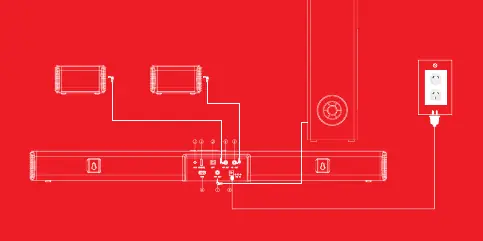
- The installation diagram shows the connection of the subwoofer and satellite speakers to the main soundbar unit.
- Wall mounting requires 500mm spacing between holes.
Model compatibility
- USB supports FAT32 format and 64GB max.
- HDMI(ARC) and Optical cables are not provided.

Manual page author
Michael Turner
Technical manual editor