Electronics / Speakers & Soundbars
User Manual for boAt AAVANTE BAR 1800V2 Soundbar
Quick guide for the boAt AAVANTE BAR 1800V2 soundbar. Learn how to connect your devices, use the remote control, mount the soundbar on the wall, and troubleshoot common audio issues.
Quick answers from the manual
Quick answer
- The boAt AAVANTE BAR 1800V2 is a 2.1 channel soundbar with a wireless subwoofer. It supports Bluetooth, HDMI(ARC), Optical, Coaxial, AUX, and USB inputs. p. 1
Key actions
- Pairing the subwoofer p. 4
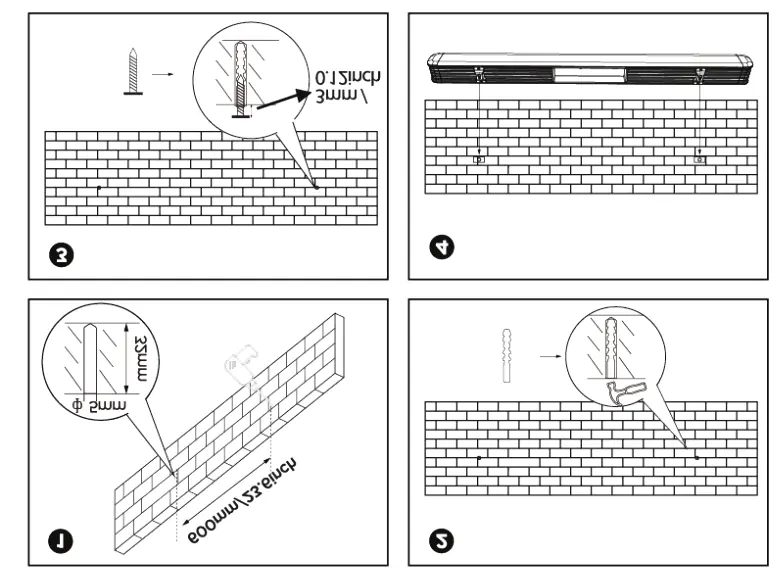
- Wall mounting p. 6
First start
- Connect both the soundbar and subwoofer to power. Wait for the subwoofer LED to turn solid red, indicating successful pairing. p. 4
Show 4 more answers Show less
Problems and fixes
No sound
Check that the Sound bar system is not set to standby and the correct source is selected.
p. 10Maintenance and reset
- Clean the surface with a barely damp cloth. Do not use abrasives or chemical solvents. p. 11
Technical specifications
| Parameter | Value | Meaning | Pages |
|---|---|---|---|
| Output Power | 120W RMS | 15Wx4 + 60W | p. 11 |
| Bluetooth | V5.0 + EDR | Wireless connectivity range up to 10m | p. 11 |
Where to find it in the PDF
- Connections p. 2
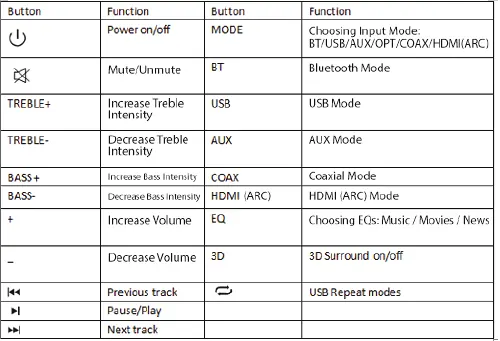
- Remote Control p. 3
- Wall Mounting p. 6
- Technical Specifications p. 11
Table of contents
Manual images
Click an image to enlargeQuick guide from the manual
The boAt AAVANTE BAR 1800V2 is a 2.1 channel soundbar system with a wireless subwoofer. To set up, connect both units to a power source. They will pair automatically within 3-5 seconds. A blinking red LED on the subwoofer indicates pairing is in progress, while a solid red LED confirms a successful connection.
Connections
The soundbar features several input options located on the rear panel:
- USB IN: Supports flash drives up to 32GB (FAT32 format) for MP3/WAV playback.
- OPTICAL IN: For compatible devices using an optical cable.
- COAXIAL IN: For compatible devices using a coaxial cable.
- HDMI(ARC): For compatible devices using an HDMI cable.
- AUX IN: For 3.5mm jack cable connections.
- AC IN: Power supply input.
Remote Control and Operation
The remote control allows you to manage volume, bass/treble intensity, and input modes. Use the MODE button to cycle through BT, USB, AUX, OPT, COAX, and HDMI(ARC). The EQ button toggles between Music, Movies, and News presets. The 3D button enables or disables 3D surround sound.
Soundbar Controls
The physical control panel on the soundbar includes buttons for power, volume adjustment, and track navigation. The LED display indicates the current mode (e.g., BT for Bluetooth, ARC for HDMI ARC, OPT for Optical).
Wall Mounting
The soundbar can be mounted on a wall using the two keyhole slots on the rear. Ensure a spacing of 600mm between the mounting points. Use appropriate fixings for your wall type.
Troubleshooting
- No sound: Ensure the system is not in standby mode, the correct source is selected, and the volume on the source device is turned up.
- No sound (digital source): Check that the sample rate of the source is within the correct range for the soundbar.
- Remote not working: Try replacing the batteries.
- Bluetooth lag: If experiencing lag when connected to a TV via Bluetooth, use a wired connection (AUX, Optical, HDMI, or Coax) instead.
Safety Instructions
To ensure safe operation, do not expose the unit to rain, moisture, or dripping water. Do not place the soundbar on unstable surfaces or near heat sources like radiators. Ensure proper ventilation by not covering the unit. Do not attempt to service the unit yourself, as this may expose you to dangerous voltage.
Manufacturer information
boAt Lifestyle
Practical help
Common problems
No sound
Check that the system is not in standby, the correct source is selected, and the volume on the source device is turned up.
Remote control not working
Try replacing the batteries.
Sound lag via Bluetooth
Use a wired connection (AUX, Optical, HDMI, or Coax) instead of Bluetooth.
Before use
- Ensure the power adaptor is properly connected.
- Check that the local voltage matches the system requirements.
- Ensure the subwoofer is paired (solid red LED).
- Format USB drives to FAT32 (max 32GB).
Show more Show less
Specs in practice
- Output Power
- 120W total (60W soundbar + 60W subwoofer).
- USB Compatibility
- Supports MP3/WAV files, FAT32 format, up to 32GB.
Images and diagrams
- Wall mounting requires 600mm spacing between the two mounting holes.
- LED indicators on the soundbar show the active mode (e.g., BT, OPT, ARC).
Model compatibility
- Not compatible with CRT TVs.
- USB drives must be formatted as FAT32.

Manual page author
Michael Turner
Technical manual editor