Electronics / Speakers & Soundbars
User Guide for boAt AAVANTE THUMP PLUS Soundbar
Quick guide for the boAt AAVANTE THUMP PLUS soundbar. Learn how to set up, connect via Bluetooth, USB, AUX, or HDMI ARC, mount on the wall, and use the remote control.
Quick answers from the manual
Quick answer
- The boAt AAVANTE THUMP PLUS is a 2.1-channel soundbar with a wired subwoofer. It supports Bluetooth v5.4, USB, AUX, Optical, and HDMI (ARC) connections. p. 1, 15
Key actions
- Bluetooth Pairing p. 11
- Wall Mounting p. 6
First start
- Connect the power cable and subwoofer, turn on the unit, and select the desired input mode using the remote or control panel. p. 10
Show 4 more answers Show less
Problems and fixes
Bluetooth connectivity issues
Remove from device history, ensure distance is less than 8 meters, and re-pair.
p. 12Maintenance and reset
- Long press the (+) button on the soundbar for 2 seconds to clear Bluetooth history and reset volume to 50%. p. 8
Technical specifications
| Parameter | Value | Meaning | Pages |
|---|---|---|---|
| Output Power | 200W R.M.S | Total audio power output | p. 15 |
| Bluetooth | v5.4 | Wireless connectivity version | p. 15 |
Where to find it in the PDF
- Safety & Warnings p. 3, 4
- Installation p. 5, 6
- Controls & Connections p. 7, 8
- Specifications p. 15
Table of contents
Manual images
Click an image to enlargeQuick guide from the manual
The boAt AAVANTE THUMP PLUS is a 2.1-channel soundbar system with a wired subwoofer. This guide covers setup, connection methods (Bluetooth, USB, AUX, Optical, HDMI ARC), and remote control operation. Ensure the unit is placed on a stable surface or mounted securely on a wall. Always check the voltage before connecting to power.
Unpacking and Setup
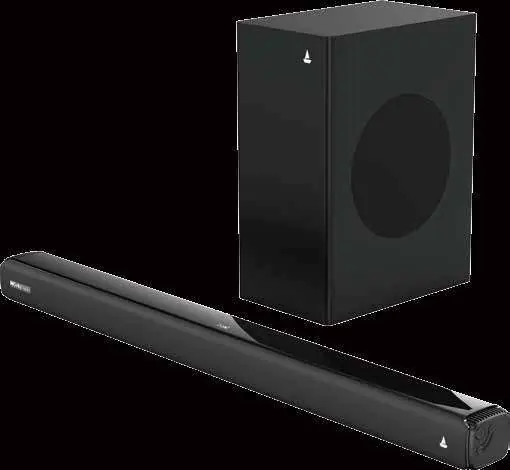
- Remove the soundbar and subwoofer from the carton.
- Remove all packing materials.
- Place the soundbar on a level surface, such as a TV unit or shelf, aligning it centrally with the TV.
- Ensure there is space between the soundbar and the wall for proper airflow.
- Unwind the power cord and connect the subwoofer to the soundbar.
Installation - Wall Mounting
If you prefer wall mounting, ensure the wall is reinforced. If unsure, seek professional assistance.
- Drill 2 holes in the wall matching the distance of the wall bracket holes on the soundbar.
- Insert plastic anchors and secure screws, leaving some space.
- Attach the 2 EVA pads onto the wall mount bracket.
- Hang the soundbar by inserting the screws into the wall mount bracket.
Controls and Connections
The soundbar features an LED display and physical buttons for power, volume, and input selection. Rear connections include:
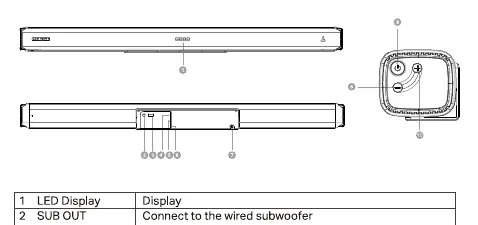
- SUB OUT: Connect to the wired subwoofer.
- USB Input: For USB flash drives (MP3 files).
- AUX: 3.5mm input for external audio devices.
- Optical: For digital audio from TV or other devices.
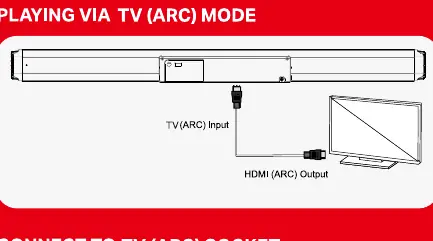
- TV (ARC): HDMI connection for TV audio return channel.
Remote Control
The remote control allows full operation of the soundbar, including:
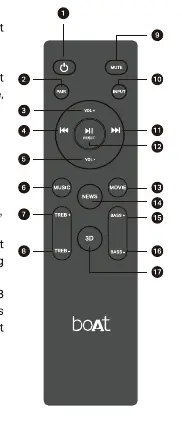
- Power: Standby ON/OFF.
- Input: Switch between Bluetooth, USB, AUX, TV(ARC), and Optical modes.
- Volume/Bass/Treble: Adjust sound levels and EQ effects (Music, Movie, News, 3D).
- Playback: Play/Pause, Previous/Next track, Fast rewind/forward.
Operating Modes
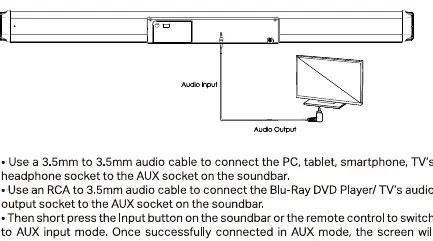
- Bluetooth: Select Bluetooth mode, search for 'Aavante Thump Plus' on your device, and pair.
- USB: Insert a USB drive with MP3 files; the unit switches automatically.
- AUX: Connect via 3.5mm cable and select AUX mode.
- Optical: Connect via optical cable; set TV output to PCM mode.
- TV (ARC): Connect via HDMI cable; ensure TV supports HDMI-CEC and ARC.
Specifications
- Output Power: 200W RMS
- Frequency Response: 45Hz-20kHz
- Bluetooth: v5.4
- Signal-to-Noise Ratio: 70dB
- Working Voltage: AC 110V-240V
Manufacturer information
boAt Lifestyle
Practical help
Common problems
Bluetooth connection issues
Remove 'Aavante Thump Plus' from your device's Bluetooth history, ensure the device is within 8 meters, and try pairing again.
No sound in Optical mode
Ensure the TV or source device audio output is set to PCM mode.
Remote control not working
Check battery polarity, ensure the remote is within 8 meters, and remove any obstacles between the remote and the soundbar.
Before use
- Unpack and remove all packing material.
- Place the soundbar on a flat, stable surface or mount it securely.
- Connect the wired subwoofer to the soundbar.
- Insert two AAA batteries into the remote control.
- Verify the power supply voltage matches the unit requirements.
Show more Show less
Specs in practice
- Output Power
- 200W RMS provides the total audio power output.
- Frequency Response
- 45Hz-20kHz indicates the range of sound frequencies the system can reproduce.
- Bluetooth v5.4
- The latest version for stable wireless connectivity.
Images and diagrams
- Wall mounting steps showing hole drilling and bracket attachment.
- Rear panel connection layout for Subwoofer, USB, AUX, Optical, and HDMI.
- Remote control button mapping for EQ and playback.
Model compatibility
- TV (ARC) mode requires a TV that supports HDMI-CEC and ARC functions.
- Optical mode requires the source device to be set to PCM output.
- USB mode supports MP3 files only.

Manual page author
Emily Carter
User documentation editor