Electronics / Speakers & Soundbars
User Manual for boAt AAVANTE BAR 1700D Soundbar
Quick guide for the boAt AAVANTE BAR 1700D soundbar. Learn how to connect via Bluetooth, HDMI ARC, Optical, or AUX, mount the soundbar, and use the remote control.
Quick answers from the manual
Quick answer
- The boAt AAVANTE BAR 1700D is a 2.1 channel soundbar system with 120W output. It supports Bluetooth, HDMI (ARC), Optical, and AUX connections. Setup involves connecting the power, selecting the input mode via the remote or soundbar buttons, and ensuring the TV/source device is set to the correct audio output. p. 3, 6, 7
Key actions
- Switching input modes p. 6, 7
- Pairing Bluetooth p. 6
- Wall mounting p. 5
First start
- Plug in the power cord, switch on the soundbar, and select the desired input mode. p. 6
Show 3 more answers Show less
Problems and fixes
No sound
Check standby mode, source selection, and volume levels.
p. 11Technical specifications
| Parameter | Value | Meaning | Pages |
|---|---|---|---|
| Output Power | 120W | Total RMS power | p. 3 |
| Bluetooth | V5.0 | Bluetooth version | p. 3 |
Where to find it in the PDF
- Controls and connections p. 3
- Remote Control p. 4
- Positioning p. 5
- Operation Instructions p. 6
Table of contents
Manual images
Click an image to enlargeQuick guide from the manual
The boAt AAVANTE BAR 1700D is a 2.1 channel soundbar system designed for home audio. To get started, connect the power cord to a wall outlet, power on the device, and select your preferred input mode (Bluetooth, AUX, Optical, HDMI ARC, or USB) using the remote control or the buttons on the soundbar. Ensure your TV or source device is configured to output audio to the soundbar for the best experience.
Controls and connections
The soundbar features a main display and several input ports on the back panel:
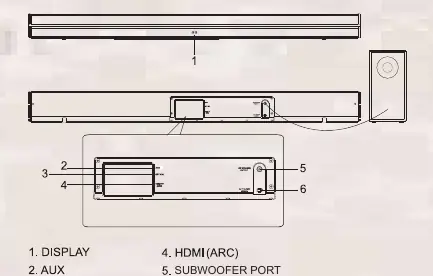
- Display: Shows the current input mode (e.g., Bt, AU, OP, Hd, US).
- AUX: For analog audio input.
- Optical: For digital optical audio input.
- HDMI (ARC): For high-quality digital audio from compatible TVs.
- Subwoofer Port: Dedicated connection for the included subwoofer.
- Power Input: AC 110-240V 50/60Hz.
Remote control
The remote control provides full access to system functions:
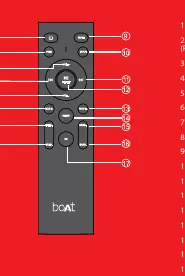
- Power/Standby: Turns the unit on or off.
- Input: Cycles through available modes (AUX, USB, HDMI, OPT, BT).
- EQ Effects: Dedicated buttons for Music, Movie, News, and 3D sound profiles.
- Playback Controls: Play/Pause, Previous, and Next buttons (active in USB and BT modes).
- Volume/Bass/Treble: Adjust master volume, bass intensity, and treble intensity.
- Pairing: Press and hold for 2 seconds to connect or disconnect Bluetooth devices.
Positioning the soundbar
For optimal sound performance:

- Flat Surface: Place the soundbar horizontally on a TV unit or shelf, aligned centrally with the TV screen. Avoid placing it inside a cabinet or walled shelf to ensure proper airflow.
- Wall Mounting: If wall mounting, ensure the wall is vertical, fast, and reinforced. For plaster walls, screw into wall studs. Maintain at least 25mm (1 inch) distance between the soundbar and the TV. If you are not confident in mounting it yourself, seek professional assistance.
Operation and connection modes
The soundbar supports multiple input sources:
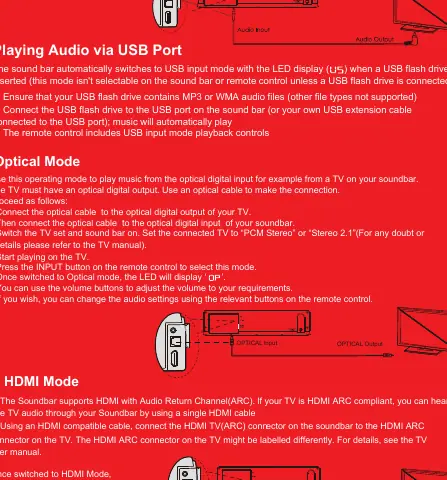
- Bluetooth: Switch to BT mode. The LED will show 'Bt'. Activate pairing on your device and select 'Aavante Bar 1700D'.
- AUX: Connect using the included audio cable. Playback is controlled via the connected device.
- Optical: Connect via optical cable. Set the TV audio output to 'PCM Stereo' or 'Stereo 2.1'.
- HDMI (ARC): Connect via HDMI cable to the TV's HDMI ARC port.
- USB: Automatically switches to USB mode when a flash drive containing MP3 or WMA files is inserted.
Troubleshooting
- No sound: Ensure the system is not in standby, the correct source is selected, and the volume is turned up on both the soundbar and the source device.
- No sound from computer/player via AUX: Check that the source volume is turned up.
- Remote not working: Check if batteries are flat and replace them.
- Bluetooth lag: If experiencing lag with a TV, use a wired connection (AUX, Optical, or HDMI) instead.
Manufacturer information
boAt Lifestyle
Practical help
Common problems
No sound
Check that the soundbar is not in standby mode, the correct input source is selected, and the volume is turned up on both the soundbar and the source device.
No sound from computer/audio player via AUX
Ensure the volume on the source device is turned up.
Remote control not working
The batteries may be flat; try replacing them.
Sound lag when connected via Bluetooth to TV
Connect the TV and soundbar using an AUX, Optical, or HDMI cable instead.
Before use
- Check that your local power supply voltage matches the soundbar requirements (110V-240V).
- Place the soundbar on a flat, stable surface or securely mount it to a wall.
- Insert 2 AAA batteries into the remote control.
- Connect the soundbar to the power outlet.
- Ensure the soundbar is not placed in a confined space to allow for proper ventilation.
Show more Show less
Specs in practice
- Output Power
- 120W R.M.S. total (30W*2 for soundbar + 60W for subwoofer).
- Frequency Response
- 45Hz-20KHz, covering the standard audible range.
Images and diagrams
- The rear panel contains the AUX, Optical, HDMI (ARC), and Subwoofer ports.
- The remote control features dedicated buttons for EQ modes (Music, Movie, News, 3D) and input selection.
Model compatibility
- Compatible with LED/LCD/Plasma & Smart TVs.
- Not recommended for use with CRT TVs due to potential image interference.
- May not be compatible with all Bluetooth-enabled TVs; wired connection is recommended for best performance.

Manual page author
David Miller
Documentation analyst