Electronics / Speakers & Soundbars
User Manual for boAt Aavante Bar Aroha Soundbar
Get the most out of your boAt Aavante Bar Aroha soundbar with this comprehensive user guide. Learn about setup, wall mounting, remote control functions, and technical specifications.
Quick answers from the manual
Quick answer
- This manual provides instructions for setting up, operating, and mounting the boAt Aavante Bar Aroha soundbar, including connection methods like Bluetooth, AUX, USB, and Optical. p. 1
Key actions
- Switching Input Modes p. 1
- Wall Mounting p. 1
First start
- Remote Battery Installation p. 1
- Positioning the Soundbar p. 1
- Power Connection p. 1
Show 2 more answers Show less
Technical specifications
| Parameter | Value | Meaning | Pages |
|---|---|---|---|
| Model | boAt Aavante Bar Aroha | Product model name | p. 1 |
| Output Power | 100W R.M.S. | Audio output power | p. 1 |
| Bluetooth | V5.3 | Bluetooth version | p. 1 |
| Frequency Response | 40Hz-20KHz | Audio frequency range | p. 1 |
| Dimensions | Soundbar: L903*D86.5*H65mm, Subwoofer: W190*D322*H370mm | Physical dimensions | p. 1 |
Where to find it in the PDF
- Components List p. 1
- Safety & Warnings p. 1
- Control Panel & Ports p. 1
- Remote Control p. 1
- Wall Mounting p. 1
- Using the Soundbar p. 1
- Technical Specifications p. 1
Table of contents
Manual images
Click an image to enlargeQuick Guide
The boAt Aavante Bar Aroha is a 2.1 channel soundbar system designed to enhance your audio experience. Before using the device, ensure all components are present, including the soundbar, subwoofer, remote control, and necessary cables. The system supports multiple input modes including Bluetooth, AUX, USB, Optical, and HDMI(ARC).
Components List
- 1X Soundbar
- 1X Subwoofer
- 1X AUX Cable
- 1X User Manual
- 1X Remote Control
- 1X Warranty Card
- 1X Wall Mounting Accessories
- 1X Audio Catalogue
- 1X AAA Battery
Soundbar Control Panel & Ports
The soundbar features physical buttons for basic control:
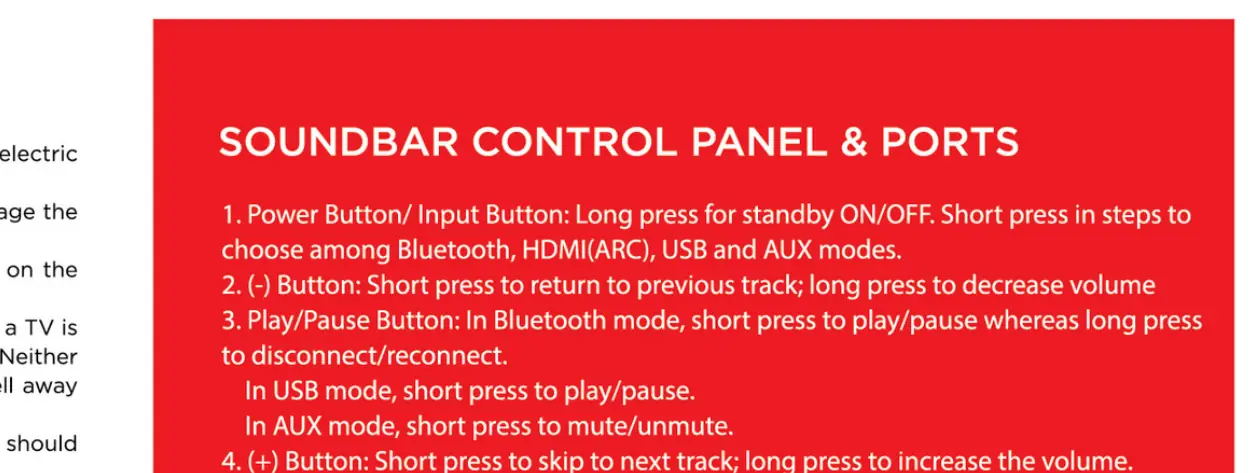
- Power/Button/Input Button: Long press for standby/on/off. Short press to cycle through modes (Bluetooth, HDMI(ARC), USB, AUX).
- Volume/Track Controls: Short press to skip tracks or adjust volume. Long press to disconnect/connect Bluetooth or mute/unmute.
- Ports: Includes AUX IN, OPTICAL, HDMI(ARC), and USB port.
Remote Control
The remote control allows for full operation of the soundbar:
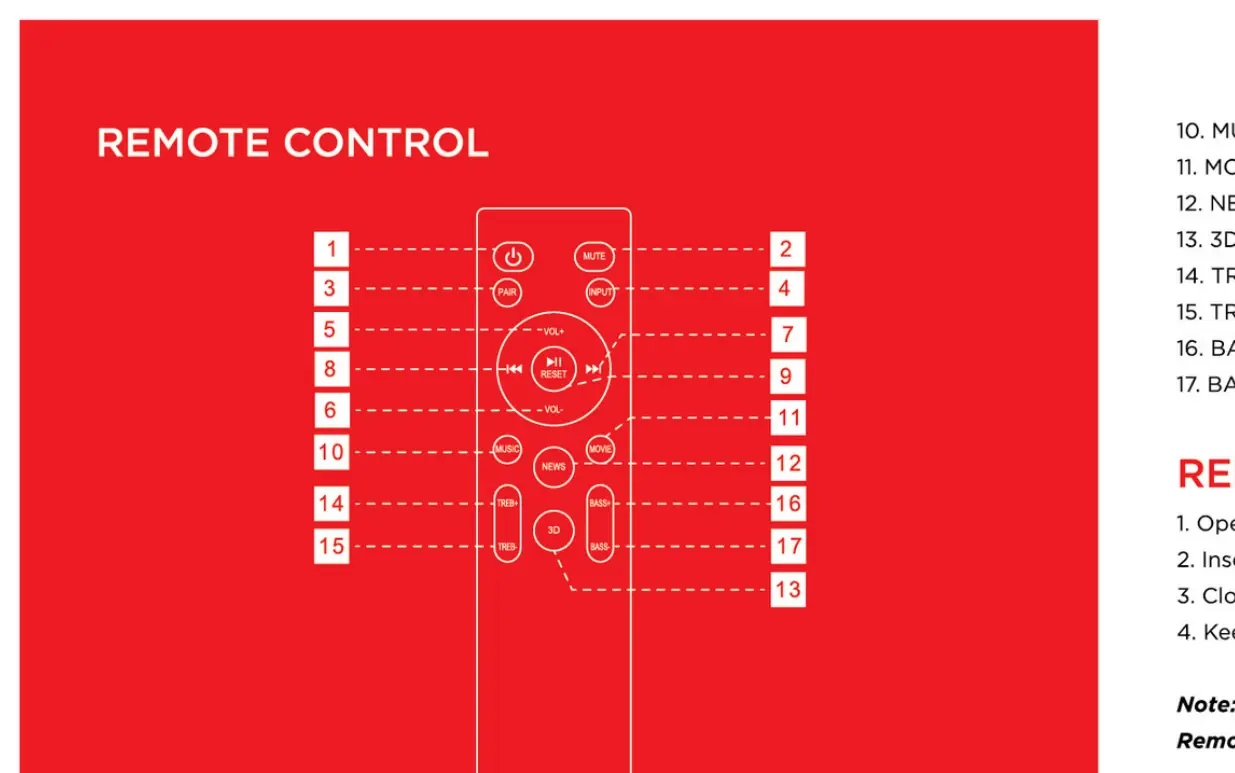
- Power: Standby mode for power ON/OFF.
- Mute: Mute ON/OFF.
- Pair: Connect or disconnect Bluetooth.
- Input: Switch among input modes (BT, OPT, HDMI(ARC), USB, AUX).
- Volume: Increase or decrease volume.
- Playback: Play/Pause, Next/Previous track.
- EQ Modes: Dedicated buttons for Music, Movie, News, and 3D EQ effects.
- Treble/Bass: Increase or decrease Treble and Bass levels.
Wall Mounting
To mount the soundbar on a wall:
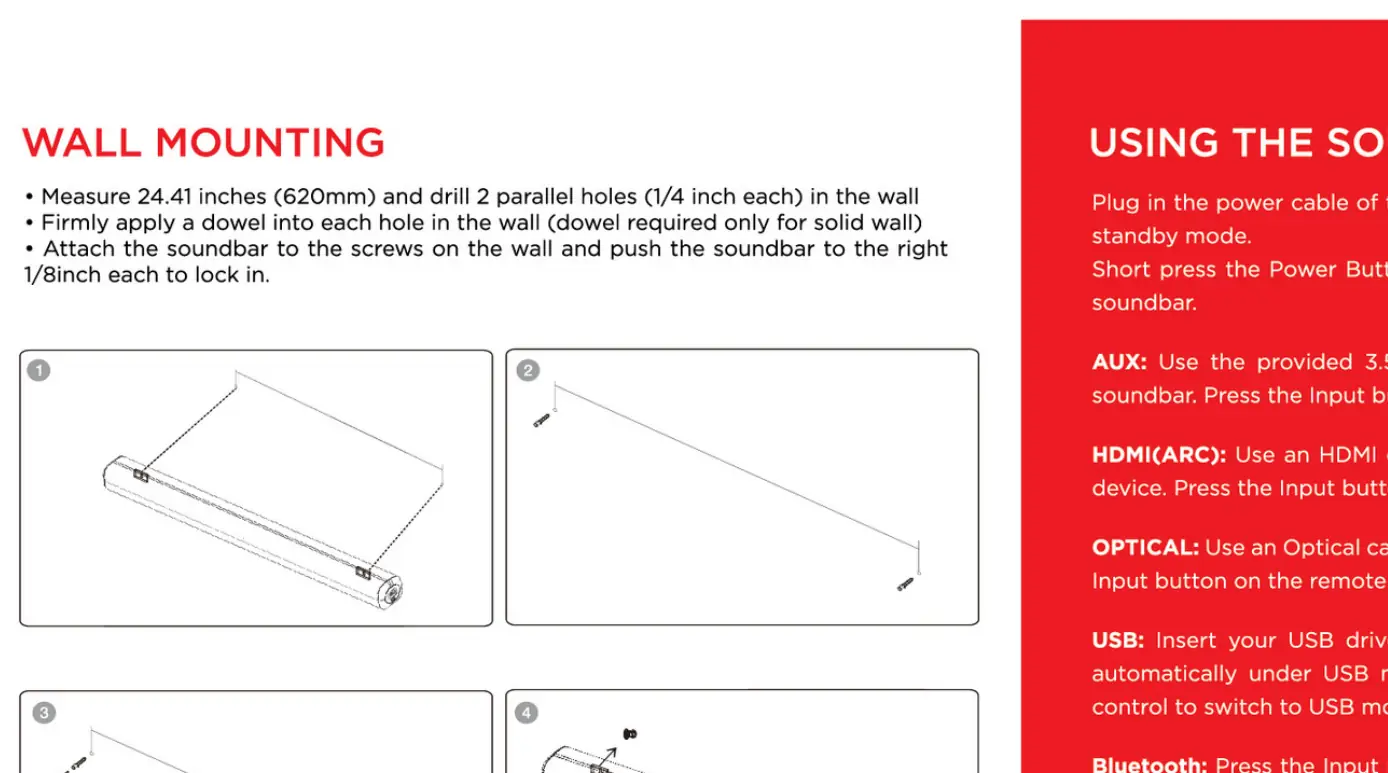
- Measure 24.4 inches (620mm) and drill two parallel 1/4 inch holes in the wall.
- Insert wall anchors into each hole (use appropriate anchors for solid walls).
- Attach the screws to the wall and mount the soundbar by aligning it with the screws.
Positioning the Soundbar
Place the soundbar horizontally on a solid surface such as a TV unit or shelf, aligning it centrally with the TV screen. Ensure the subwoofer is placed on the floor for optimal bass performance.
AC Power
Ensure the power supply is correct and matches the voltage of your local power supply. Connect the power cable to a wall outlet. Ensure the main power switch is in the OFF state before connecting the power cord to the soundbar.
Technical Specifications
- Technology: Optical, HDMI(ARC), Bluetooth v5.3, AUX, USB
- Drivers: 2.25" * 2 SB + 5.25" * 1 SW
- Output Power: 100W R.M.S.
- Frequency Response: 40Hz-20KHz
- Signal-to-Noise Ratio: ≥ 70dB
- Impedance: 4Ω*2 + 8Ω*2
- Bluetooth Version: V5.3
- Dimensions: Soundbar: 903*86.5*65mm; Subwoofer: 190*322*370mm
Safety & Warnings
To reduce the risk of electric shock, do not dismantle the product. Do not expose the unit to rain, moisture, or direct heat. Ensure the unit is placed on a stable surface and do not block any ventilation openings. Keep the device away from heat sources like radiators or stoves.
Manufacturer information
boAt Lifestyle
Practical help
Common problems
Remote control not working
Check if batteries are installed correctly and ensure the remote is within 8m range of the soundbar.
No sound output
Check if the power is on, the correct input mode is selected, and the volume is not muted.
Before use
- Verify all components (Soundbar, Subwoofer, Remote, Cables) are included.
- Install the AAA battery into the remote control.
- Place the soundbar on a stable, horizontal surface.
- Connect the subwoofer to the soundbar.
- Ensure the power supply matches the local voltage requirements.
- Select the desired input mode (BT, AUX, USB, OPT, HDMI) before playing audio.
Show more Show less
Specs in practice
- Bluetooth v5.3
- The wireless connectivity standard for streaming audio from compatible devices.
Images and diagrams
- Wall Mounting: Drill two holes 620mm apart, insert anchors, and screw in the mounting screws to hang the soundbar.
- Remote Battery: Open the battery compartment, insert the AAA battery observing polarity, and close the cover.
Model compatibility
- Supports Bluetooth, AUX, USB, Optical, and HDMI(ARC) connectivity.

Manual page author
Michael Turner
Technical manual editor