Electronics / Speakers & Soundbars
User Manual for boAt Stone 350 Portable Wireless Speaker
Comprehensive user guide for the boAt Stone 350 portable speaker. Learn how to pair via Bluetooth, use TWS mode, charge the device, and troubleshoot common connection issues.
Quick answers from the manual
Quick answer
- This manual provides instructions for operating the boAt Stone 350 portable wireless speaker, including Bluetooth pairing, TWS connection, charging, and technical specifications. p. 1
Key actions
- Power ON/OFF: Long press the power button. p. 1
- Bluetooth Pairing: Turn on the speaker, wait for the LED to blink blue, and search for 'Stone 350' on your phone. p. 1
- TWS Connection: Turn on both speakers, press and hold MFB on one for 2 seconds until a beep, wait for connection, then pair with phone. p. 1
- Charging: Use the provided charging cable. The LED turns steady red while charging and goes off when fully charged. p. 1
First start
- Turn on the speaker, ensure the LED indicator blinks blue, and search for 'Stone 350' in your phone's Bluetooth settings to pair. p. 1
Show 3 more answers Show less
Problems and fixes
Connection troubles
Remove Stone 350 from the list of paired devices on your phone, keep the phone closer to the speaker and try pairing again.
p. 1Technical specifications
| Parameter | Value | Meaning | Pages |
|---|---|---|---|
| Bluetooth Version | V5.0 | Bluetooth version | p. 1 |
| Working Range | 10m | Wireless operating range | p. 1 |
| Water Resistance | IPX7 | Water resistance rating | p. 1 |
| Output Power | 10W | Audio output power | p. 1 |
| Play Time | Up to 12 hours | Battery life | p. 1 |
| Charging Time | 1.5-2 hours | Time to charge | p. 1 |
| Battery | 2200mAh | Battery capacity | p. 1 |
Where to find it in the PDF
- User Manual p. 1
Table of contents
Quick guide from the manual
The boAt Stone 350 is a portable wireless speaker featuring Bluetooth connectivity, TWS (True Wireless Stereo) support, and playback via TF card or AUX cable. Before using the device, ensure it is fully charged using a 5V/2A charger. If you experience connection issues, remove the speaker from your phone's paired device list and attempt to pair it again.
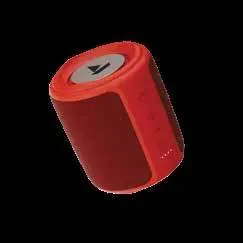
Device Controls
The speaker is operated using the following buttons:
- Power Button: Long press to turn ON/OFF. Short press to switch modes (Bluetooth/AUX/TF Card).
- MFB (Multifunction Button): Short press to play/pause or answer/end calls. Long press for 2 seconds to reject calls. Double press to redial the last number.
- "+" Button: Short press to increase volume. Long press to skip to the next track.
- "-" Button: Short press to decrease volume. Long press to return to the previous track.
Bluetooth Connectivity
- Turn the speaker on; the LED indicator will blink blue.
- Activate Bluetooth on your phone and search for "Stone 350".
- Select the device to pair. A sound prompt will confirm the connection.
- The speaker will automatically reconnect to the last paired device when turned on.
TWS Mode (Connecting Two Speakers)
You can connect two Stone 350 speakers to create a stereo effect:
- Turn on both speakers.
- Press and hold the MFB on one of the speakers for about 2 seconds until you hear a beep.
- Wait a few seconds for the speakers to connect to each other.
- Activate Bluetooth on your phone and search for "Stone 350" to pair with the combined unit.
Charging
The speaker will beep every 5 minutes when the battery is low. After three such indications, the speaker will turn off automatically. Use the provided charging cable and a 5V/2A adapter to charge the device. The LED indicator turns steady red while charging and turns off when fully charged. Avoid using the speaker while it is charging to maintain battery performance.
AUX and TF Card Modes
- AUX Mode: Connect your device using the AUX cable and short press the Power button to switch to AUX mode. Playback is controlled via the connected device.
- TF Card Mode: Insert a TF card into the slot to automatically switch to TF card playback mode.
Safety and Warnings
- Do not disassemble or repair the product yourself.
- Do not submerge the product in water, despite the IPX7 rating.
- Keep the product away from extreme temperatures and heat sources like radiators or stoves.
- Avoid listening at maximum volume to protect your hearing and extend speaker life.
- Use only the recommended charging norms (5V/2A).
Manufacturer information
boAt Lifestyle
Practical help
Common problems
Speaker not connecting to phone
Remove 'Stone 350' from the list of paired devices on your phone, keep the phone closer to the speaker, and try pairing again.
Low battery indication
The speaker beeps every 5 minutes. Charge the device immediately using a 5V/2A charger.
Battery performance degradation
Avoid using the speaker while it is charging.
Before use
- Charge the speaker fully before first use.
- Ensure you have a 5V/2A charger/adapter.
- Verify you have the provided charging cable and audio cable.
- Keep the speaker away from extreme heat sources.
Show more Show less
Specs in practice
- Charging Norms
- Requires 5V/2A input for optimal charging.
Images and diagrams
- The MFB is the primary control for calls and media playback.
- The Power button handles ON/OFF and mode switching.
- The +/- buttons control both volume levels and track navigation.
Model compatibility
- Compatible with Bluetooth devices.
- Supports TF Card playback.
- Supports AUX wire connection.

Manual page author
Michael Turner
Technical manual editor