Power / Wireless Chargers
User Manual for mophie powerstation pro Power Bank
Quick guide for the mophie powerstation pro power bank. Learn how to charge the device, check battery levels, and safely power your electronics.
Quick answers from the manual
Quick answer
- To charge the mophie powerstation pro, connect it to a power source. To charge your devices, connect them to the output ports on the power bank. Press the status button to check the remaining battery level via the 4 LEDs. p. 2, 3, 4
Key actions
- Charge the power bank before first use. p. 5
- Check battery level. p. 2
First start
- Fully charge the unit until all 4 LEDs light up. p. 5
Problems and fixes
Device is excessively hot, emitting odor, or deformed.
Immediately stop product use and contact the manufacturer.
p. 5Maintenance and reset
- Switch off the power bank when not in use. p. 5
Where to find it in the PDF
- Charging and Status p. 2
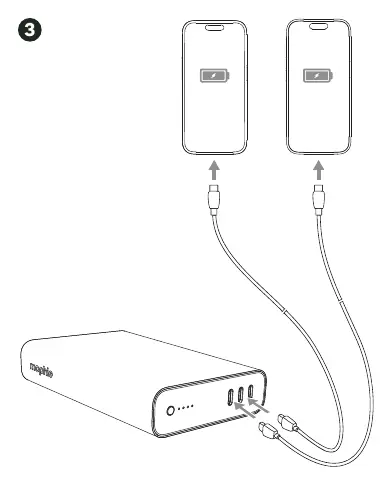
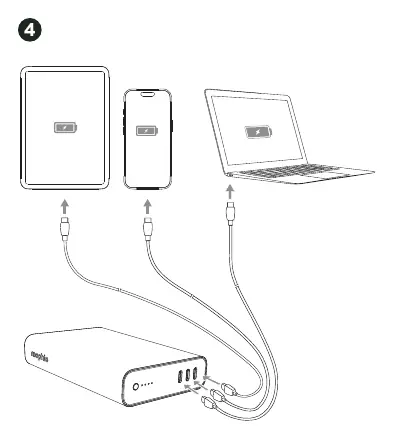
- Charging Devices p. 3, 4
- Safety Instructions p. 5
Table of contents
Manual images
Click an image to enlargeQuick guide from the manual
The mophie powerstation pro is a portable power bank designed to charge your mobile devices. Before using it for the first time, ensure the device is fully charged. You can check the remaining battery level by pressing the charge status button, which will light up the 4 status LEDs.
Charging the powerstation
To charge the power bank, connect it to a power source using the appropriate cable. Ensure the device is fully charged before use.
Charging your devices
To charge your mobile devices, connect them to the output ports on the power bank. The power bank can charge multiple devices simultaneously. Do not disconnect the power bank from a connected device while it is charging; wait until the device is fully charged.
Important safety instructions
- Temperature: Do not store the device in high-temperature environments, including intense sunlight or near heat sources. Exposure to temperatures above 212°F (100°C) may cause an explosion.
- Usage: Operate the device only in open-air conditions. Do not use it in enclosed, unventilated spaces like pockets, purses, or carrying bags, as this may cause overheating.
- Handling: Do not disassemble, modify, or attempt to replace any parts of the device. Avoid drops, bumps, or impacts. If the device is damaged (dents, punctures, corrosion), discontinue use immediately.
- Water: Do not expose the power bank to rain or snow.
- Disposal: Never dispose of batteries in the garbage. Take used batteries to a local battery-recycling center.
- Supervision: If used by a minor, an adult must provide supervision and instructions.
Troubleshooting and maintenance
If you find that your device is excessively hot, emitting an odor, is deformed, abraded, cut, or demonstrating abnormal behavior, immediately stop using the product and contact the manufacturer. Switch off the power bank when not in use; it will automatically switch off when disconnected from a device.
Customer service
For support, you can contact mophie via telephone at 1-888-8mophie (1-888-866-7443) or international at +1 (269) 743-1340. Visit their website at www.mophie.com/cs for more information.
Official resources from the manual
Practical help
Common problems
Device is excessively hot, emitting odor, or deformed
Immediately stop using the product and contact the manufacturer.
Power bank not charging devices
Ensure the power bank is fully charged and the cable is securely connected to both the power bank and the device.
Before use
- Fully charge the power bank before first use.
- Check the device for any physical damage such as dents, punctures, or corrosion.
- Ensure you are using the correct cable for your device.
- Verify the device is in an open-air environment during operation.
Specs in practice
- 4 Status LEDs
- Indicates the remaining battery charge level when the status button is pressed.
Images and diagrams
- Page 2: Shows how to charge the power bank and check the battery status.
- Page 3: Shows how to charge a single device.
- Page 4: Shows how to charge multiple devices simultaneously.
Model compatibility
- Consult your device packaging to determine if this product is compatible with your particular device.

Manual page author
Emily Carter
User documentation editor
Prepares concise manual descriptions and highlights the most useful setup, operation, and maintenance information for readers.