Tools / Power Tools
User Manual for Bosch GWS 17-125 S and GWS 17-125 PS Angle Grinders
Quick guide for the Bosch GWS 17-125 S and GWS 17-125 PS angle grinders. Includes assembly, operation, safety instructions, and maintenance procedures.
Table of contents
Manual images
Click an image to enlargeQuick Guide
This manual provides essential information for operating the Bosch GWS 17-125 S and GWS 17-125 PS angle grinders. Always ensure the power supply matches the tool's voltage rating before use. Perform a test run for at least 1 minute without load before starting work. Always use the auxiliary handle and appropriate protective guards.
Product Description
The GWS 17-125 S and PS are professional-grade angle grinders designed for cutting, grinding, and brushing metal and stone materials. Key components include:
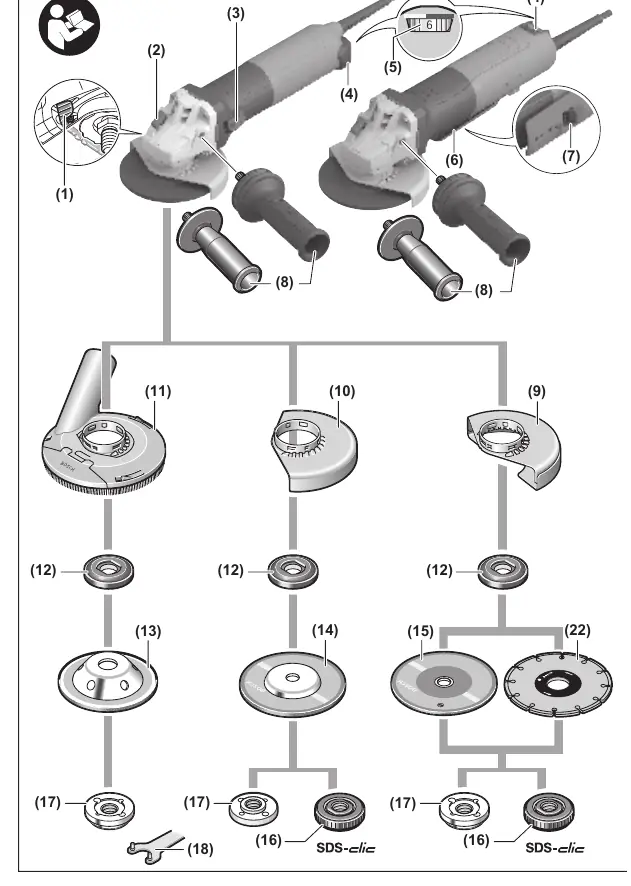
- Protective Guard: Essential for safety during grinding and cutting.
- Auxiliary Handle: Provides control and vibration damping.
- Speed Pre-selection: Allows adjustment of rotation speed for different materials.
- Dust Filter: Protects the motor from debris.
- SDS-clic Nut: Enables quick tool-free accessory changes.
Assembly
Mounting the Protective Guard: Place the guard on the tool's collar, ensuring the coding cams align with the support. Press the unlocking lever and rotate the guard until it clicks into the desired position.
Mounting the Auxiliary Handle: Screw the handle into the gear head on either the left or right side, depending on your preference.
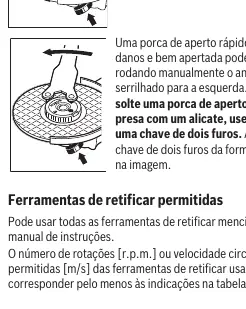
Mounting Grinding Tools: Clean the grinding spindle and all parts to be mounted. Press the spindle lock button to secure the spindle. Use the two-pin spanner or the SDS-clic nut to tighten the accessory securely.
Operation
Switching On/Off: For the GWS 17-125 S, slide the switch forward to turn on and press the front to lock. For the GWS 17-125 PS, push the unlocking lever back and press the switch up.
Speed Pre-selection: Use the adjustment wheel to select the appropriate speed for the material and application (e.g., lower speeds for brushing, higher speeds for cutting).
Kickback Control: The tool features electronic kickback control that interrupts power if the disc becomes blocked.
Maintenance
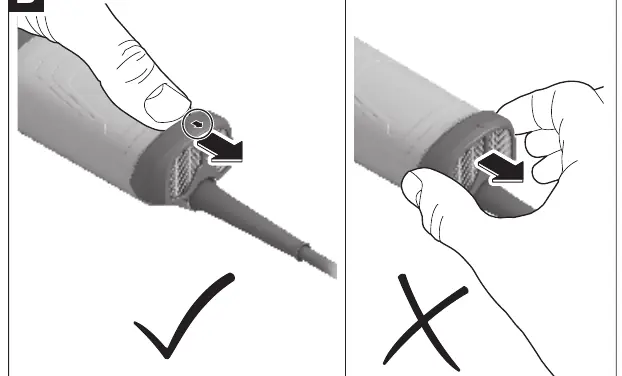
Cleaning: Regularly clean the ventilation slots to prevent dust accumulation. The dust filter on the bottom of the tool should be removed and cleaned periodically.
Service: If the power cord requires replacement, it must be performed by an authorized Bosch service center to maintain safety.
Safety
Always wear safety glasses and appropriate personal protective equipment. Do not use damaged accessories. Ensure the workpiece is securely fixed. Do not use the tool for polishing or grinding concrete.
Manufacturer information
Bosch
Practical help
Common problems
Tool does not start
Check the power supply and ensure the switch is in the correct position.
Excessive vibration
Check if the accessory is damaged, improperly mounted, or if the spindle is dirty.
Kickback
Ensure proper grip, use the auxiliary handle, and avoid blocking the disc in the workpiece.
Before use
- Verify the power supply voltage matches the tool's rating plate.
- Ensure the protective guard is securely mounted and adjusted.
- Check that the accessory is not damaged, cracked, or worn.
- Ensure the auxiliary handle is securely attached.
- Perform a test run for at least 1 minute without load.
Specs in practice
- No-load speed
- 2800–11500 rpm, adjustable via the speed wheel.
- Disc diameter
- Maximum 125 mm.
- Spindle thread
- M14 standard thread.
Images and diagrams
- Page 4: Overview of components and assembly configurations.
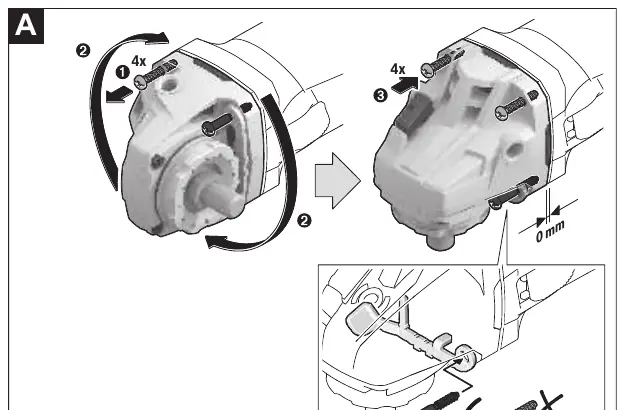
- Page 6: Instructions for rotating the gear head and removing the dust filter.
- Page 15: Proper installation of the SDS-clic quick-clamping nut.
- Page 17: Correct technique for cutting stone and metal.
Model compatibility
- Only use accessories with a rated speed at least equal to the tool's maximum speed.
- Do not use the tool for grinding concrete.
- Cutting stone requires a specific protective guard and dust extraction.

Manual page author
David Miller
Documentation analyst
Organizes user manual content into clear summaries, with attention to model details, product context, and everyday usability.