Tools / Power Tools
Bosch GWS 180-LI Professional Cordless Angle Grinder User Manual
Quick guide for the Bosch GWS 180-LI Professional cordless angle grinder. Includes setup, assembly, operation, safety, and maintenance instructions.
Table of contents
Manual images
Click an image to enlargeQuick guide from the manual
This manual provides essential information for the safe and efficient operation of the Bosch GWS 180-LI Professional cordless angle grinder. Before using the tool, ensure the battery is charged and the appropriate protective guard is installed for your specific task.
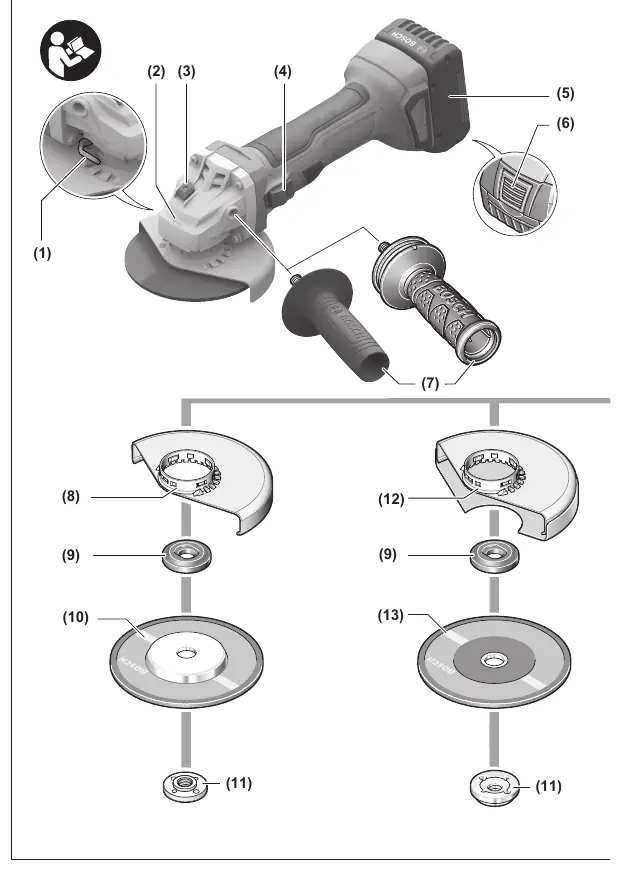
Product description
The GWS 180-LI is a cordless angle grinder designed for cutting, roughing, and brushing metal and stone materials, as well as drilling in stone with diamond core cutters without the use of water. It features a restart protection, soft start, and is compatible with Bosch 18V battery systems.
Assembly
Battery: Insert the charged battery into the base of the tool until it locks securely. To remove, press the release button and pull the battery out.



Protective guard: Place the guard onto the holder until the coding cams align. Press and hold the unlocking lever, press the guard onto the spindle collar, and rotate until it clicks into place.
Auxiliary handle: Always use the tool with the auxiliary handle attached. Screw it into the left or right side of the machine head depending on your preference.
Abrasive tools: Clean the grinding spindle and all parts to be mounted. Use the spindle lock button to lock the spindle before tightening or loosening the clamping nut with a two-hole spanner.
Operation
Switching on/off: Push the On/Off switch forward to start. To lock it, push the front part of the switch down until it clicks. To switch off, release the switch or press the rear part if it is locked.
Working advice:
- Rough grinding: Use a 30° to 40° angle for best results. Move the tool back and forth with moderate pressure.
- Cutting metal: Always use the protective guard for cutting. Work with moderate feed suited to the material.
- Cutting stone: Use a diamond cutting disc and ensure sufficient dust extraction. The tool is for dry cutting only.
Maintenance and cleaning
Always remove the battery before performing any maintenance or tool changes. Keep the tool and ventilation slots clean for safe operation. Store and handle accessories with care.
Manufacturer information
Bosch
Practical help
Common problems
Tool stops automatically
The battery is discharged or the tool is electrostatically charged. Recharge the battery or press the On/Off switch again to restart.
Diamond cutting disc overheats
Stop cutting and run the tool at no-load at maximum speed for a short time to cool it down.
Reduced cutting performance
The diamond cutting disc is dull. Resharpen by making short cuts in an abrasive material like lime-sand brick.
Before use
- Check that the abrasive tool is correctly mounted and can rotate freely.
- Ensure the protective guard is securely attached and adjusted.
- Check the battery charge level.
- Ensure the auxiliary handle is securely attached.
- Perform a test run for at least 1 minute without load.
Specs in practice
- Rated voltage
- 18V DC
- Max. disc diameter
- 100/115/125 mm depending on the specific model version
Images and diagrams
- Page 4: Exploded view of the tool components (1-13).
- Page 5: Accessory mounting sequence (14-23).
- Page 15: Cutting stone (Figure A).
Model compatibility
- Compatible with Bosch GBA 18V and ProCORE18V battery series.

Manual page author
Emily Carter
User documentation editor
Prepares concise manual descriptions and highlights the most useful setup, operation, and maintenance information for readers.