Tools / Power Tool Accessories
User Manual for Bosch GAA 10.8V-21 Professional Battery Adapter
Quick guide for the Bosch GAA 10.8V-21 Professional battery adapter. Learn how to power USB devices and heated workwear, troubleshoot connection issues, and safely operate your battery adapter.
Table of contents
Manual images
Click an image to enlargeQuick Guide from the Manual
The Bosch GAA 10.8V-21 Professional is a battery adapter designed to power USB devices and heated workwear using Bosch 10.8V or 12V lithium-ion batteries. Key operations include inserting the battery, connecting heating elements, and activating the USB port for charging mobile devices.
Safety Instructions
- Do not open the battery: Risk of short-circuiting.
- Avoid short circuits: Keep the battery away from paper clips, coins, keys, nails, screws, or other small metal objects when not in use.
- Use manufacturer products: Only use the battery with products from the manufacturer to protect against dangerous overload.
- Use recommended chargers: Only charge batteries using chargers recommended by the manufacturer.
- Environmental protection: Protect the battery against heat, continuous intense sunlight, fire, dirt, water, and moisture.
Product Description
The adapter features the following components:
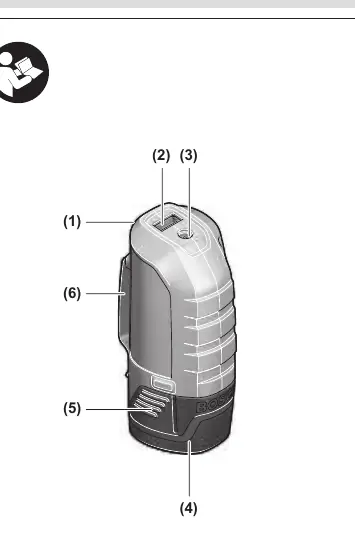
- (1) Battery adapter
- (2) USB port
- (3) Socket for connector plug of heating element
- (4) Rechargeable battery
- (5) Rechargeable battery release button
- (6) Belt clip
- (7) Connector plug
- (8) Activation button for USB connection
Operation
Inserting and Removing the Battery
Do not use force to insert the battery. It is designed to fit only in the correct position.
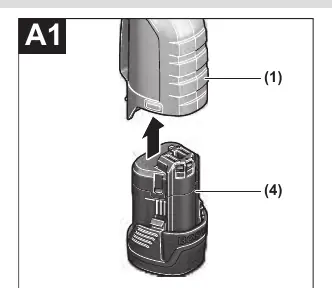
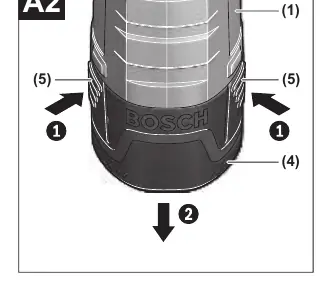
- To insert: Push the battery (4) all the way into the battery adapter (1).
- To remove: Press the release buttons (5) on the battery and pull it out of the battery adapter (1).
Connecting Heating Elements
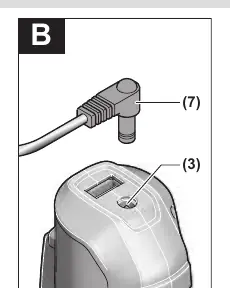
- Plug the connector plug (7) into the socket (3) on the battery adapter.
- Slide the battery adapter (1) into the pocket provided in the garment or attach it to your belt using the belt clip (6).
Charging External USB Devices
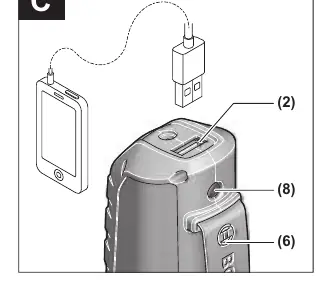
- Connect the charging cable of your USB device to the USB socket (2) on the battery adapter (1).
- Press the activation button (8) for approximately three seconds. The connected USB device will begin charging.
- The USB port is automatically deactivated after approximately 2 hours to save energy. If no charging cable is connected, it deactivates after 30 seconds.
Troubleshooting
If you encounter issues, check the following:
- Heating element does not warm up: Charge the battery and ensure the connector plug (7) is connected correctly.
- USB device cannot be charged: Charge the battery, ensure the charging cable is connected to the USB socket (2), and press the activation button (8) for three seconds. Verify that the device is compatible with the adapter's specifications.
Technical Data
- USB Port: Type A, 5.0V output voltage, 2.1A output current.
- Heating Element Connection: 12V output voltage, 1.2A output current.
- Max USB Cable Length: 1.5m.
- Operating Temperature: -20 to +50 °C.
- Charging Temperature: 0 to +35 °C.
Manufacturer information
Bosch
Practical help
Common problems
Heating element does not warm up
Charge the battery and ensure the connector plug (7) is fully inserted into the socket (3).
USB device not charging
Charge the battery, ensure the cable is connected to the USB socket (2), and press the activation button (8) for 3 seconds.
Before use
- Ensure the battery is fully charged.
- Check that the battery release buttons are not broken.
- Verify the USB device is compatible with 5V/2.1A output.
- Ensure the heating element plug is securely connected.
Specs in practice
- Heating Output
- 12V / 1.2A for powering heated workwear.
- Operating Temperature
- -20 to +50 °C; performance may be limited below 0 °C.
Images and diagrams
- The adapter features a USB port (2) and a heating element socket (3) on the top.
- The battery (4) slides into the bottom of the adapter (1).
- The activation button (8) is used to start the USB charging process.
Model compatibility
- Compatible with Bosch 10.8V or 12V lithium-ion batteries.
- Maximum permitted length of USB cable is 1.5 meters.

Manual page author
Emily Carter
User documentation editor
Prepares concise manual descriptions and highlights the most useful setup, operation, and maintenance information for readers.