Tools / Power Tools
User Manual for Hilti DC-EX 125/5"M Dust Removal System
Quick guide for the Hilti DC-EX 125/5"M dust removal system. Includes installation, disc fitting, depth adjustment, and operation instructions.
Table of contents
Manual images
Click an image to enlargeQuick guide from the manual
The Hilti DC-EX 125/5"M is a dust removal system designed for cutting and slitting mineral materials, particularly masonry, using 125 mm (5") discs in combination with a Hilti dust extractor. This system must only be used with approved Hilti angle grinders and without the use of water.
Safety Instructions
- Always wear personal protective equipment, including protective goggles, ear protection, and protective gloves.
- Use respiratory protection to keep residual dust away from the face and airways.
- Always use the side handle of the approved Hilti power tool, even when the hood is fitted.
Fitting the Hood
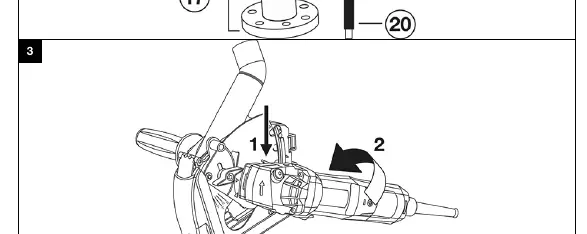
- Fit the guard onto the arbor collar so that the two triangular marks on the guard and the power tool are in alignment.
- To bring the hood to the desired working position, pivot the device radially while pressing the catch on the angle grinder until it engages with an audible click.
Fitting Diamond Cutting Discs
For slitting applications:
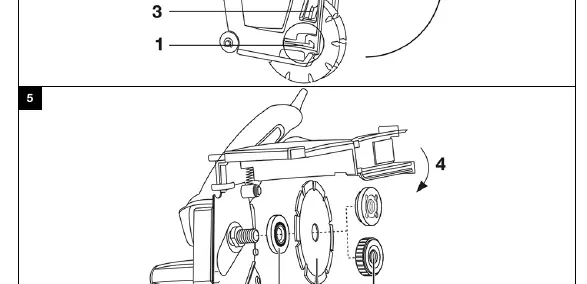
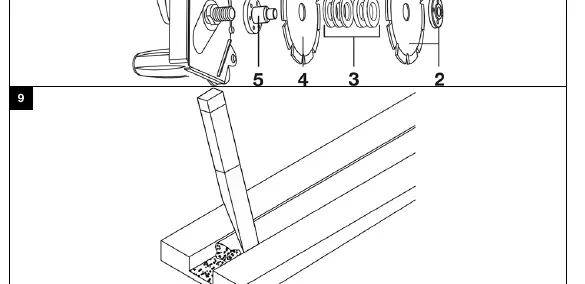
- Remove the clamping flange for the arbor.
- Screw the adapter onto the arbor and tighten it securely.
- Insert a diamond cutting disc, observing the specified direction of rotation.
- Fit the spacer rings for the desired width between slits.
- Insert a second diamond cutting disc, observing the specified direction of rotation.
- Screw on the clamping nut and tighten it securely with the pin wrench.
For standard cutting:
- Fit the clamping flange onto the arbor.
- Place the first diamond cutting disc on the clamping flange.
- Screw on the Kwik-Lock nut until it is seated against the cutting disc.
Operation
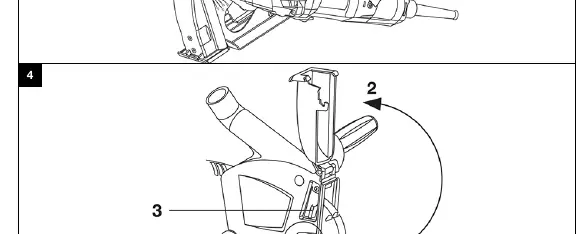
Setting Depth: Release the locking screw, push the back panel to the desired position (indicated on the scale), and firmly tighten the locking screw.
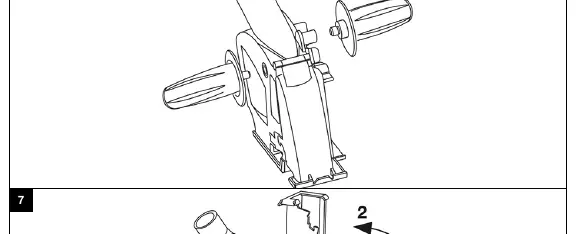
Plunge Function: Position the carriage plate on the work, switch on the tool, and guide the cutting disc into the work. The plunge function can be disabled using the locking screw.
Wall and Corner Accessibility: Press the locking catch and open the front clip more than 180°.
Technical Data
- Weight: 1.35 kg
- Disc diameter: 125 mm
- Slitting width with twin discs: 25 mm
- Maximum cutting depth: 28 mm
Manufacturer information
Hilti Corporation
Practical help
Common problems
Hood does not fit or rotate
Ensure the triangular marks on the hood and the tool are aligned during installation.
Plunge function not working
Check if the locking screw is tightened, which disables the plunge function.
Kwick-Lock nut cannot be used
Kwick-Lock nuts are not permitted for slitting applications; use the standard clamping nut and adapter set.
Before use
- Wear protective goggles, ear protection, and gloves.
- Ensure the Hilti dust extractor is connected.
- Check that the diamond disc is suitable for mineral materials.
- Verify the direction of rotation on the disc.
- Ensure the side handle is fitted to the desired side.
Specs in practice
- Disc diameter
- 125 mm
- Max cutting depth
- 28 mm
Images and diagrams
- 2: Locking catch
- 3: Front clip
- 14: Depth gauge scale
- 15: Locking screw
Model compatibility
- Use only with approved Hilti angle grinders.
- Do not use with water.

Manual page author
Michael Turner
Technical manual editor
Reviews PDF manuals for structure, safety notes, and practical product details so readers can find the right information quickly.