Power / Batteries & Chargers
User Manual for Bosch AL 1810 CV / AL 18V-20 Battery Charger
Quick guide for the Bosch AL 1810 CV and AL 18V-20 battery chargers. Includes safety instructions, charging procedures, LED indicator meanings, and troubleshooting.
Quick answers from the manual
Quick answer
- The Bosch AL 1810 CV and AL 18V-20 are battery chargers for Bosch Li-Ion batteries. Charging begins automatically when the charger is plugged in and the battery is inserted into the slot. p. 8
Key actions
- Insert the battery into the charging slot. p. 8
First start
- Plug the charger into a mains socket and insert the battery. p. 8
Show 3 more answers Show less
Problems and fixes
Battery charge indicator (3) stays lit, charging not possible
Check if battery is connected correctly, clean contacts, or replace battery.
p. 8Technical specifications
| Parameter | Value | Meaning | Pages |
|---|---|---|---|
| Charging Current | 1000mA / 2000mA | Charging current for AL 1810 CV / AL 18V-20 | p. 7 |
Where to find it in the PDF
- Safety Instructions p. 6, 7
- Technical Data p. 7, 8
- Operation p. 8
Table of contents
Quick guide from the manual
The Bosch AL 1810 CV and AL 18V-20 are designed for charging Bosch Li-Ion batteries. The charging process is automatic and intelligent, adjusting current based on battery temperature and voltage to ensure optimal charging and battery longevity.
Safety instructions
- Do not expose the charger to rain or wet conditions.
- Do not operate the charger on easily ignited surfaces (e.g., paper, textiles) or in flammable environments.
- Always check the charger, cable, and plug before use. Do not use if damaged.
- Only charge Bosch Li-Ion batteries with a capacity of 1.5 Ah or more (4 battery cells or more).
- Do not charge non-rechargeable batteries.
Operation
The charging process begins as soon as the mains plug is inserted into the socket and the battery is placed in the charging slot.
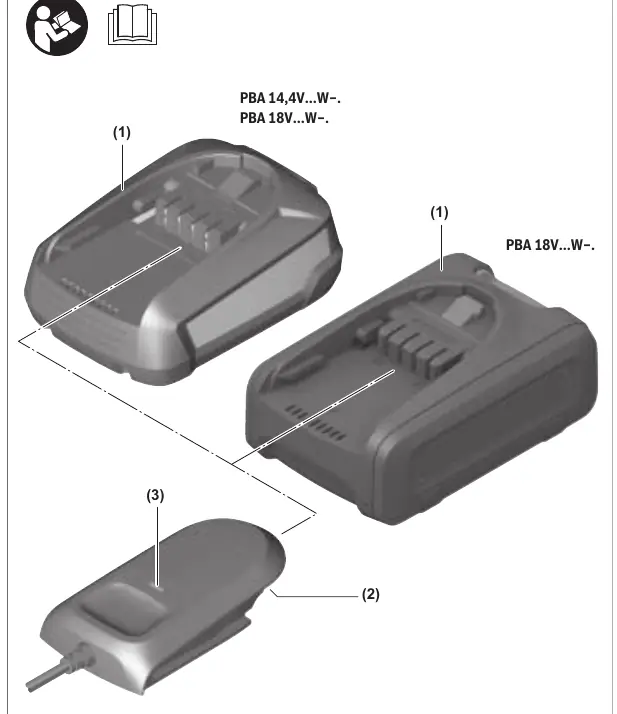
What the display elements mean
- Flashing battery charge indicator: Indicates that the charging process is underway.
- Solid light on battery charge indicator: Indicates that the battery is fully charged or that the battery temperature is outside the permitted charging range and cannot be charged. Once the permitted temperature range is reached, charging will resume.
- Solid light without battery: Indicates that the mains plug is inserted and the charger is ready for operation.
Troubleshooting
If the battery charge indicator stays lit and charging is not possible, check the following:
- Ensure the battery is connected correctly.
- Clean the battery contacts (e.g., by inserting and removing the battery several times).
- Replace the battery if it is defective.
If the battery charge indicator does not light up:
- Check if the mains plug is fully inserted into the socket.
- Check the mains voltage. If necessary, have the charger checked by an authorized after-sales service center for Bosch power tools.
Maintenance and Service
If the power supply cord needs replacement, it must be done by Bosch or an authorized service center to avoid safety hazards. For repairs and spare parts, please refer to the 10-digit article number on the product nameplate.
Manufacturer information
Bosch
Practical help
Common problems
Battery charge indicator stays lit, charging not possible
Check if the battery is connected correctly, clean the battery contacts, or replace the battery if defective.
Battery charge indicator does not light up
Ensure the mains plug is fully inserted into the socket and check the mains voltage.
Before use
- Check the charger, cable, and plug for any signs of damage.
- Ensure the mains voltage matches the voltage specified on the charger's rating plate.
- Do not operate the charger on flammable surfaces.
- Ensure the battery is a compatible Bosch Li-Ion battery (1.5 Ah or more).
Show more Show less
Specs in practice
- Charging Current
- 1000mA for AL 1810 CV; 2000mA for AL 18V-20.
- Permitted Temperature
- Charging is only possible when the battery temperature is between 0°C and +45°C.
Images and diagrams
- (2) Charging slot
- (3) Green battery charge indicator
Model compatibility
- Compatible with Bosch Li-Ion batteries with a capacity of 1.5 Ah or more (4 battery cells or more).

Manual page author
David Miller
Documentation analyst