Power / Batteries & Chargers
User Manual for Bosch GAL 18V-20 Professional Battery Charger
Quick guide for the Bosch GAL 18V-20 Professional battery charger. Includes setup, charging instructions, wall mounting, and troubleshooting steps.
Quick answers from the manual
Quick answer
- The Bosch GAL 18V-20 is a battery charger for Bosch Li-ion batteries and AMPShare partner batteries. Charging starts automatically when the battery is inserted into the charging bay. p. 7, 8
Key actions
- Insert battery into charging bay (1) to start charging. p. 8
First start
- Plug the charger into a mains socket and insert the battery into the charging bay. p. 8
Show 4 more answers Show less
Problems and fixes
Battery not charging, indicator (2) lit continuously
Ensure battery is fully inserted. Unplug and replug the charger. If the error occurs again, have the charger checked by an authorized service center.
p. 8Maintenance and reset
- If the power supply cord needs replacement, it must be done by Bosch or an authorized service center. p. 8
Technical specifications
| Parameter | Value | Meaning | Pages |
|---|---|---|---|
| Charging current | 2.0 A | Output current for charging | p. 8 |
| Battery charging voltage | 10.8–18 V | Automatic voltage detection | p. 8 |
Where to find it in the PDF
- English Manual p. 7, 8
Table of contents
Quick guide from the manual
The Bosch GAL 18V-20 Professional is a battery charger designed for Bosch Li-ion batteries and AMPShare partner batteries. Charging begins automatically when the charger is plugged into a mains socket and a battery is inserted into the charging bay.
Product description
The charger features the following components:
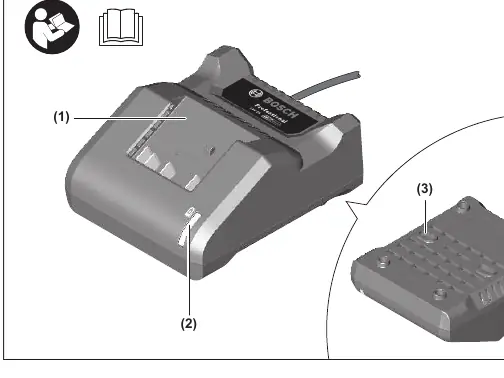
- (1) Charging bay
- (2) Green battery charge indicator
- (3) Wall mount
Charging process
Ensure the mains voltage matches the specifications on the charger's rating plate. The charging process is only possible when the battery temperature is within the permitted range of 0–45 °C.
Wall mounting
The charger can be used free-standing on a desktop or mounted on a wall. To mount on a wall, drill two holes with a clearance of 72 mm. Use round-head screws with a diameter of 5 mm to 6.5 mm to secure the charger.
Troubleshooting
If the battery is not charging and the charge indicator (2) is lit continuously, the charger has identified an internal error. Ensure all batteries are fully inserted, then unplug and reinsert the mains plug. If the error persists, contact an authorized Bosch service center.
If no indicators light up, the socket, mains cable, or charger may be defective. Check the mains voltage and contact an authorized service center if necessary.
Maintenance and cleaning
To avoid safety hazards, if the power supply cord needs replacement, it must be performed by Bosch or an authorized service center for Bosch power tools.
Manufacturer information
Bosch
Practical help
Common problems
Battery not charging, indicator (2) lit continuously
Ensure the battery is fully inserted. Unplug and replug the charger. If the error persists, contact an authorized Bosch service center.
No indicators lit
Check the mains voltage. If the socket, cable, or charger is defective, contact an authorized service center.
Before use
- Check that the mains voltage matches the rating plate.
- Ensure the charger is placed in a dry, indoor environment.
- Inspect the charger, cable, and plug for damage before use.
- Ensure the battery temperature is within the 0–45 °C range.
Show more Show less
Specs in practice
- Charging current
- 2.0 A
- Battery charging voltage
- 10.8–18 V (automatic detection)
Images and diagrams
- (1) Charging bay
- (2) Green battery charge indicator
- (3) Wall mount
Model compatibility
- Compatible with Bosch Li-ion batteries.
- Compatible with AMPShare partner batteries.
- Minimum battery capacity: 1.3 Ah.

Manual page author
David Miller
Documentation analyst